
Technology
From Content Bottlenecks to Business Growth: How AI Is Changing CMS Strategy


A business website is no longer just a collection of pages displaying products, services, and contact information. It’s a constantly evolving digital experience that must respond to changing customer expectations, marketing priorities, and search behaviors.
Yet many businesses still struggle with outdated content management processes. Publishing a new landing page can involve multiple approvals, technical assistance, and lengthy revisions. Meanwhile, competitors are experimenting with artificial intelligence to accelerate content production and improve digital experiences.
The real opportunity isn’t simply generating more content. It’s building a content management strategy that combines AI-powered efficiency with human oversight, brand consistency, and measurable business value.
Move Beyond Traditional Content Management Limitations
Traditional content management systems have helped businesses organize and publish digital information for years. However, growing content demands can expose weaknesses in workflows that depend heavily on manual production and technical support.
Marketing teams may need developer assistance for routine page changes, while content creators spend valuable time formatting material instead of developing useful ideas.
This is where Drupal CMS AI becomes relevant to businesses exploring more flexible approaches to digital content management. By combining structured content capabilities with artificial intelligence, organizations can simplify certain publishing tasks while maintaining control over their websites.
AI-assisted site building, visual editing, and content optimization can reduce repetitive work and help teams move from planning to execution more efficiently.
However, automation shouldn’t replace thoughtful content strategy. Businesses still need clear objectives, reliable information, and people responsible for reviewing published material.
The strongest systems make everyday work easier without sacrificing accuracy or accountability.
Give Marketing Teams More Control Over Website Updates
One persistent challenge in business content management is the gap between marketing ideas and technical execution.
A marketing team might identify an opportunity for a new campaign but lack the tools to create its landing page independently.
Waiting for developer availability can delay launches and reduce responsiveness.
Modern visual editing tools address this problem by allowing authorized users to assemble pages from approved components.
Drag-and-drop interfaces and live previews can make routine changes more accessible without requiring extensive coding knowledge.
This doesn’t eliminate the need for developers. Instead, it allows technical specialists to concentrate on integrations, performance, security, and complex functionality.
Businesses benefit when responsibilities are distributed according to expertise.
Marketing teams gain greater publishing independence, while developers spend less time handling repetitive requests.
Use AI to Accelerate Content Without Losing Accuracy
AI writing tools can help businesses generate outlines, summarize research, suggest headlines, and prepare initial drafts.
These capabilities are particularly useful when organizations manage large websites with frequent content updates.
However, producing text quickly doesn’t guarantee that the information is accurate, original, or valuable.
AI-generated material can contain unsupported claims, outdated details, or language that doesn’t reflect a company’s expertise.
Establish a review process that requires human verification before publication.
Subject-matter experts should evaluate technical accuracy, while editors assess clarity, usefulness, and consistency with brand standards.
Businesses should also define which types of content require additional scrutiny, especially material involving financial, legal, or health-related information.
AI works best as an assistant that reduces repetitive effort.
Human judgment remains essential for deciding what deserves publication and whether it genuinely serves customers.
Prepare Content for Search Engines and AI Discovery
Digital visibility is changing as customers increasingly use conversational search tools alongside traditional search engines.
Instead of browsing several pages, users may ask AI-powered systems for direct explanations, recommendations, or comparisons.
This creates new challenges for businesses that rely on website traffic to attract customers.
Content should answer meaningful questions clearly while demonstrating relevant expertise.
Structured headings, descriptive language, accurate information, and logical organization help make pages easier to understand.
Businesses can also use structured data where appropriate to provide additional context about products, services, and organizations.
However, no optimization technique guarantees inclusion in AI-generated answers.
The priority should remain publishing reliable, useful information that satisfies genuine customer needs.
A well-organized CMS makes it easier to maintain these standards consistently across a growing website.
Protect Brand Consistency as Content Production Expands
As businesses publish more frequently, maintaining a recognizable brand identity becomes increasingly challenging.
Different teams may use inconsistent terminology, visual styles, or messaging when producing campaigns independently.
AI-generated content can amplify these inconsistencies when prompts lack sufficient guidance.
A modern CMS should support approved design components, editorial standards, and defined publishing permissions.
Brand guidelines can establish expectations for tone, terminology, formatting, and visual presentation.
Reusable templates also help teams create consistent experiences without rebuilding pages from scratch.
AI tools may assist with checking content against established standards, but human reviewers should remain responsible for final decisions.
Consistency matters because customers encounter businesses across multiple digital channels.
When messaging feels coherent, visitors can better understand what an organization offers and what distinguishes it from competitors.
Make Accessibility Part of the Publishing Process
Website accessibility should be considered throughout content creation rather than treated as a final technical adjustment.
Poorly structured headings, inadequate color contrast, missing image descriptions, and inaccessible forms can create barriers for visitors.
These issues may also increase legal and reputational risks depending on applicable requirements.
Integrating accessibility checks into CMS workflows can help teams identify problems before publishing.
Automated tools can flag certain issues, including missing alternative text or potential contrast failures.
However, automated testing cannot identify every accessibility concern.
Manual reviews and testing with assistive technologies remain important for evaluating the actual user experience.
Businesses should also train content creators to write descriptive links, organize information logically, and use accessible components.
Making accessibility part of routine publishing supports more inclusive digital experiences while reducing the need for extensive corrections later.
Connect Content Workflows Across Business Departments
Content management rarely belongs to a single department.
Marketing creates campaigns, sales teams need updated product information, customer support publishes helpful resources, and compliance teams review sensitive messaging.
When these departments operate through disconnected systems, information can become inconsistent or outdated.
A centralized CMS with appropriate integrations can help maintain more reliable content across different channels.
Reusable content structures allow teams to update shared information without manually changing every page.
For example, updating a product description in a central location may help prevent conflicting details across related digital experiences.
Clearly defined ownership and approval permissions remain important.
Organizations should establish who can create, review, modify, and publish different content types.
Better coordination reduces duplicated work and helps customers receive more consistent information throughout their interactions with a business.
Measure Whether AI Is Actually Improving Performance
Adopting AI-powered content management shouldn’t be treated as an achievement by itself.
Businesses need to determine whether new capabilities improve meaningful outcomes.
Start by identifying measurable objectives, such as reducing publishing delays, improving content accuracy, or increasing qualified website inquiries.
Track how long it takes to create and approve pages before and after introducing new workflows.
Monitor customer engagement, conversion performance, accessibility issues, and the amount of editorial correction required.
Consider the total cost of ownership, including software subscriptions, implementation, training, and ongoing support.
AI may reduce certain production tasks while introducing new responsibilities involving governance and quality assurance.
Regular performance reviews help businesses identify which processes deserve further automation and which require additional human attention.
Ultimately, the future of business content management isn’t about replacing people with artificial intelligence. It’s about creating systems where technology handles repetitive work while people concentrate on strategy, creativity, and customer relationships.
Organizations that achieve this balance can build digital experiences that are easier to manage, more consistent, and better prepared for changing business demands.

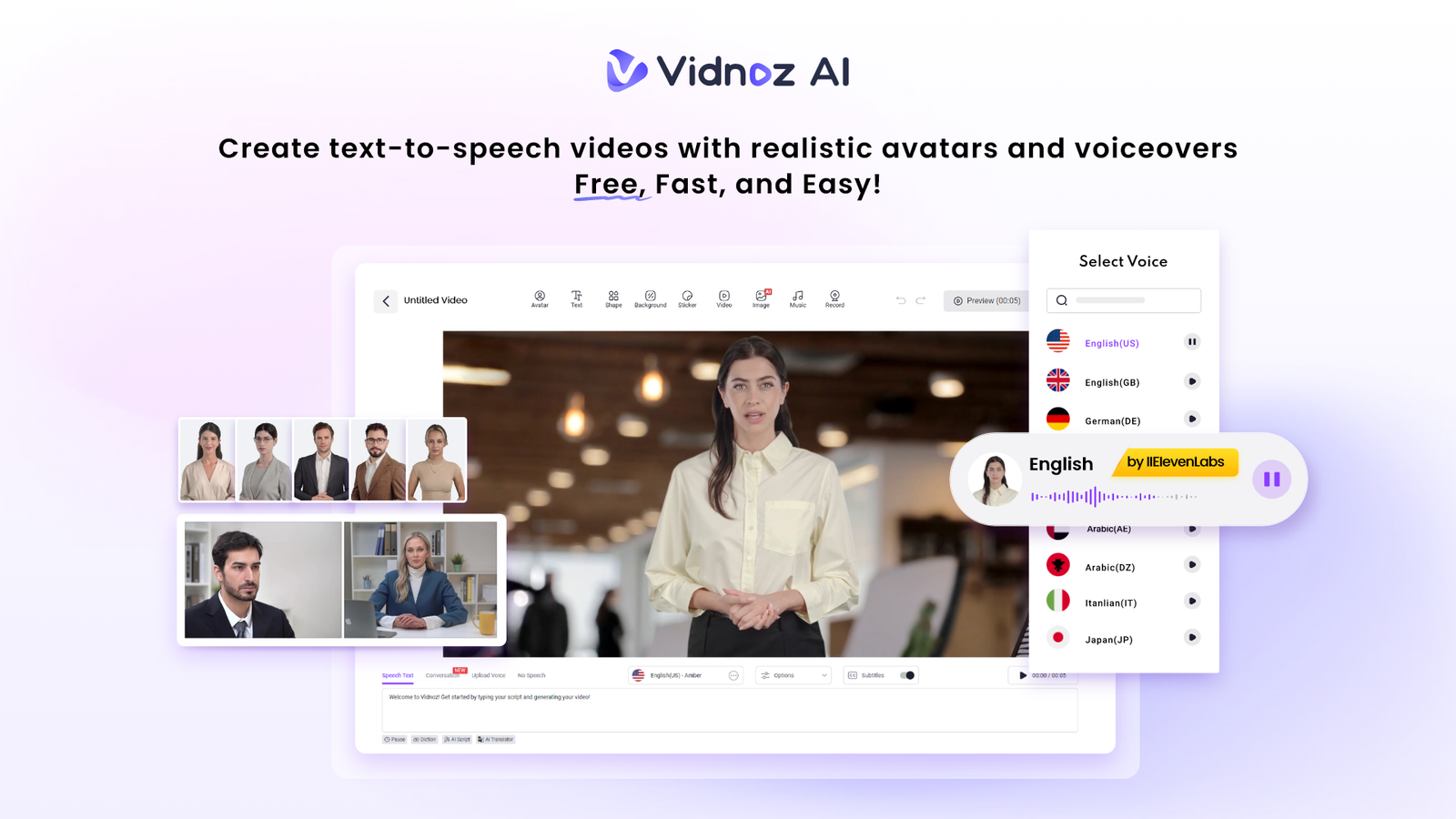
Diversity and inclusion are not merely buzzwords. They provide the basis of a strong, innovative, and respectful working environment. The environment can be nurtured through effective training. Nevertheless, creating engaging training videos may be costly and time-consuming. What if you could create professional, inclusive, and impactful videos for free?
Vidnoz is a free, AI-based video creation tool designed to help users create videos effortlessly. It requires no special skills, making it a great option for producing high-quality training videos quickly.
It is also certified under ISO/IEC 27001:2022 for Information Security Management, meaning your company’s data and information remain secure and protected.
Key Features for Impactful Diversity Training
Vidnoz AI offers powerful features that are perfect for creating diversity and inclusion content. Here’s how they can help you.
- Represent Everyone with 1900+ Lifelike Avatars
Diversity training requires a great deal of representation. The videos that you create should be representative of the individuals in your company and the world. Vidnoz offers a variety of over 1900 realistic avatars of different industries, ages, races, and professions. This means that you will always have someone to convey your message. You need not be restricted to stock actors. You can even make your own favorite avatars that will suit your needs.
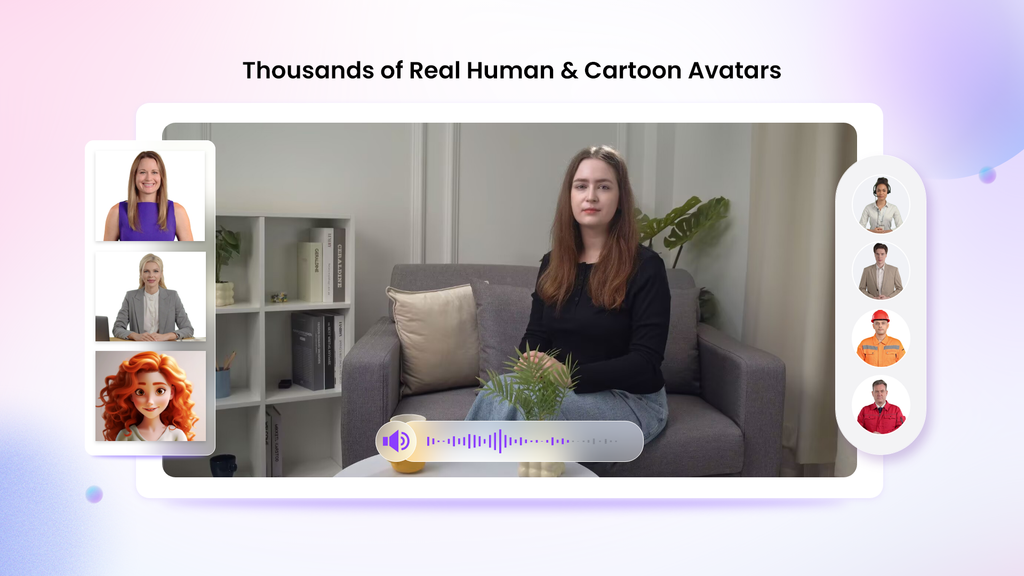
For example:
- Your Digital Twin: Create an avatar of your CEO or HR leader to deliver a personal message.
- Expressive Avatars: Use avatars that show emotion to make scenarios about empathy and understanding more powerful.
- Product Avatars: Create a unique brand mascot to guide employees through training modules.
With so many choices, your training videos will show your commitment to diversity, not just talk about it.
- Speak to a Global Audience with 2000+ Lip Sync AI Voices
In a global company, language should not be a barrier to learning. Vidnoz provides over 2000 natural-sounding AI voices in more than 140 languages. These voices are powered by leading technology from ElevenLabs, Microsoft, and Google, ensuring they sound clear and human.
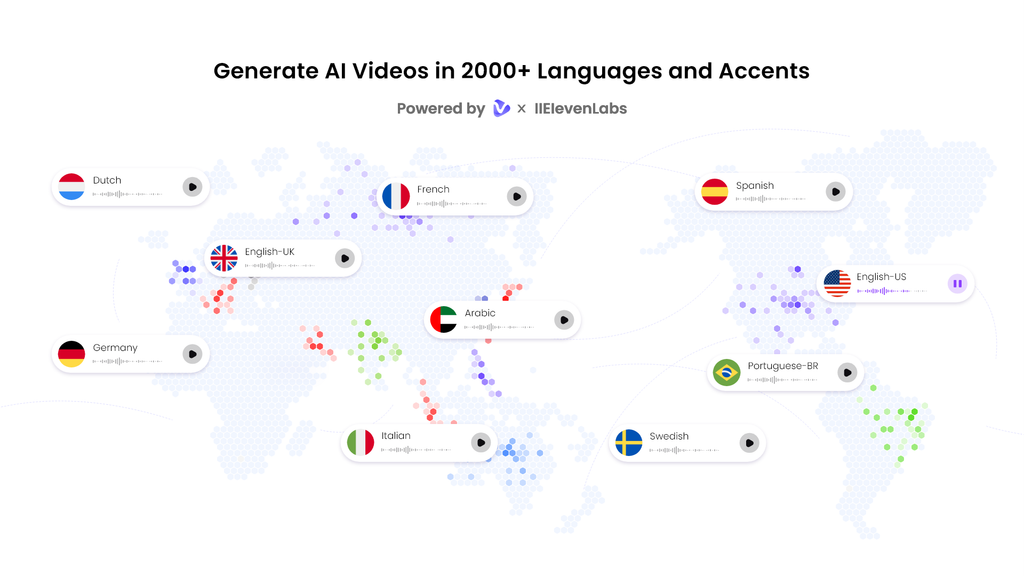
This feature is a game-changer for diversity training. You can create one core video and then easily generate versions in Spanish, French, Mandarin, or any other language your team speaks. The AI ensures the avatar’s lips sync perfectly with the audio, making the experience seamless for every viewer. This makes everyone feel included and valued.
- Get Started Fast with 2800+ Pre-Designed Video Templates
You don’t need to be a video editor to create professional content. Vidnoz offers a massive library of over 2800 video templates for training, presentations, marketing, and more.
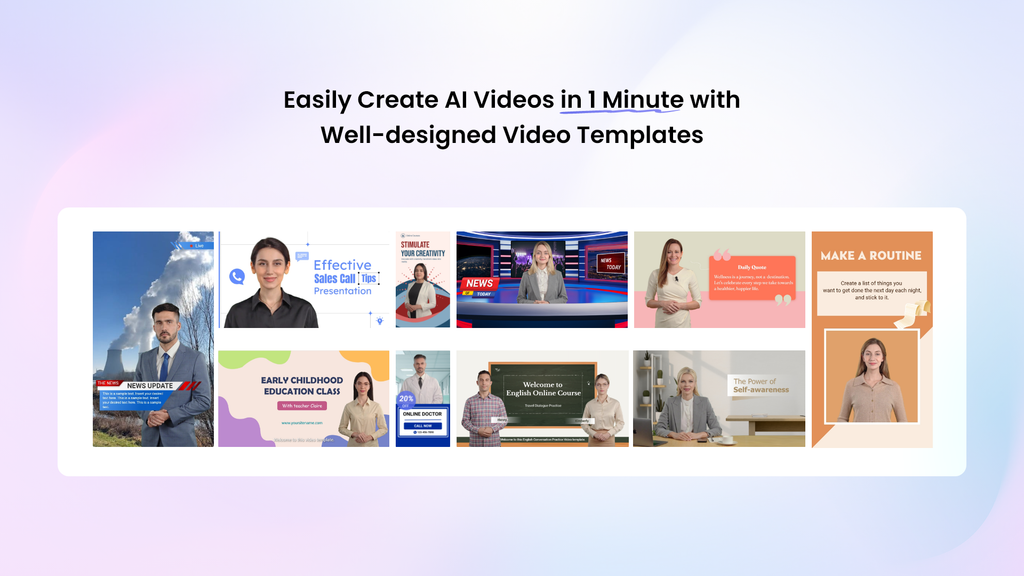
You can simply choose a template that fits your topic, like a corporate presentation or an explainer video. Then, you can customize it with your own text, colors, and branding. This saves you hours of work and ensures your videos look polished and credible from the start.
- Accessible to All with Free Daily Use
Budget should not stop you from building a more inclusive workplace. Vidnoz believes in making video creation accessible. Every user gets 30 credits of free AI video generation every single day.
This is more than enough to create short, powerful training modules, announcements, or scenario-based lessons. You can test the platform, create real content, and see the results for yourself without any financial commitment.
How to Create Your Diversity Training Video in 4 Simple Steps
Ready to get started? Creating a video with Vidnoz AI is incredibly easy. Just follow these four steps.
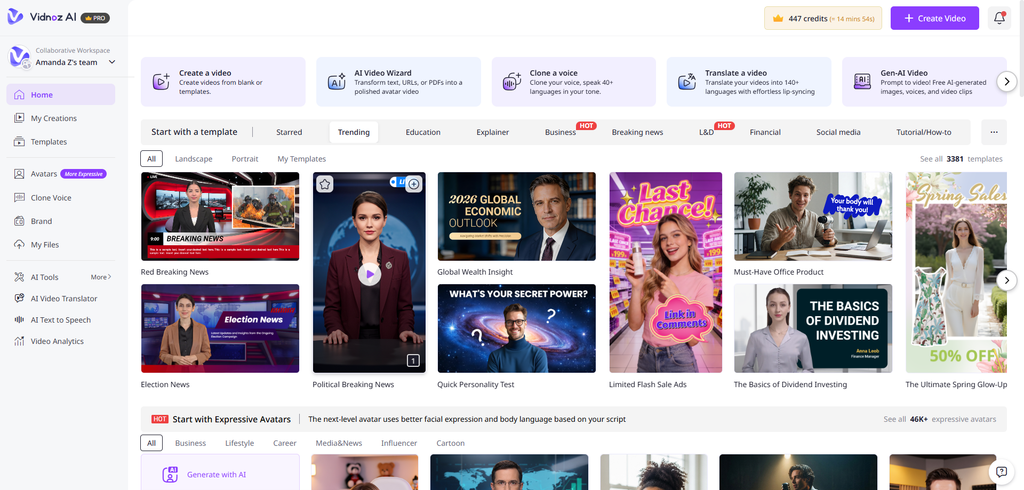
Step 1: Choose a Template & Avatar
First, log in to Vidnoz AI Video Generator and browse the template library. Pick a design that matches the tone of your training. Next, go to the avatar library and select an avatar that represents your message and audience.
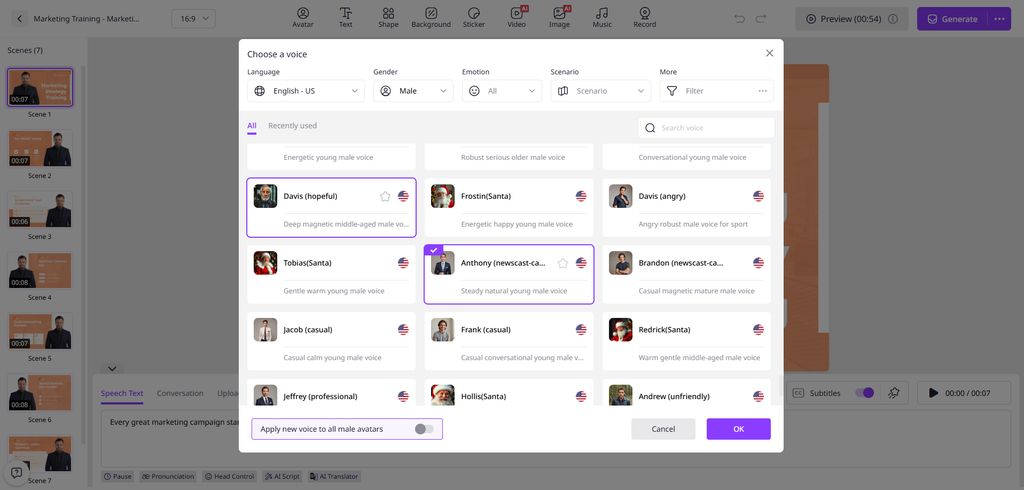
Step 2: Create AI Voiceover
Now, it’s time to bring your script to life. Type or paste your script into the text box. Choose the language and select a voice that sounds right for your content. You can preview different voices to find the perfect one. The AI will generate a natural-sounding voiceover that syncs with your avatar.
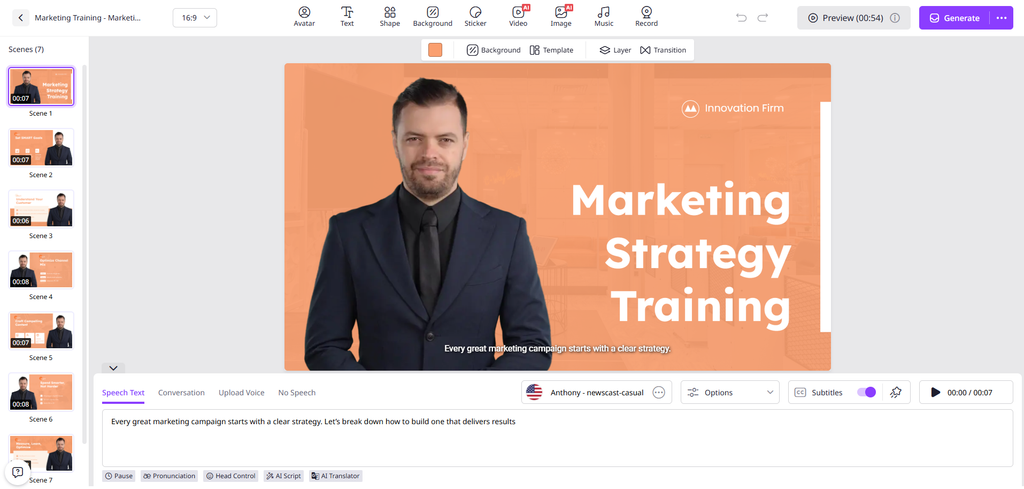
Step 3: Add Your Custom Touch
This is where you make the video your own. Add your company logo to maintain brand consistency. Use text overlays to highlight key points, like “Unconscious Bias” or “Active Listening.” You can also add background music or images to make your video more engaging.
Step 4: Generate AI Video and Share
Once you are happy with your creation, click the “Generate” button. Vidnoz AI will process your video in just a few minutes. After it’s done, you can download it or share it directly with your team via email or on your company’s internal platform.
Final Thoughts:
Effective diversity training is an ongoing journey, not a one-time event. It requires content that is representative, accessible, and engaging. Vidnoz AI provides all the tools you need to create these videos quickly and affordably.
By using diverse avatars, multilingual voiceovers, and professional templates, you can produce training materials that truly connect with every member of your team. You can move beyond boring slideshows and create dynamic content that inspires change. Start building a more inclusive workplace today by creating your first free training video with Vidnoz AI.

Real-time protection plays an essential role in keeping computers safe from malware, viruses, spyware, and other emerging cyber threats. To understand how effectively IObit Malware Fighter handles these risks, we put its security features to the test. In this hands-on review, we explore how the software monitors system activities, detects suspicious files, and blocks potential threats before they can harm your computer. We will also explore its amazing features and learn how to use them to strengthen PC security. Ensure to read this guide till the end.
Part 1: Overview of IObit Malware Fighter
IObit is a software development company known for creating Windows utilities, PC optimization programs, and security solutions. One of its top tools is IObit Malware Fighter. It is an all-in-one antivirus and anti-malware security solution that is designed to eliminate various types of threats from your PC, including viruses, spyware, ransomware, Trojans, adware, and more. The software combines multiple scanning technologies with real-time protection capabilities to identify suspicious files, monitor system activities, and prevent potential security threats from compromising your computer. It also offers additional security features, such as USB protection, browser protection, and Safe Box, to provide users with an extra layer of protection.
Part 2: Top Features That Make IObit Malware Fighter Worth Trying
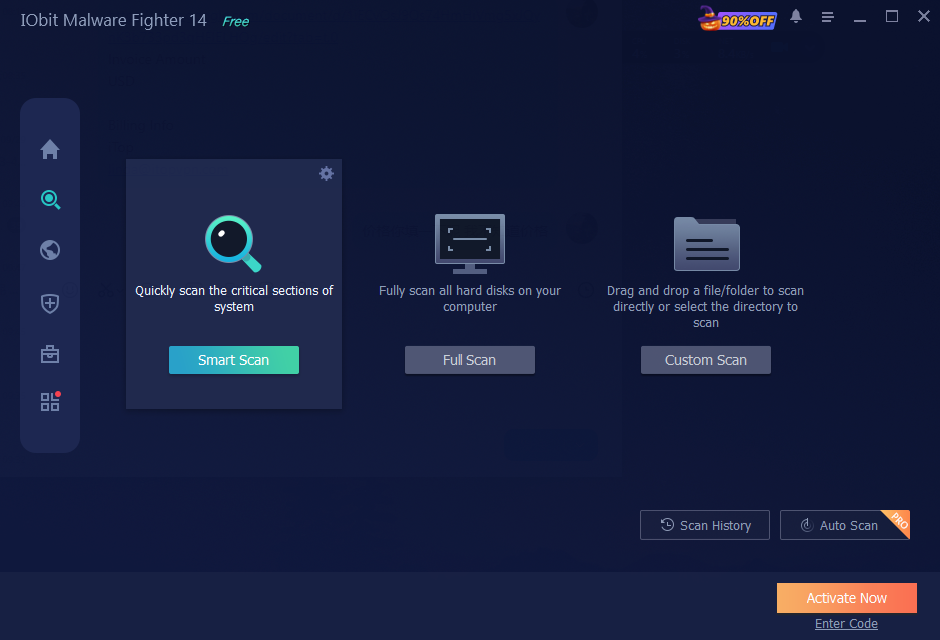
IObit Malware Fighter offers a range of security features designed to protect computers against malware, viruses, and online threats. Here are some key features that make it worth exploring in 2026:
- Real-Time Protection: One of the standout features of this tool is that it supports real-time protection, helping keep your PC safe around the clock. It continuously monitors system activities, files, and processes to identify suspicious behavior before it can cause damage.
- 9 Security Guards: The program reinforces your PC security with nine dedicated security guards, such as Network, Files, Startup, Process, MBR, Camera, Behavior, and Browser Password Guard. Each guard focuses on a specific area of your system to provide more comprehensive protection against different types of cyber threats.
- Triple Engine Protection: IObit Malware Fighter uses three powerful engines – the latest industry – leading Bitdefender Engine, the enhanced IObit Anti-Malware Engine, and the upgraded IObit Anti-Ransomware Engine. Each engine focuses on identifying and combating different types of security threats.
- Detect Various Threats: The best part of IObit Malware Fighter is that it detects and eliminates various types of threats that can harm your device, including viruses, spyware, adware, Trojans, ransomware, worms, keyloggers, and other malicious programs.
- Intuitive Interface: IObit Malware Fighter offers an easy-to-use interface, which is ideal for non-tech and beginner users. Users can easily eliminate potential threats from their PC without professional help. Plus, it can be downloaded from its official site for free.
Part 3: Hands-On Testing: How to Enable IObit Malware Fighter Real-Time Protection
IObit Malware Fighter makes it easy for users to activate and manage its real-time protection features. Follow the steps below to enable IObit Malware Fighter’s real-time protection and strengthen your PC security:
- Navigate to the IObit Malware Fighter official site and download the latest version of the program on your PC. IObit Malware Fighter is available for free and offers advanced features, such as real-time protection and more.
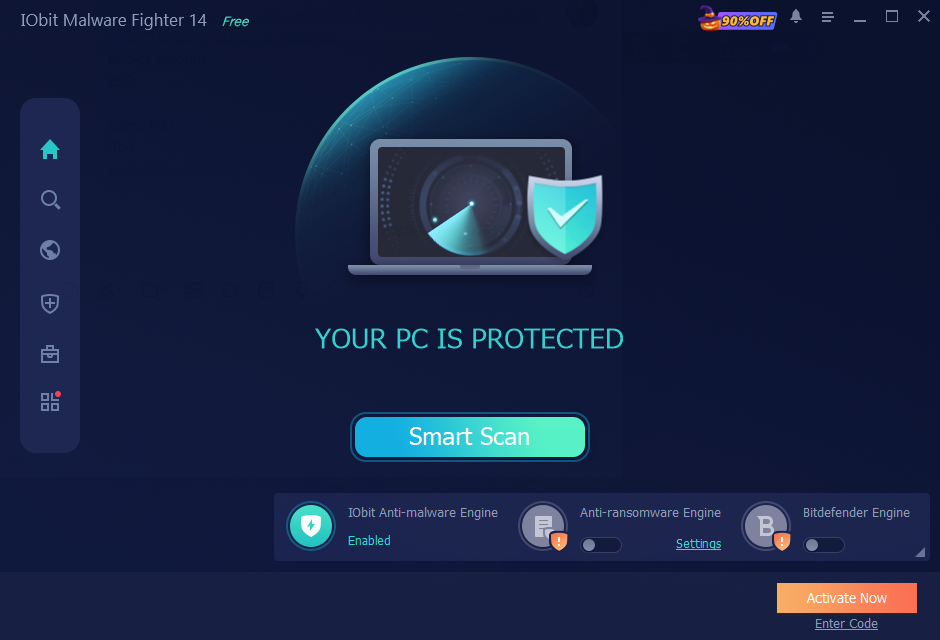
- Once the tool is downloaded, launch it and select the “Security Guards” option from the left panel. You will now see a list of available security guard designs, such as Files, Network, Startup, Camera, and Browser Password Guard.
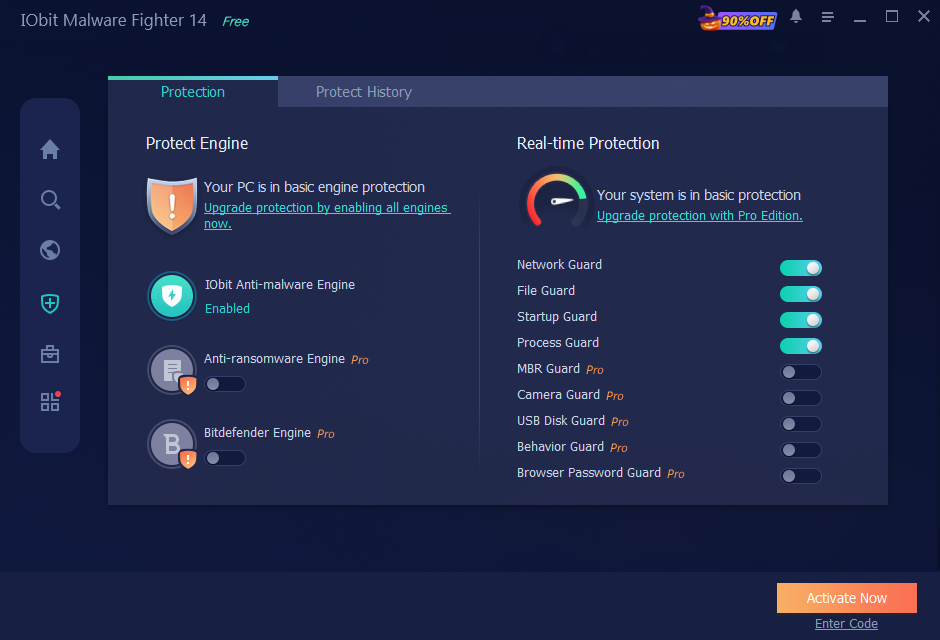
- Toggle the available security guards to the On position to activate their respective protection features. Once all the desired security guards are enabled. You’ve now successfully enabled IObit Malware Fighter real-time protection.
Part 4: Tips To Use IObit Malware Fighter
Here are some tips that will help users maximize IObit Malware Fighter’s security capabilities and keep their computers protected against potential cyber threats, especially for those utilizing the free antimalware edition:
- Download Software From Official Site: Make sure that you download the software from the IObit Malware Fighter official site rather than third-party platforms or unverified sources.
- Keep the Software Updated: Always use the latest version of IObit Malware Fighter to access updated security features, bug fixes, and the latest malware definitions.
- Enable USB Disk Protection: Make sure to scan external USB drives before opening their content to reduce the risk of transferring malware to your computer.
- Use Safe Box for Sensitive Files: Always store important documents, personal information, and confidential files in Safe Box to add an extra layer of protection.
Part 5: FAQs Related to IObit Malware Fighter
- Is Real-Time Protection Available for Free?
Yes. IObit Malware Fighter real-time protection is available for free. Users can follow the above instructions and enable the real-time protection feature to protect their devices from potential cyber threats in real time.
- Can IObit Malware Fighter Remove Ransomware?
IObit Malware Fighter includes an Anti-Ransomware Engine designed to help protect computers against ransomware threats. Its protection capabilities aim to detect and prevent malicious activities that could encrypt or compromise important files.
Final Thoughts
IObit Malware Fighter is a useful security solution for Windows users looking to strengthen their PC protection against different types of cyber threats. With features like real-time protection, nine dedicated Security Guards, and triple-engine protection and Safe Box, the program offers multiple tools to help safeguard computers and sensitive information.


Twitch lowered the bar for its Affiliate programme in 2026, and many older guides still quote the previous numbers. If you are trying to unlock subscriptions, Bits payouts and the other Affiliate perks, it is worth knowing exactly which goals you need to hit, how Twitch measures them, and how to check your progress without guessing.
The current Affiliate goals
Twitch’s “Path to Affiliate” achievement now asks for four things within the same 30-day window:
- 25 followers
- 4 hours of streaming (240 minutes in total)
- Streams on 4 different days
- An average of 3 viewers on 4 of those days
The old version asked for 50 followers, 500 minutes (about 8 hours) and 7 separate stream days. If a tutorial still lists those figures, it was written before the update.
How the “3 average viewers” rule really works
This is the goal that confuses most new streamers. Twitch does not look at one big average across the whole month. It looks at each stream day separately: a day counts when your average concurrent viewers for that day reaches 3. You need four such days in the last 30 days, and days below 3 simply don’t count. They do not pull the others down.
A few details matter in practice:
- Days are counted in GMT. Twitch’s achievement tracker uses GMT without daylight-saving adjustments, while your analytics dashboard shows your local time zone. A late-night stream in the Americas can land on the next day in Twitch’s count.
- Chatbots don’t count as viewers.
- The average is per day, not per peak. Hitting 10 viewers for five minutes during a raid doesn’t help much if you spend three hours at one viewer.
Because of this, a short, focused stream at a time your community can actually join often does more for the requirement than a long stream in an empty time slot.
Checking your progress with real numbers
The achievement page in your Creator Dashboard shows whether each goal is complete, but it doesn’t explain how close a given day is to the threshold. To plan ahead, you can feed your own stream data into a Twitch average viewers calculator. Enter the length of each stream and the viewers you had, and it shows the average per day and which days already qualify. This is useful when you are deciding whether one more stream this week could complete the goal.
What about Partner?
Partner is the next step and is considerably harder. The current “Path to Partner” achievement asks for 6 streams on 6 unique days with an average of at least 75 viewers, in two consecutive 30-day windows. A broadcast below 75 average viewers simply doesn’t count towards the six. Even when you meet the numbers, Partner is an application: Twitch reviews it, and exceptions are possible for creators who are growing quickly or who bring a large audience from another platform.
A realistic 30-day plan
- Pick a fixed schedule. Two or three set days per week, at the same hour, makes it easier for the same people to return. Consistency helps the per-day average more than random long sessions.
- Stream for 60 to 90 minutes. Shorter streams make it easier to keep your average above 3 for the whole session.
- Bring your existing audience. Friends, Discord members and followers from TikTok or YouTube Shorts are usually your first regular viewers.
- Collaborate. Co-streams and raids with streamers of a similar size bring real viewers who already enjoy your category.
- Check your days weekly. Once three qualifying days are complete, plan the fourth stream for your strongest time slot.
The zero-viewer start is the hardest part for almost every new channel, and a whole market of growth services has formed around it. On sites like ViewerWorks, for example, streamers can buy Twitch viewers or followers for their broadcasts. Whatever route you choose, the viewers who return week after week are the ones who came for your content.
After you qualify
Twitch sends the Affiliate invitation automatically, but it can take up to 48 hours to appear. Before you accept, make sure your account has two-factor authentication enabled and a verified email address, because both are needed for onboarding and payouts. Once you are in, it helps to estimate what subscriptions and Bits might bring in at your size. A free Twitch earnings calculator gives a quick, realistic picture of subscriptions and Bits before you plan any upgrades to your setup.
For the official wording of each goal, Twitch keeps an up-to-date description on its achievements help page.

How Watch Repair Tools Australia is building a local resource for the repair trade

How Can I Get Business Finance? The Financial Documents Required Before Application

Choosing the Right New Vehicle for Your Lifestyle in Sarasota, Florida
Who Is Gale Burnick? The Story Of George R. R. Martin’s Ex Wife

Who Is Hermann Nicoli? The Full Story Of Candice Swanepoel’s Former Fiancé

Who Is Alicia Dove? The Life Story Of Corey Taylor’s Wife
-
Celebrity4 months ago
Who Is Gale Burnick? The Story Of George R. R. Martin’s Ex Wife
-
 Celebrity4 months ago
Who Is Hermann Nicoli? The Full Story Of Candice Swanepoel’s Former Fiancé
-
 Celebrity4 months ago
Who Is Alicia Dove? The Life Story Of Corey Taylor’s Wife
-

 Celebrity4 months ago
Meet Carole Rogers: Everything to Know About Kenny Rogers’ Daughter
-

 Celebrity4 months ago
Who Is Sydney Davis? The Full Story Of Billy Bush’s Ex Wife
-

 Celebrity4 months ago
Who Is Anna Hillinger? The Full Life Story Of Mike Shinoda’s Wife
-

 Celebrity4 months ago
Who Is Demacio Castellon? Life Story Of Nelly Furtado’s Ex Husband
-

 Blog3 months ago
What Is Sosoactive? A Complete Guide to the Digital Platform