
Technology
What Is SnowMTL? A Simple Guide to AI Comic Translation


Reading a comic in another language once meant waiting for a fan translation or an official release. SnowMTL became known among manga, manhwa, and manhua readers because it offered a faster route: machine-made translations that helped people understand raw pages.
The name can now point to more than one thing. The older snowmtl.ru site was known as a machine-translation reader and source for translated comic content. That site now displays a message saying it is closed. A newer site at snowmtl.org works more like an AI manga translator, where users upload comic images and receive translated text from speech bubbles.
What SnowMTL Means Today
SnowMTL is best understood as a name linked with machine translation for Asian comics. MTL means “machine translation.” In this case, software reads text from manga, manhwa, manhua, or webtoon pages and turns it into another language.
That process is useful when no official translation is available. The newer site says it can translate uploaded comic images and return the lines in reading order, making it closer to an on-demand translator than a comic library.
Two Versions People Often Mean
People searching the term may be talking about two separate services. This matters because old forum posts, GitHub requests, and newer search results do not always describe the same product.
The older reader site
The original snowmtl.ru became known as a source for quickly translated comics. GitHub users asked for it to be added as a source in comic-reading apps, and some described it as fast and free even though the content used machine translation. The site now states that it is closed.
The newer AI translation tool
The current snowmtl.org site focuses on image translation. It asks users to upload a JPG, PNG, or WEBP page, choose a target language, and run the translation. The site says it uses GPT-4o vision to read speech bubbles and return translated text.
Why the Original Platform Became Popular
Speed was a big part of the appeal. Fans often find raw chapters before an English release appears. A rough machine translation can reveal what is happening before a polished release arrives.
The old SnowMTL also attracted attention because readers wanted it inside third-party manga apps. Public GitHub issues from 2024 and 2025 show repeated requests to add the site as a source. That does not prove the site was perfect, but it does show clear interest from comic-reading app users.
For some fans, quality came second to speed. They wanted to know what happened in a new chapter as soon as possible. Awkward English was often accepted if the main story could still be understood.
How the Current Translation Tool Works
The basic process is simple. A user uploads one comic page as an image. The tool scans the page, finds written text, and tries to understand what each line says. It then translates that text into the selected language.
SnowMTL says the system reads speech bubbles with GPT-4o vision and returns translations in seconds. Its homepage also lists common image formats and a 10 MB upload limit. The site presents the result in reading order, which can make a busy comic page easier to follow.
This workflow combines image recognition with language translation. Unlike copied text, comic dialogue is often trapped inside artwork, so the tool must detect the words before translating them.
Manga, Manhwa, Manhua, and Webtoons
These comic formats come from different places. Manga is linked with Japan, manhwa with Korea, and manhua with China. Webtoons are digital comics that often use a long vertical layout.
SnowMTL is aimed at users who read across these formats rather than only one type. The newer site specifically mentions manga, manhwa, and webtoons, while similar AI comic tools also support Chinese manhua. This shows how modern comic translation tools are being built for readers who move between several languages and formats.
The format can affect translation too. A vertical webtoon may place dialogue far apart, while a manga page can contain several small speech bubbles. The software must work out the reading order before the translated lines make sense.
Language Support and Everyday Use
The newer tool says users can choose from 10 languages. Its visible interface includes options such as English, Japanese, Korean, Chinese, Spanish, and others. That means the service is not limited to people seeking English translations.
A reader may use SnowMTL for a page that has not been translated yet or to compare a raw line with an existing version. Language learners can also check short dialogue, though machine output is not a perfect grammar lesson.
It can be especially handy for small tasks. You may want to understand one speech bubble, read an untranslated bonus page, or check a chapter preview. In those cases, waiting for a full fan or official translation may not make much sense.
What Machine Translation Does Well
Machine translation is strong at speed. It can process a short page far faster than a human team doing translation, editing, cleaning, and typesetting. For readers who mainly want the plot, that can be enough.
It can also handle basic dialogue when the source text is clear. SnowMTL and other AI comic tools aim to detect text inside images, translate it, and reduce manual work. Similar modern manga translators use OCR or image-reading systems for the same basic reason.
Still, fast does not mean flawless. Machine output is best seen as a reading aid. It gives access to meaning, but it may miss the style that makes a scene funny, tense, rude, or emotional.
Where MTL Can Get Things Wrong
Comics are hard to translate because short lines can carry a lot of hidden meaning. A character may drop the subject of a sentence. A joke may depend on a sound, name, cultural reference, or earlier scene.
An AI system can guess wrong in these cases. It may confuse the speaker, mistranslate a name, or make a formal line sound casual. Sound effects can also be hard to read when they are part of the artwork.
That is why SnowMTL should not be judged by the same standard as a finished official localization. Its main value is quick access. Accuracy can vary from page to page, especially when an image is blurry, the lettering is highly stylized, or the dialogue uses heavy slang.
Readers should pay extra attention when one translated sentence makes no sense beside the artwork. Sometimes the picture gives enough context to spot a bad translation before it changes how you understand the scene.
SnowMTL vs Human Translation
Human translators can read context across a full chapter. They can catch jokes, wordplay, slang, and character voice, then shape natural English without changing the intended meaning.
SnowMTL trades some of that care for speed. It can be useful when a reader wants a rough version now rather than a polished version later. For simple dialogue, the difference may feel small. For comedy, romance, historical speech, or complex fantasy terms, it can be much larger.
The best choice depends on the goal. Use MTL to understand a raw page quickly. Use an official or carefully edited human translation when exact wording, tone, names, and story details matter more.
There is also no rule saying readers must choose only one. Some people read a machine version first, then return to a professional translation later. The first version answers “what happened?” while the second can show what the dialogue was really trying to say.
Is It Safe and Legal to Use?
The translation technology itself is not the same thing as permission to copy or publish a comic. Copyright can still apply to the artwork, dialogue, characters, and original pages. Translating something does not automatically remove those rights.
Uploading a page so you can understand it is also different from taking full chapters and publishing translated copies for other people. Users should respect the rights of comic creators and publishers, and licensed editions remain the safest choice when they are available.
Privacy matters as well. If a tool requires an upload, avoid sending private art, client work, or unreleased material unless you understand the service’s terms.
The older SnowMTL reader model also created different questions because aggregator-style services may surface material without being the original publisher. Readers should check where a chapter came from before assuming it is an official release.
Who Will Find It Most Useful?
The tool suits readers who follow raw manga, manhwa, manhua, or webtoons and do not want to wait for a translation. It can also help anyone who only needs the basic meaning of a few panels.
Language learners can use SnowMTL as a second opinion, not as the final answer. Scan the line, compare the output, and check a dictionary or grammar source when something looks odd. That makes machine translation more useful for study.
For professional translators or publishers, it makes more sense as a rough first pass. Final copy still needs human review, especially for names, jokes, speech style, cultural references, and terms that appear many times across a story.
Casual readers are likely to get the most value from it. If the goal is simply to understand what a character said on one untranslated page, an instant AI translation can solve the problem with very little work.
Final Thoughts
SnowMTL has changed from the name of a well-known MTL reader into a term now tied to a newer AI comic translation tool. The old snowmtl.ru site says it is closed, while snowmtl.org offers image-based translation for comic pages.
Its appeal is easy to understand. Readers want fast access to stories that may not yet exist in their language. Machine translation can fill that gap, but it works best when readers accept its limits.
A clean image and simple dialogue may translate well. A page packed with slang, jokes, unusual names, or stylized lettering can be much harder. In those moments, the machine gets you part of the way there, while the final few details may still need a human eye.


Maintenance professionals are usually well aware of how important it is to adequately clean the electrical and electronic devices for which they are responsible. It is no less critical, however, to make sure such appliances are completely dry prior to power being restored.
An electrical contact cleaner spray can be a highly effective solution for clearing away dirt, grease, oxidation, and flux residue from components such as switches, connectors, relays, or circuit boards.
If, however, equipment is reconnected or energised too soon after cleaning, this can introduce risks that could have been avoided, such as short circuits, arcing, or residual vapour ignition. This underscores the importance of maintenance personnel understanding drying times and the factors that influence them.
Why Is It So Important to Allow Components to Fully Dry After Contact Cleaning?
Electrical contact cleaners are formulated for the purpose of eradicating the contaminants that can easily build up on a wide range of electrical components and devices over time. Many products in this category use fast-evaporating solvents, which allows for treated surfaces to dry relatively quickly.
However, the mere fact of a cleaner being labelled “fast-drying” does not automatically mean equipment can be switched on immediately after application.
If the cleaning solvent hasn’t yet evaporated sufficiently at the time of power being restored, there might still be traces of it on surfaces, inside connectors, or within other small surfaces. This, in turn, may lead to tracking, corrosion, intermittent faults, or severe risks to personnel safety.
The Perilous Consequences of Cleaned Equipment Being Energised Too Soon
In the event of a given device being energised while solvent is still present, critical safety and operational hazards may be created, such as:
- Short Circuits and Current Leakage — Even if a solvent is marketed as non-conductive or specialised for electrical components, there can still be a risk of residual liquid bridging contacts, terminals, or bus bars, or mixing with conductive dust, carbon, and metallic debris. This, in turn, can lead to unexpected current paths or short circuits.
- Fire and Combustion Hazards — Many cleaning solvents, encompassing such popular options as alcohol, acetone, or hydrocarbon-based products, are flammable or combustible. If, then, equipment is energised too soon after such a product has been used on it, this could bring about an electrical arc, spark, or high heat from components, igniting the wet solvent.
- Insulation Breakdown and Tracking — Wet solvents can degrade, soften, or crack protective insulation, rubber seals, and plastic housings. The application of voltage in the presence of such compromised insulation can lead to surface tracking, arcing, and permanent component failure.
- Toxic Vapour Spike — If electrical energy or heat is applied to residual wet solvents, this can speed up rapid evaporation. As a result, the concentration of hazardous airborne vapours in enclosed or poorly ventilated areas could see an abrupt spike.
- Electric Shock and Electrocution — A solvent that has become contaminated with water, dirt, or ionic residues during the cleaning procedure may conduct electricity directly to the operator or bring about catastrophic panel failure. This can also be a major risk if the solvent is not a verified, pure dielectric fluid.
The potential for liquid cleaner to remain trapped in areas that might not be immediately visible, underscores the importance of allowing adequate drying time. This should not, then, be treated as a mere “optional” step at the end of the cleaning process.
So, How Long Does It Take for Contact Cleaner to Dry?
There is no single “catch-all” answer to this question that covers all conceivable situations. Some formulations might take only seconds to evaporate, while others may only do so over the course of several minutes.
Much will depend on the chemical formulation of the cleaning agent, the amount of cleaner used, the design and accessibility of the component being cleaned, and the conditions in which the cleaning product is used. Key aspects of the latter include ambient temperature, ventilation and airflow.
Here are a few typical ranges as far as contact cleaner drying times are concerned:
- Potentially as little as two minutes in the case of light application or trace amounts in warm, well-ventilated conditions.
- Often around five minutes for standard or moderate applications.
- Five to 15 minutes or longer in situations of heavier use, cooler temperatures, higher humidity, or confined spaces.
Maintenance teams should use the cleaning product manufacturer’s instructions and the product technical data sheet (TDS) as their primary points of reference when determining how long to wait before reconnecting equipment.
Conclusion: Allowing Sufficient Drying Time Is a Simple but Much-Needed Step
Ultimately, maintenance workers who are committed to using contact cleaners correctly and safely must allow proper time for their chosen product to dry after it has been applied.
Doing so is a relatively straightforward and low-effort measure that is nonetheless imperative for minimising avoidable risks and supporting the reliable operation of electrical equipment for months and years to come.

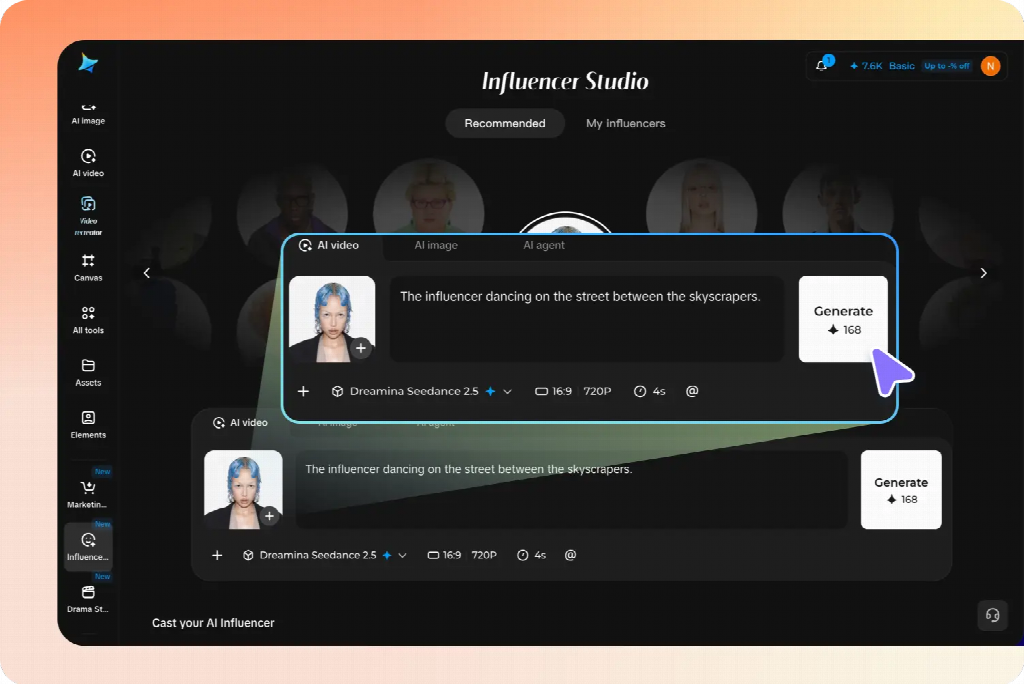
You have a folder full of outfit ideas: an oversized jacket with a colourful scarf, relaxed tailoring for a weekend, a familiar piece styled in a different way. You would love to turn those ideas into a visual series, but you do not need—or want—to appear in every image. An ai influencer can become the recurring host for that creative project. With Dreamina, you can develop an original character from a written description or an authorised photo reference, save it for reuse and explore images and videos in different settings.
The interesting part is giving the character a style that feels like its own. What colours does it return to? Which details make an outfit worth a closer look? A clear creative direction can help connect different posts, whether you are exploring personal style, building a fictional fashion story or developing ideas for a creative project.
Start with a perspective, not a list of traits
“Stylish, confident and friendly” could describe thousands of characters. It does not tell a creator what this particular person would do, wear or say. A perspective is more useful because it gives those decisions a direction.
Imagine an entirely fictional character called Mira, who enjoys finding unexpected ways to wear familiar clothes. She is drawn to textures and small details rather than expensive labels. That perspective gives a creator a useful starting point: instead of generating unrelated fashion portraits, they can explore how a jacket, scarf or pair of trousers might be interpreted in different moods.
A recurring character can help a creator bring those ideas together visually. It can also make room for experimentation without requiring a new photoshoot for every imagined look. The result is a creative concept, though: it cannot establish how an actual garment fits or feels.
Mira is an example, not a real creator or a promise that an audience will respond in a particular way. Her point of view can guide creative decisions without requiring an elaborate invented biography. A character centred on music, food, games or illustration would begin with different questions.
Try writing a single sentence: “This character notices ___ and likes to explore ___.” Then add one boundary: what would feel out of place? For Mira, a post that treats an imagined outfit as proof that a real product fits perfectly would break the creative premise. A clearly labelled styling illustration could fit it.
Let visual details tell part of the story
Fashion can communicate personality through choices that are easy to overlook: the proportion of a jacket, a repeated accessory, the colours a character returns to or the way an outfit changes with the setting.
Choose a few details that serve the character. Mira might favour roomy tailoring, practical shoes and one bright accessory. Those choices can be interpreted across different scenes without requiring the same clothes in every image. The point is to create a recognisable visual language, not an unchanging uniform.
Think about the environment too. A character who notices textures might be photographed—or illustrated in this case—against a tiled wall, a fabric-covered chair or a pavement after rain. Those choices should support the perspective rather than simply add decoration.
A useful exercise is to remove the character’s face from a draft image. Do the styling, composition and setting still feel connected to the character? If not, the face may be doing all the work. A stronger identity can often be recognised through several related details.
Create a small character reference
Before generating many scenes, write a short reference that can guide future decisions. Include the character’s role, visual style, recurring features, preferred tone and a few things that do not fit. Keep it concise enough to use.
For the fictional example, the reference might say: “Mira is a digital character who explores everyday personal style. Relaxed tailoring, warm neutrals and one unexpected colour. Observant and playful rather than authoritative. No claims that imagined outfits are real purchases or personal experiences.”
Turn that reference into an initial visual description. For example: “Create an original illustrated fashion character with a short dark bob, relaxed tailoring, warm neutral colours and one bright accessory. Editorial illustration, full-body composition, soft natural light.” The character, styling and visual treatment are described separately, making it easier to decide what should stay and what can change.
Generate a few directions, then choose the one that fits the idea rather than simply the most polished portrait. The character can be saved for reuse as you explore later images. If you begin with a photo reference, use one you own or have permission to upload and adapt; a reference can guide the appearance without guaranteeing an exact match.
Image generation can support this exploration, but outputs may change facial features, accessories or proportions between versions. Review the details that matter rather than assuming a reference will reproduce them exactly. If consistency is important, compare each new image with the reference before using it.
Give the character a way of seeing
A memorable personality is not only about what a character likes. It is also about the way they interpret familiar situations.
Picture a second-hand jacket on a chair. One character might see an opportunity to build three outfits. Another might imagine who wore it before and turn the scene into a fictional story. A third might focus on the materials and show how texture changes the mood of an image.
All three start with the same object, but they lead to different content. Choose the approach that belongs to your character. For Mira, the caption might ask: “What if the brightest part of an outfit were the smallest?” A follow-up image could show a neutral look with one colourful accessory. The idea is specific enough to guide the styling and open enough for different interpretations.
Avoid relying only on catchphrases. A repeated sentence can become recognisable, but personality also comes through the selection of subjects, the pace of a story and the details a character chooses to highlight.
Build a visual story instead of a collection of poses
A character becomes easier to understand when an image suggests a moment. That does not require pretending a virtual person has lived a real experience. It can be a clearly fictional scene with a beginning, a choice and a change.
Imagine a short series called “One Jacket, Three Moods”. In the first image, Mira considers the jacket with a simple outfit. In the second, she pairs it with a brighter accessory. In the third, the styling shifts towards a more relaxed evening look. A caption can invite viewers to compare the directions or explain the creative choice.
Use the saved character as the visual starting point for each scene. One prompt might describe Mira in a relaxed jacket and neutral trousers against a simple background; a second could keep the same character and jacket while introducing a red scarf. Review both images together. If the jacket changes significantly, revise the concept or describe the images as separate styling ideas instead of suggesting they show the exact same real item.
The character can also appear in a short video exploring the idea. Keep the movement simple, then check the character, clothing and accessories throughout the clip. A generated scene is useful for showing a creative direction, but it is not evidence of a garment’s construction, size or availability.
The series has a premise and a visual progression. It gives each image a purpose while keeping the focus on style. If the clothing is generated rather than photographed, describe it as an illustration or concept where that distinction matters; do not imply an item is available for purchase or accurately depicts a real garment.
The same structure can work for a character interested in interiors, art or food: one object, a few distinct interpretations and a clear explanation of what changes. The character’s perspective is what holds the sequence together.
Write a voice that sounds natural
A virtual personality’s captions do not need to read like a character profile. Short, specific observations often sound more natural than repeated claims about being curious or adventurous.
Compare “I am passionate about fashion and creativity” with “I keep coming back to the red scarf—it changes the whole outfit without changing the jacket.” The second line gives the reader something concrete to picture. It also fits the fictional character’s interest in small details.
Read the caption aloud. Would the sentence make sense to someone who has not seen earlier posts? Does it explain an actual creative decision, or does it use adjectives to fill space? A calm, direct voice can be as distinctive as a playful one.
If the account uses a generated voice, make sure you have the necessary rights and permissions. Do not imitate an identifiable person’s voice or suggest that a real person said something they did not. The people managing the character remain responsible for checking what is presented as fact.
Keep continuity without making the character rigid
A digital personality can change clothes, discover new interests and experiment with visual styles. Continuity does not mean every post must have identical lighting or repeat the same pose. It means the changes feel understandable within the character’s creative direction.
A simple reference sheet can separate fixed and flexible elements. Mira’s general appearance and point of view may remain stable; her location, outfit and story can change. Save an approved character image, note the details that matter and compare new images against it. If an important feature changes unexpectedly during generation, revise the draft or choose another result.
Review a small group of posts side by side. Does the character remain recognisable? Do the images feel as though they belong to the same project? Is the variety helping the audience see different sides of the character, or has the original perspective disappeared?
A character may also develop intentionally. If Mira moves from outfit ideas to a broader interest in textile design, the account can introduce that shift through a story or explanation. Thoughtful development is different from accidentally changing the character’s identity in every post.
Make the fiction clear
Virtual personalities can be fictional and transparent at the same time. A profile can say that the character is digitally created, and individual posts can provide extra context when a viewer might mistake a scene for an actual event or a real person’s experience.
For example, an illustrated café scene can be presented as an imagined setting. It should not imply that a real café hosted the character, or that a real brand supplied an outfit, unless that is true. If the character promotes a product as part of a commercial relationship, follow the relevant advertising and platform disclosure requirements.
Use only reference images, designs, music and other materials you have permission to upload and share. A familiar face or distinctive design is not free to use simply because it appears online. Check the service’s current terms and the applicable conditions for the output, especially for commercial projects.
Transparency can also be part of the creative experience. Explaining that a character and its world are fictional gives the audience an honest invitation to enjoy the story.
Let the character become recognisable over time
A memorable virtual personality is rarely built by deciding everything in advance. It develops through a series of choices: what the character notices, how the visuals support that perspective, and which stories feel worth telling.
Start with a fashion idea you want to explore, build a character that fits it and create a small series around a clear question. A reusable virtual host can help connect the visuals, while the styling choices and captions give people a reason to engage. Review the results, keep the fiction clear and let the character develop as the project takes shape.
Technology
The Hidden Cost of Outdated Software: Why US Companies Are Investing in Legacy Application Modernization


In November 2026, the Federal Aviation Administration announced it will finally replace the floppy disks still used in many US air traffic control systems. The technology helping guide one of the busiest airspaces on earth was still moving data on a format most college students have never touched.
It’s an extreme example, but we see the same pattern in companies of every size. A system gets built, it works, and the team moves on. Fifteen or twenty years later it’s running billing, claims, or inventory on a codebase only two people fully understand. On one recent project, our client’s two-decade-old database had become so inconsistent that staff had to watch it constantly and correct records by hand just to keep daily operations running.
That’s the trap. Outdated software feels free because the big check was written years ago. In reality you pay for it every month, just not on a single invoice. The cost hides in maintenance contracts, overtime, unpatched security gaps, integrations that take a quarter instead of a week, and ideas your team can’t build because the core system won’t allow it.
This guide shows where those costs come from, how to put a real number on them, and why so many US companies are choosing to invest in legacy application modernization now instead of waiting for something to break.
What Is Legacy Application Modernization?
Legacy application modernization is the process of updating outdated software so it’s secure, easier to change, and able to work with modern tools like cloud platforms, APIs, and AI. It can mean moving an app to the cloud, restructuring its code, rebuilding it on a new stack, or replacing it entirely.
Age alone doesn’t make software “legacy.” An application becomes legacy when it’s harder to change than your business needs it to be. A five-year-old app built in a rush can be a bigger liability than a well-kept 20-year-old one.
Watch For These Signs:
- It runs on languages or frameworks with a shrinking talent pool, like COBOL, VB6, classic ASP, PowerBuilder, or early Java EE.
- The vendor no longer supports the operating system, database, or hardware underneath it.
- Documentation is thin, and key business rules live in the heads of a few long-time employees.
- Connecting it to modern tools takes custom middleware, nightly batch files, or manual re-entry.
- Every release needs weeks of manual testing and a weekend maintenance window.
- Your team quotes weeks for changes that sound simple.
If two or more of these sound familiar, you’re almost certainly paying the costs below.
The Real Price Tag: 6 Hidden Costs of Outdated Software
1. Maintenance Swallows The Budget Meant For Growth
Deloitte’s 2026 research puts technical debt at somewhere between 21% and 40% of total IT spending. Put simply, up to 40 cents of every IT dollar can go toward servicing yesterday’s decisions.
The federal government shows how far this can go. Washington spends more than $100 billion a year on IT and cyber investments, and roughly 80% of that goes to operating and maintaining existing systems, legacy ones included. Even in aviation, officials have told lawmakers that most of the roughly $4 billion Congress provides each year for modernization ends up maintaining old systems rather than replacing them.
Private companies face the same squeeze. Research from Pegasystems and Savanta estimated that the average global enterprise wastes more than $370 million a year because it can’t modernize legacy systems efficiently. The biggest share, close to $134 million, came from slow transformation projects, followed by about $58 million lost to failed efforts and $56 million spent maintaining, updating, and integrating legacy technology.
2. Security Gaps That Grow Every Year
When a vendor ends support, security patches end too. Older applications often can’t handle multi-factor authentication, modern encryption, or centralized logging without major workarounds.
That’s a serious problem in the most expensive breach market in the world. IBM’s 2026 report puts the average US breach at $11.5 million, more than twice the global average. Government systems show how common these gaps are: of the 11 most critical federal legacy systems GAO reviewed in 2025, eight relied on outdated languages, seven had known cybersecurity vulnerabilities, and four ran on unsupported hardware or software.
Auditors for HIPAA, PCI DSS, and SOC 2 also tend to flag unsupported software, which turns a technical problem into a compliance one.
3. Outages That Make Headlines
In December 2023, the US Department of Transportation fined Southwest Airlines a record $140 million over a 10-day holiday meltdown that stranded more than 2 million travelers. The airline said the disaster cost it nearly $1.2 billion. Pilot and flight attendant unions blamed outdated scheduling technology, and Southwest executives acknowledged at a congressional hearing that the scheduling system was part of the problem, alongside other operational mistakes.
The lesson isn’t that bad weather happens. It’s that old software often can’t recover when it does.
4. A Shrinking Pool Of People Who Can Fix It
Research from Advanced found that nearly nine in ten large businesses worry about a shortage of staff with the skills to maintain their legacy systems. The pipeline isn’t refilling, since most universities no longer teach mainframe courses.
There’s also a quieter version of this risk. When the one engineer who understands your billing logic retires, those business rules often leave with them.
5. Slower Delivery And Stalled AI Plans
A feature that should take two weeks takes two months. Worse, your team can’t plug in AI assistants, real-time analytics, or a better mobile experience, because the core system can’t share data cleanly. Your competitors aren’t waiting for you to catch up.
6. Data Trapped In Silos
Modern SaaS platforms and AI models expect clean APIs and real-time data. Many legacy systems offer flat files and overnight batch jobs instead. Sometimes the problem runs deeper: in the underwriting platform we rebuilt, the inspection forms at the center of the business had never been stored as structured data at all, so nothing in them could be searched, reported on, or automated.
The usual result is duplicate data entry, reports that are a day old on arrival, and spreadsheets acting as glue between systems that should talk to each other.
The Hidden Costs At A Glance
| Hidden Cost | How It Shows Up | Business Impact |
| Maintenance overload | Most of the IT budget goes to “keeping the lights on” | Little left for growth projects |
| Security exposure | Unpatched software, weak authentication | Higher breach risk, audit findings |
| Outage risk | Systems that can’t scale or recover | Lost revenue, fines, brand damage |
| Talent scarcity | Few people know the old stack | Expensive contractors, key-person risk |
| Slow delivery | Long release cycles, fragile code | Competitors ship first |
| Data silos | Batch files, manual re-entry | Poor reporting, blocked AI and automation |
How To Calculate What Your Legacy Software Really Costs
Most companies underestimate legacy costs because they only count the obvious line items. Here’s a simple formula to get a more honest number:
Annual cost of legacy = maintenance labor + licenses, support, and hosting + incident and downtime costs + specialist contractor premiums + compliance remediation + opportunity cost
Illustrative Example: (A hypothetical mid-sized company; swap in your own numbers):
| Cost item | Assumption | Annual cost |
| Maintenance labor | 5 engineers spending 50% of their time on upkeep, at $170,000 fully loaded | $425,000 |
| Licenses, extended support, aging hosting | Vendor fees and older infrastructure | $120,000 |
| Incidents and downtime | 3 significant incidents at $40,000 each | $120,000 |
| Specialist contractor | Part-time expert in the legacy stack | $90,000 |
| Direct Total | $755,000 |
That’s before counting opportunity cost: the product launches, integrations, and AI features that didn’t happen. In this example, a phased modernization that cut upkeep in half would save roughly $375,000 a year, which can pay back a mid-sized program in well under two years.
Why US Companies Are Investing in Legacy Application Modernization in 2026
The Debt is Compounding. Forrester predicted that more than half of technology decision-makers would face moderate or severe technical debt in 2025, rising to 75% by 2026. Each year of delay adds more code, more workarounds, and more risk to untangle.
Even Washington Learned The Hard Way. GAO flagged 10 critical federal legacy systems in 2019, and by February 2025 only three had been modernized. Air traffic control is now getting $12.5 billion in modernization funding, and FAA officials have warned Congress that roughly $20 billion more will be needed to finish the job. Waiting didn’t make modernization cheaper. It made it bigger.
AI Needs A Modern Foundation. AI is only as useful as the data it can reach. If your core data lives in a 25-year-old system with no API, your AI plans stall before they start. Technavio expects the application modernization services market to grow by nearly $25 billion between 2025 and 2030 at a 16.2% annual rate, points to generative AI integration into legacy systems as a key driver, and projects North America to account for 38.6% of that growth.
Firefighting Has Become The Job. In Pega’s research, more than a third of IT leaders said retiring legacy systems felt too time-consuming, 29% said they were too busy fighting fires those systems caused, and fewer than one in ten felt able to fully retire or replace their legacy applications.
How AI Is Changing Modernization in 2026
For years, the slowest and most expensive part of modernization was simply understanding the old code: what it does, what depends on it, and which business rules are buried inside. AI is speeding that up.
AWS launched AWS Transform in May 2025, describing it as the first agentic AI service built to modernize mainframe workloads at scale. Toyota Motor North America used it to help modernize more than 40 million lines of COBOL into Java. IBM offers watsonx Code Assistant for Z, which uses generative AI to refactor, transform, and validate COBOL code.
AI also earns its place inside the modernized system itself. On the Sentinel platform, we built AI-assisted review that compares inspection photos against form answers, flags inconsistencies, and drafts comments, giving human reviewers a faster and sharper starting point.
That last part matters. AI doesn’t decide what your business needs, catch every edge case, or take responsibility for the result. Converted code still needs experienced engineers to review it and test it against real data, and AI-flagged issues still need a person to make the call. The practical takeaway: projects that weren’t affordable three years ago may be within reach now, as long as AI is paired with careful human oversight.
Modernization Doesn’t Mean Rewriting Everything
The biggest myth in this space is that modernization means throwing out the old system and starting over. Sometimes it does. Usually it doesn’t.
| Approach | What it means | Best for | Effort and risk |
| Rehost | Move the app to the cloud with minimal code changes | Quick infrastructure savings, data center exits | Low |
| Replatform | Small changes to use managed cloud services | Sound apps on aging infrastructure | Low to medium |
| Refactor | Clean up and restructure code without changing behavior | Valuable apps slowed by technical debt | Medium |
| Rearchitect | Break a monolith into services with APIs | Systems that need to scale or integrate widely | Medium to high |
| Rebuild | Rewrite on a modern stack | Core systems where the old code can’t be saved | High |
| Replace | Switch to a commercial or SaaS product | Generic functions like HR, accounting, CRM | Medium |
| Retire | Shut it down | Apps nobody really uses | Low |
Most real projects combine several of these. A safer pattern many teams use is the “strangler fig” approach: put an API layer in front of the old system, then replace it one function at a time while the business keeps running. No big-bang cutover, no all-or-nothing weekend.
That’s why good Legacy Application Modernization Services start with an honest assessment instead of a pitch for a full rewrite. And when a rebuild really is the right call, as it was for Sentinel, it takes experienced Software Development Services to carry decades of business rules into new code without losing anything along the way.
How Much Does Legacy Application Modernization Cost in 2026?
Industry pricing guides published in 2026 put most projects between $50,000 and more than $2 million, with small systems around $50,000 to $150,000 and mid-sized systems landing between $150,000 and $500,000. A portfolio assessment and roadmap on its own typically costs $15,000 to $30,000.
What moves the number most:
- Code size and quality: messy, undocumented code takes longer to untangle.
- Number of integrations: every connected system adds testing and discovery.
- Data volume and cleanliness: migration is often the riskiest step.
- Compliance needs: HIPAA, PCI DSS, and SOC 2 add controls and audit work.
- Downtime tolerance: zero-downtime cutovers cost more to plan.
- Approach: rehosting costs far less than a full rebuild.
At Auspicious Soft, we scope a fixed price or a clear milestone budget before development starts, and well-defined projects can run on a fixed-price contract, so there are no surprise invoices. For a sense of scale, the Sentinel rebuild, a full replacement of a 20-year-old platform, took eight months with a focused team of four to five specialists.
The smartest way to control cost is to phase the work. Start with an assessment, prove value with one pilot, then fund the next phase from the savings.
Industry Spotlight: Where Legacy Systems Hurt Most
Healthcare. Older EHR and billing systems struggle with modern access controls and standards-based APIs like FHIR, which makes patient portals, interoperability, and HIPAA compliance harder than they need to be.
Insurance, banking, and credit unions. Many core banking and policy systems still run on decades-old code. In insurance underwriting, we’ve seen firsthand how a legacy platform can turn every inspection into manual assignment and re-keying, with reporting nobody fully trusts.
Manufacturing and logistics. Aging ERP and warehouse systems limit supply chain visibility and IoT integration. The Toyota example above shows that even the largest manufacturers are modernizing.
Retail and eCommerce. Legacy inventory and order systems make it hard to sync stock across channels or survive peak-season traffic.
A 7-Step Roadmap To Get Started
- Take inventory. List your applications and score each one on business value and technical health. High-value apps in poor health go to the top.
- Put a number on doing nothing. Use the formula above. That figure becomes your business case.
- Pick a pilot. Choose one application that matters but won’t sink the company if something goes sideways.
- Match the approach to the app. Rehost what just needs a new home, refactor what’s worth keeping, replace what’s generic.
- Protect your data and business logic. Document business rules before touching code, and never apply a data fix you can’t undo. On Sentinel, we set a go-live cutoff that kept old records searchable without cluttering live work, built readers that understand both old and new data formats, and backed up every correction before applying it.
- Deliver in small increments. Automated testing and CI/CD pipelines let you release in weeks rather than quarters, with a rollback plan for every step.
- Measure and keep going. Track release frequency, incident counts, maintenance spend, and user satisfaction.
What To Look For In A Modernization Partner
- Hands-on experience with both your legacy stack and your target platform.
- An assessment-first process with phased, transparent estimates.
- Working software delivered at every stage, not just at the end.
- Strong testing and data migration discipline.
- Responsible use of AI tools, with human review of every change.
- Working hours that overlap with your US team.
- Documentation and knowledge transfer so you’re never locked in.
- References from projects similar to yours.
How Auspicious Soft Approaches Modernization
At Auspicious Soft, we work with companies that know their software is holding them back but can’t afford to pause the business while they fix it. Our Legacy Application Modernization Services cover the full journey: application assessment, code refactoring, cloud migration, API enablement, UI and UX redesign, and careful data migration.
Every Engagement Follows The Same Path:
- Discovery: How your teams actually use the system.
- Design: Workflow design & modernization planning.
- Development: Explain the incremental development approach
- Migration &QA: Data migration, testing, and quality assurance.
- Launch & Support: Make post-launch support a separate, clearly defined step.
Modernization is also where new opportunities open up. Through our Software Development Services, we help clients build on their modernized foundation with custom features, customer portals, mobile apps, third-party integrations, and AI-powered automation.
Why US Companies Choose Us:
- Proven Since 2018: 200+ digital products delivered by a team of 30+ Engineers, with 98% Client Retention.
- Independently Rated: 5.0 on Clutch and 4.5 on Google across 87 reviews.
- Budget Protection: Fixed-price contracts for well-defined projects, so surprise invoices never happen.
- Built Around Your Schedule: A dedicated project manager, weekly video updates, and a senior team that works in step with your business hours, backed by a US sales office in Los Angeles.
- You Own Everything: We sign an NDA before you share any details, and you keep 100% of the source code and IP.
- Compliance Built In: We build to standards like HIPAA for healthcare and PCI DSS for payments.
Client Story: Sentinel Underwriting Review (Insurance and Risk Intelligence)
The Challenge: Sentinel has led web-based property inspection and insurance-to-value intelligence for more than 48 years, serving insurance, mortgage, banking, and real estate clients. But its core platform was about two decades old. The database had become inconsistent and needed constant hand-fixing; much of the historical data was corrupted or locked in hard-to-restructure formats, and the system couldn’t support growth, automation, or reliable reporting.
What We Did: Over eight months (two of design, six of development), a team of four to five specialists rebuilt the entire workflow on Next.js, Node.js, and PostgreSQL running on Microsoft Azure. We migrated the full inspection history, built five role-based portals, added automated Verisk 360Value replacement-cost valuations, and set up AI-assisted review of inspection photos.
The Results: 400K+ historical inspections are now migrated, cleaned, and searchable in one place. Manual assignment and re-keying have been replaced by automation, and the new platform handled about 1,350 inspections end to end in its first full month.
Final Thoughts
Outdated software rarely fails all at once. It drains you slowly through maintenance bills, security exposure, a shrinking talent pool, and opportunities you never get to chase. Then one day, like Southwest in 2022, it fails all at once.
The companies pulling ahead in 2026 aren’t necessarily the ones with the newest technology. They’re the ones that stopped paying interest on the old. If you’re not sure where to begin, begin with the numbers. Run the cost formula above, then compare it to a phased plan.
Frequently Asked Questions
Q: What is legacy application modernization?
Legacy application modernization is the process of updating outdated software so it’s secure, easier to change, and able to work with modern tools like cloud platforms, APIs, and AI. It can mean moving an app to the cloud, restructuring its code, rebuilding it, or replacing it entirely.
Q: How do I know if my software needs modernization?
Common signs include unsupported operating systems or databases, a shrinking pool of developers who know the code, slow and risky releases, frequent outages, and difficulty connecting to modern tools. If two or more apply, it’s worth getting an assessment.
Q: How long does a legacy modernization project take?
It depends on the size and complexity of the system. A single small application can often be modernized in a few weeks to a few months, while large enterprise systems usually take a year or more and are delivered in phases.
Q: How much does legacy application modernization cost?
Industry pricing guides published in 2026 put most small projects at roughly $8,000 to $15,000 and mid-sized systems at $30,000 to $80,000, with large rebuilds reaching $80,000 to $250,000+ million or more. A short assessment is the most reliable way to get an estimate for your specific system.
Q: Can we modernize without losing our historical data?
Yes, with the right migration strategy. On a recent insurance platform rebuild, we migrated more than 400k historical inspections by using readers that understand both old and new data formats, backing up every correction before applying it, and setting a go-live cutoff that keeps history searchable without cluttering live work.
Q: Is it risky to modernize a business-critical system?
Every change carries some risk, but incremental modernization keeps it manageable. Running old and new systems in parallel, validating data at each step, and keeping a rollback plan ready means the business keeps running while the work happens.
Q: Can we keep adding new features while we modernize?
Yes. Many companies pair modernization with ongoing Software Development Services, so new features ship on the modern parts of the system while older components are replaced in the background.

Catching Medication Risks Sooner Through Better Safety Reporting

What Does Timsko Mean? Grammar and Examples

What Is Domikyo.com? Everything You Should Know
Who Is Gale Burnick? The Story Of George R. R. Martin’s Ex Wife

Who Is Hermann Nicoli? The Full Story Of Candice Swanepoel’s Former Fiancé

Who Is Alicia Dove? The Life Story Of Corey Taylor’s Wife
-
Celebrity4 months ago
Who Is Gale Burnick? The Story Of George R. R. Martin’s Ex Wife
-
 Celebrity4 months ago
Who Is Hermann Nicoli? The Full Story Of Candice Swanepoel’s Former Fiancé
-
 Celebrity4 months ago
Who Is Alicia Dove? The Life Story Of Corey Taylor’s Wife
-

 Celebrity4 months ago
Meet Carole Rogers: Everything to Know About Kenny Rogers’ Daughter
-

 Blog3 months ago
What Is Sosoactive? A Complete Guide to the Digital Platform
-

 Celebrity4 months ago
Who Is Sydney Davis? The Full Story Of Billy Bush’s Ex Wife
-

 Celebrity4 months ago
Who Is Anna Hillinger? The Full Life Story Of Mike Shinoda’s Wife
-

 Celebrity4 months ago
Who Is Demacio Castellon? Life Story Of Nelly Furtado’s Ex Husband