
Technology
The Hidden Cost of Outdated Software: Why US Companies Are Investing in Legacy Application Modernization


In November 2026, the Federal Aviation Administration announced it will finally replace the floppy disks still used in many US air traffic control systems. The technology helping guide one of the busiest airspaces on earth was still moving data on a format most college students have never touched.
It’s an extreme example, but we see the same pattern in companies of every size. A system gets built, it works, and the team moves on. Fifteen or twenty years later it’s running billing, claims, or inventory on a codebase only two people fully understand. On one recent project, our client’s two-decade-old database had become so inconsistent that staff had to watch it constantly and correct records by hand just to keep daily operations running.
That’s the trap. Outdated software feels free because the big check was written years ago. In reality you pay for it every month, just not on a single invoice. The cost hides in maintenance contracts, overtime, unpatched security gaps, integrations that take a quarter instead of a week, and ideas your team can’t build because the core system won’t allow it.
This guide shows where those costs come from, how to put a real number on them, and why so many US companies are choosing to invest in legacy application modernization now instead of waiting for something to break.
What Is Legacy Application Modernization?
Legacy application modernization is the process of updating outdated software so it’s secure, easier to change, and able to work with modern tools like cloud platforms, APIs, and AI. It can mean moving an app to the cloud, restructuring its code, rebuilding it on a new stack, or replacing it entirely.
Age alone doesn’t make software “legacy.” An application becomes legacy when it’s harder to change than your business needs it to be. A five-year-old app built in a rush can be a bigger liability than a well-kept 20-year-old one.
Watch For These Signs:
- It runs on languages or frameworks with a shrinking talent pool, like COBOL, VB6, classic ASP, PowerBuilder, or early Java EE.
- The vendor no longer supports the operating system, database, or hardware underneath it.
- Documentation is thin, and key business rules live in the heads of a few long-time employees.
- Connecting it to modern tools takes custom middleware, nightly batch files, or manual re-entry.
- Every release needs weeks of manual testing and a weekend maintenance window.
- Your team quotes weeks for changes that sound simple.
If two or more of these sound familiar, you’re almost certainly paying the costs below.
The Real Price Tag: 6 Hidden Costs of Outdated Software
1. Maintenance Swallows The Budget Meant For Growth
Deloitte’s 2026 research puts technical debt at somewhere between 21% and 40% of total IT spending. Put simply, up to 40 cents of every IT dollar can go toward servicing yesterday’s decisions.
The federal government shows how far this can go. Washington spends more than $100 billion a year on IT and cyber investments, and roughly 80% of that goes to operating and maintaining existing systems, legacy ones included. Even in aviation, officials have told lawmakers that most of the roughly $4 billion Congress provides each year for modernization ends up maintaining old systems rather than replacing them.
Private companies face the same squeeze. Research from Pegasystems and Savanta estimated that the average global enterprise wastes more than $370 million a year because it can’t modernize legacy systems efficiently. The biggest share, close to $134 million, came from slow transformation projects, followed by about $58 million lost to failed efforts and $56 million spent maintaining, updating, and integrating legacy technology.
2. Security Gaps That Grow Every Year
When a vendor ends support, security patches end too. Older applications often can’t handle multi-factor authentication, modern encryption, or centralized logging without major workarounds.
That’s a serious problem in the most expensive breach market in the world. IBM’s 2026 report puts the average US breach at $11.5 million, more than twice the global average. Government systems show how common these gaps are: of the 11 most critical federal legacy systems GAO reviewed in 2025, eight relied on outdated languages, seven had known cybersecurity vulnerabilities, and four ran on unsupported hardware or software.
Auditors for HIPAA, PCI DSS, and SOC 2 also tend to flag unsupported software, which turns a technical problem into a compliance one.
3. Outages That Make Headlines
In December 2023, the US Department of Transportation fined Southwest Airlines a record $140 million over a 10-day holiday meltdown that stranded more than 2 million travelers. The airline said the disaster cost it nearly $1.2 billion. Pilot and flight attendant unions blamed outdated scheduling technology, and Southwest executives acknowledged at a congressional hearing that the scheduling system was part of the problem, alongside other operational mistakes.
The lesson isn’t that bad weather happens. It’s that old software often can’t recover when it does.
4. A Shrinking Pool Of People Who Can Fix It
Research from Advanced found that nearly nine in ten large businesses worry about a shortage of staff with the skills to maintain their legacy systems. The pipeline isn’t refilling, since most universities no longer teach mainframe courses.
There’s also a quieter version of this risk. When the one engineer who understands your billing logic retires, those business rules often leave with them.
5. Slower Delivery And Stalled AI Plans
A feature that should take two weeks takes two months. Worse, your team can’t plug in AI assistants, real-time analytics, or a better mobile experience, because the core system can’t share data cleanly. Your competitors aren’t waiting for you to catch up.
6. Data Trapped In Silos
Modern SaaS platforms and AI models expect clean APIs and real-time data. Many legacy systems offer flat files and overnight batch jobs instead. Sometimes the problem runs deeper: in the underwriting platform we rebuilt, the inspection forms at the center of the business had never been stored as structured data at all, so nothing in them could be searched, reported on, or automated.
The usual result is duplicate data entry, reports that are a day old on arrival, and spreadsheets acting as glue between systems that should talk to each other.
The Hidden Costs At A Glance
| Hidden Cost | How It Shows Up | Business Impact |
| Maintenance overload | Most of the IT budget goes to “keeping the lights on” | Little left for growth projects |
| Security exposure | Unpatched software, weak authentication | Higher breach risk, audit findings |
| Outage risk | Systems that can’t scale or recover | Lost revenue, fines, brand damage |
| Talent scarcity | Few people know the old stack | Expensive contractors, key-person risk |
| Slow delivery | Long release cycles, fragile code | Competitors ship first |
| Data silos | Batch files, manual re-entry | Poor reporting, blocked AI and automation |
How To Calculate What Your Legacy Software Really Costs
Most companies underestimate legacy costs because they only count the obvious line items. Here’s a simple formula to get a more honest number:
Annual cost of legacy = maintenance labor + licenses, support, and hosting + incident and downtime costs + specialist contractor premiums + compliance remediation + opportunity cost
Illustrative Example: (A hypothetical mid-sized company; swap in your own numbers):
| Cost item | Assumption | Annual cost |
| Maintenance labor | 5 engineers spending 50% of their time on upkeep, at $170,000 fully loaded | $425,000 |
| Licenses, extended support, aging hosting | Vendor fees and older infrastructure | $120,000 |
| Incidents and downtime | 3 significant incidents at $40,000 each | $120,000 |
| Specialist contractor | Part-time expert in the legacy stack | $90,000 |
| Direct Total | $755,000 |
That’s before counting opportunity cost: the product launches, integrations, and AI features that didn’t happen. In this example, a phased modernization that cut upkeep in half would save roughly $375,000 a year, which can pay back a mid-sized program in well under two years.
Why US Companies Are Investing in Legacy Application Modernization in 2026
The Debt is Compounding. Forrester predicted that more than half of technology decision-makers would face moderate or severe technical debt in 2025, rising to 75% by 2026. Each year of delay adds more code, more workarounds, and more risk to untangle.
Even Washington Learned The Hard Way. GAO flagged 10 critical federal legacy systems in 2019, and by February 2025 only three had been modernized. Air traffic control is now getting $12.5 billion in modernization funding, and FAA officials have warned Congress that roughly $20 billion more will be needed to finish the job. Waiting didn’t make modernization cheaper. It made it bigger.
AI Needs A Modern Foundation. AI is only as useful as the data it can reach. If your core data lives in a 25-year-old system with no API, your AI plans stall before they start. Technavio expects the application modernization services market to grow by nearly $25 billion between 2025 and 2030 at a 16.2% annual rate, points to generative AI integration into legacy systems as a key driver, and projects North America to account for 38.6% of that growth.
Firefighting Has Become The Job. In Pega’s research, more than a third of IT leaders said retiring legacy systems felt too time-consuming, 29% said they were too busy fighting fires those systems caused, and fewer than one in ten felt able to fully retire or replace their legacy applications.
How AI Is Changing Modernization in 2026
For years, the slowest and most expensive part of modernization was simply understanding the old code: what it does, what depends on it, and which business rules are buried inside. AI is speeding that up.
AWS launched AWS Transform in May 2025, describing it as the first agentic AI service built to modernize mainframe workloads at scale. Toyota Motor North America used it to help modernize more than 40 million lines of COBOL into Java. IBM offers watsonx Code Assistant for Z, which uses generative AI to refactor, transform, and validate COBOL code.
AI also earns its place inside the modernized system itself. On the Sentinel platform, we built AI-assisted review that compares inspection photos against form answers, flags inconsistencies, and drafts comments, giving human reviewers a faster and sharper starting point.
That last part matters. AI doesn’t decide what your business needs, catch every edge case, or take responsibility for the result. Converted code still needs experienced engineers to review it and test it against real data, and AI-flagged issues still need a person to make the call. The practical takeaway: projects that weren’t affordable three years ago may be within reach now, as long as AI is paired with careful human oversight.
Modernization Doesn’t Mean Rewriting Everything
The biggest myth in this space is that modernization means throwing out the old system and starting over. Sometimes it does. Usually it doesn’t.
| Approach | What it means | Best for | Effort and risk |
| Rehost | Move the app to the cloud with minimal code changes | Quick infrastructure savings, data center exits | Low |
| Replatform | Small changes to use managed cloud services | Sound apps on aging infrastructure | Low to medium |
| Refactor | Clean up and restructure code without changing behavior | Valuable apps slowed by technical debt | Medium |
| Rearchitect | Break a monolith into services with APIs | Systems that need to scale or integrate widely | Medium to high |
| Rebuild | Rewrite on a modern stack | Core systems where the old code can’t be saved | High |
| Replace | Switch to a commercial or SaaS product | Generic functions like HR, accounting, CRM | Medium |
| Retire | Shut it down | Apps nobody really uses | Low |
Most real projects combine several of these. A safer pattern many teams use is the “strangler fig” approach: put an API layer in front of the old system, then replace it one function at a time while the business keeps running. No big-bang cutover, no all-or-nothing weekend.
That’s why good Legacy Application Modernization Services start with an honest assessment instead of a pitch for a full rewrite. And when a rebuild really is the right call, as it was for Sentinel, it takes experienced Software Development Services to carry decades of business rules into new code without losing anything along the way.
How Much Does Legacy Application Modernization Cost in 2026?
Industry pricing guides published in 2026 put most projects between $50,000 and more than $2 million, with small systems around $50,000 to $150,000 and mid-sized systems landing between $150,000 and $500,000. A portfolio assessment and roadmap on its own typically costs $15,000 to $30,000.
What moves the number most:
- Code size and quality: messy, undocumented code takes longer to untangle.
- Number of integrations: every connected system adds testing and discovery.
- Data volume and cleanliness: migration is often the riskiest step.
- Compliance needs: HIPAA, PCI DSS, and SOC 2 add controls and audit work.
- Downtime tolerance: zero-downtime cutovers cost more to plan.
- Approach: rehosting costs far less than a full rebuild.
At Auspicious Soft, we scope a fixed price or a clear milestone budget before development starts, and well-defined projects can run on a fixed-price contract, so there are no surprise invoices. For a sense of scale, the Sentinel rebuild, a full replacement of a 20-year-old platform, took eight months with a focused team of four to five specialists.
The smartest way to control cost is to phase the work. Start with an assessment, prove value with one pilot, then fund the next phase from the savings.
Industry Spotlight: Where Legacy Systems Hurt Most
Healthcare. Older EHR and billing systems struggle with modern access controls and standards-based APIs like FHIR, which makes patient portals, interoperability, and HIPAA compliance harder than they need to be.
Insurance, banking, and credit unions. Many core banking and policy systems still run on decades-old code. In insurance underwriting, we’ve seen firsthand how a legacy platform can turn every inspection into manual assignment and re-keying, with reporting nobody fully trusts.
Manufacturing and logistics. Aging ERP and warehouse systems limit supply chain visibility and IoT integration. The Toyota example above shows that even the largest manufacturers are modernizing.
Retail and eCommerce. Legacy inventory and order systems make it hard to sync stock across channels or survive peak-season traffic.
A 7-Step Roadmap To Get Started
- Take inventory. List your applications and score each one on business value and technical health. High-value apps in poor health go to the top.
- Put a number on doing nothing. Use the formula above. That figure becomes your business case.
- Pick a pilot. Choose one application that matters but won’t sink the company if something goes sideways.
- Match the approach to the app. Rehost what just needs a new home, refactor what’s worth keeping, replace what’s generic.
- Protect your data and business logic. Document business rules before touching code, and never apply a data fix you can’t undo. On Sentinel, we set a go-live cutoff that kept old records searchable without cluttering live work, built readers that understand both old and new data formats, and backed up every correction before applying it.
- Deliver in small increments. Automated testing and CI/CD pipelines let you release in weeks rather than quarters, with a rollback plan for every step.
- Measure and keep going. Track release frequency, incident counts, maintenance spend, and user satisfaction.
What To Look For In A Modernization Partner
- Hands-on experience with both your legacy stack and your target platform.
- An assessment-first process with phased, transparent estimates.
- Working software delivered at every stage, not just at the end.
- Strong testing and data migration discipline.
- Responsible use of AI tools, with human review of every change.
- Working hours that overlap with your US team.
- Documentation and knowledge transfer so you’re never locked in.
- References from projects similar to yours.
How Auspicious Soft Approaches Modernization
At Auspicious Soft, we work with companies that know their software is holding them back but can’t afford to pause the business while they fix it. Our Legacy Application Modernization Services cover the full journey: application assessment, code refactoring, cloud migration, API enablement, UI and UX redesign, and careful data migration.
Every Engagement Follows The Same Path:
- Discovery: How your teams actually use the system.
- Design: Workflow design & modernization planning.
- Development: Explain the incremental development approach
- Migration &QA: Data migration, testing, and quality assurance.
- Launch & Support: Make post-launch support a separate, clearly defined step.
Modernization is also where new opportunities open up. Through our Software Development Services, we help clients build on their modernized foundation with custom features, customer portals, mobile apps, third-party integrations, and AI-powered automation.
Why US Companies Choose Us:
- Proven Since 2018: 200+ digital products delivered by a team of 30+ Engineers, with 98% Client Retention.
- Independently Rated: 5.0 on Clutch and 4.5 on Google across 87 reviews.
- Budget Protection: Fixed-price contracts for well-defined projects, so surprise invoices never happen.
- Built Around Your Schedule: A dedicated project manager, weekly video updates, and a senior team that works in step with your business hours, backed by a US sales office in Los Angeles.
- You Own Everything: We sign an NDA before you share any details, and you keep 100% of the source code and IP.
- Compliance Built In: We build to standards like HIPAA for healthcare and PCI DSS for payments.
Client Story: Sentinel Underwriting Review (Insurance and Risk Intelligence)
The Challenge: Sentinel has led web-based property inspection and insurance-to-value intelligence for more than 48 years, serving insurance, mortgage, banking, and real estate clients. But its core platform was about two decades old. The database had become inconsistent and needed constant hand-fixing; much of the historical data was corrupted or locked in hard-to-restructure formats, and the system couldn’t support growth, automation, or reliable reporting.
What We Did: Over eight months (two of design, six of development), a team of four to five specialists rebuilt the entire workflow on Next.js, Node.js, and PostgreSQL running on Microsoft Azure. We migrated the full inspection history, built five role-based portals, added automated Verisk 360Value replacement-cost valuations, and set up AI-assisted review of inspection photos.
The Results: 400K+ historical inspections are now migrated, cleaned, and searchable in one place. Manual assignment and re-keying have been replaced by automation, and the new platform handled about 1,350 inspections end to end in its first full month.
Final Thoughts
Outdated software rarely fails all at once. It drains you slowly through maintenance bills, security exposure, a shrinking talent pool, and opportunities you never get to chase. Then one day, like Southwest in 2022, it fails all at once.
The companies pulling ahead in 2026 aren’t necessarily the ones with the newest technology. They’re the ones that stopped paying interest on the old. If you’re not sure where to begin, begin with the numbers. Run the cost formula above, then compare it to a phased plan.
Frequently Asked Questions
Q: What is legacy application modernization?
Legacy application modernization is the process of updating outdated software so it’s secure, easier to change, and able to work with modern tools like cloud platforms, APIs, and AI. It can mean moving an app to the cloud, restructuring its code, rebuilding it, or replacing it entirely.
Q: How do I know if my software needs modernization?
Common signs include unsupported operating systems or databases, a shrinking pool of developers who know the code, slow and risky releases, frequent outages, and difficulty connecting to modern tools. If two or more apply, it’s worth getting an assessment.
Q: How long does a legacy modernization project take?
It depends on the size and complexity of the system. A single small application can often be modernized in a few weeks to a few months, while large enterprise systems usually take a year or more and are delivered in phases.
Q: How much does legacy application modernization cost?
Industry pricing guides published in 2026 put most small projects at roughly $8,000 to $15,000 and mid-sized systems at $30,000 to $80,000, with large rebuilds reaching $80,000 to $250,000+ million or more. A short assessment is the most reliable way to get an estimate for your specific system.
Q: Can we modernize without losing our historical data?
Yes, with the right migration strategy. On a recent insurance platform rebuild, we migrated more than 400k historical inspections by using readers that understand both old and new data formats, backing up every correction before applying it, and setting a go-live cutoff that keeps history searchable without cluttering live work.
Q: Is it risky to modernize a business-critical system?
Every change carries some risk, but incremental modernization keeps it manageable. Running old and new systems in parallel, validating data at each step, and keeping a rollback plan ready means the business keeps running while the work happens.
Q: Can we keep adding new features while we modernize?
Yes. Many companies pair modernization with ongoing Software Development Services, so new features ship on the modern parts of the system while older components are replaced in the background.

A business website is no longer just a collection of pages displaying products, services, and contact information. It’s a constantly evolving digital experience that must respond to changing customer expectations, marketing priorities, and search behaviors.
Yet many businesses still struggle with outdated content management processes. Publishing a new landing page can involve multiple approvals, technical assistance, and lengthy revisions. Meanwhile, competitors are experimenting with artificial intelligence to accelerate content production and improve digital experiences.
The real opportunity isn’t simply generating more content. It’s building a content management strategy that combines AI-powered efficiency with human oversight, brand consistency, and measurable business value.
Move Beyond Traditional Content Management Limitations
Traditional content management systems have helped businesses organize and publish digital information for years. However, growing content demands can expose weaknesses in workflows that depend heavily on manual production and technical support.
Marketing teams may need developer assistance for routine page changes, while content creators spend valuable time formatting material instead of developing useful ideas.
This is where Drupal CMS AI becomes relevant to businesses exploring more flexible approaches to digital content management. By combining structured content capabilities with artificial intelligence, organizations can simplify certain publishing tasks while maintaining control over their websites.
AI-assisted site building, visual editing, and content optimization can reduce repetitive work and help teams move from planning to execution more efficiently.
However, automation shouldn’t replace thoughtful content strategy. Businesses still need clear objectives, reliable information, and people responsible for reviewing published material.
The strongest systems make everyday work easier without sacrificing accuracy or accountability.
Give Marketing Teams More Control Over Website Updates
One persistent challenge in business content management is the gap between marketing ideas and technical execution.
A marketing team might identify an opportunity for a new campaign but lack the tools to create its landing page independently.
Waiting for developer availability can delay launches and reduce responsiveness.
Modern visual editing tools address this problem by allowing authorized users to assemble pages from approved components.
Drag-and-drop interfaces and live previews can make routine changes more accessible without requiring extensive coding knowledge.
This doesn’t eliminate the need for developers. Instead, it allows technical specialists to concentrate on integrations, performance, security, and complex functionality.
Businesses benefit when responsibilities are distributed according to expertise.
Marketing teams gain greater publishing independence, while developers spend less time handling repetitive requests.
Use AI to Accelerate Content Without Losing Accuracy
AI writing tools can help businesses generate outlines, summarize research, suggest headlines, and prepare initial drafts.
These capabilities are particularly useful when organizations manage large websites with frequent content updates.
However, producing text quickly doesn’t guarantee that the information is accurate, original, or valuable.
AI-generated material can contain unsupported claims, outdated details, or language that doesn’t reflect a company’s expertise.
Establish a review process that requires human verification before publication.
Subject-matter experts should evaluate technical accuracy, while editors assess clarity, usefulness, and consistency with brand standards.
Businesses should also define which types of content require additional scrutiny, especially material involving financial, legal, or health-related information.
AI works best as an assistant that reduces repetitive effort.
Human judgment remains essential for deciding what deserves publication and whether it genuinely serves customers.
Prepare Content for Search Engines and AI Discovery
Digital visibility is changing as customers increasingly use conversational search tools alongside traditional search engines.
Instead of browsing several pages, users may ask AI-powered systems for direct explanations, recommendations, or comparisons.
This creates new challenges for businesses that rely on website traffic to attract customers.
Content should answer meaningful questions clearly while demonstrating relevant expertise.
Structured headings, descriptive language, accurate information, and logical organization help make pages easier to understand.
Businesses can also use structured data where appropriate to provide additional context about products, services, and organizations.
However, no optimization technique guarantees inclusion in AI-generated answers.
The priority should remain publishing reliable, useful information that satisfies genuine customer needs.
A well-organized CMS makes it easier to maintain these standards consistently across a growing website.
Protect Brand Consistency as Content Production Expands
As businesses publish more frequently, maintaining a recognizable brand identity becomes increasingly challenging.
Different teams may use inconsistent terminology, visual styles, or messaging when producing campaigns independently.
AI-generated content can amplify these inconsistencies when prompts lack sufficient guidance.
A modern CMS should support approved design components, editorial standards, and defined publishing permissions.
Brand guidelines can establish expectations for tone, terminology, formatting, and visual presentation.
Reusable templates also help teams create consistent experiences without rebuilding pages from scratch.
AI tools may assist with checking content against established standards, but human reviewers should remain responsible for final decisions.
Consistency matters because customers encounter businesses across multiple digital channels.
When messaging feels coherent, visitors can better understand what an organization offers and what distinguishes it from competitors.
Make Accessibility Part of the Publishing Process
Website accessibility should be considered throughout content creation rather than treated as a final technical adjustment.
Poorly structured headings, inadequate color contrast, missing image descriptions, and inaccessible forms can create barriers for visitors.
These issues may also increase legal and reputational risks depending on applicable requirements.
Integrating accessibility checks into CMS workflows can help teams identify problems before publishing.
Automated tools can flag certain issues, including missing alternative text or potential contrast failures.
However, automated testing cannot identify every accessibility concern.
Manual reviews and testing with assistive technologies remain important for evaluating the actual user experience.
Businesses should also train content creators to write descriptive links, organize information logically, and use accessible components.
Making accessibility part of routine publishing supports more inclusive digital experiences while reducing the need for extensive corrections later.
Connect Content Workflows Across Business Departments
Content management rarely belongs to a single department.
Marketing creates campaigns, sales teams need updated product information, customer support publishes helpful resources, and compliance teams review sensitive messaging.
When these departments operate through disconnected systems, information can become inconsistent or outdated.
A centralized CMS with appropriate integrations can help maintain more reliable content across different channels.
Reusable content structures allow teams to update shared information without manually changing every page.
For example, updating a product description in a central location may help prevent conflicting details across related digital experiences.
Clearly defined ownership and approval permissions remain important.
Organizations should establish who can create, review, modify, and publish different content types.
Better coordination reduces duplicated work and helps customers receive more consistent information throughout their interactions with a business.
Measure Whether AI Is Actually Improving Performance
Adopting AI-powered content management shouldn’t be treated as an achievement by itself.
Businesses need to determine whether new capabilities improve meaningful outcomes.
Start by identifying measurable objectives, such as reducing publishing delays, improving content accuracy, or increasing qualified website inquiries.
Track how long it takes to create and approve pages before and after introducing new workflows.
Monitor customer engagement, conversion performance, accessibility issues, and the amount of editorial correction required.
Consider the total cost of ownership, including software subscriptions, implementation, training, and ongoing support.
AI may reduce certain production tasks while introducing new responsibilities involving governance and quality assurance.
Regular performance reviews help businesses identify which processes deserve further automation and which require additional human attention.
Ultimately, the future of business content management isn’t about replacing people with artificial intelligence. It’s about creating systems where technology handles repetitive work while people concentrate on strategy, creativity, and customer relationships.
Organizations that achieve this balance can build digital experiences that are easier to manage, more consistent, and better prepared for changing business demands.


Diversity and inclusion are not merely buzzwords. They provide the basis of a strong, innovative, and respectful working environment. The environment can be nurtured through effective training. Nevertheless, creating engaging training videos may be costly and time-consuming. What if you could create professional, inclusive, and impactful videos for free?
Vidnoz is a free, AI-based video creation tool designed to help users create videos effortlessly. It requires no special skills, making it a great option for producing high-quality training videos quickly.
It is also certified under ISO/IEC 27001:2022 for Information Security Management, meaning your company’s data and information remain secure and protected.
Key Features for Impactful Diversity Training
Vidnoz AI offers powerful features that are perfect for creating diversity and inclusion content. Here’s how they can help you.
- Represent Everyone with 1900+ Lifelike Avatars
Diversity training requires a great deal of representation. The videos that you create should be representative of the individuals in your company and the world. Vidnoz offers a variety of over 1900 realistic avatars of different industries, ages, races, and professions. This means that you will always have someone to convey your message. You need not be restricted to stock actors. You can even make your own favorite avatars that will suit your needs.
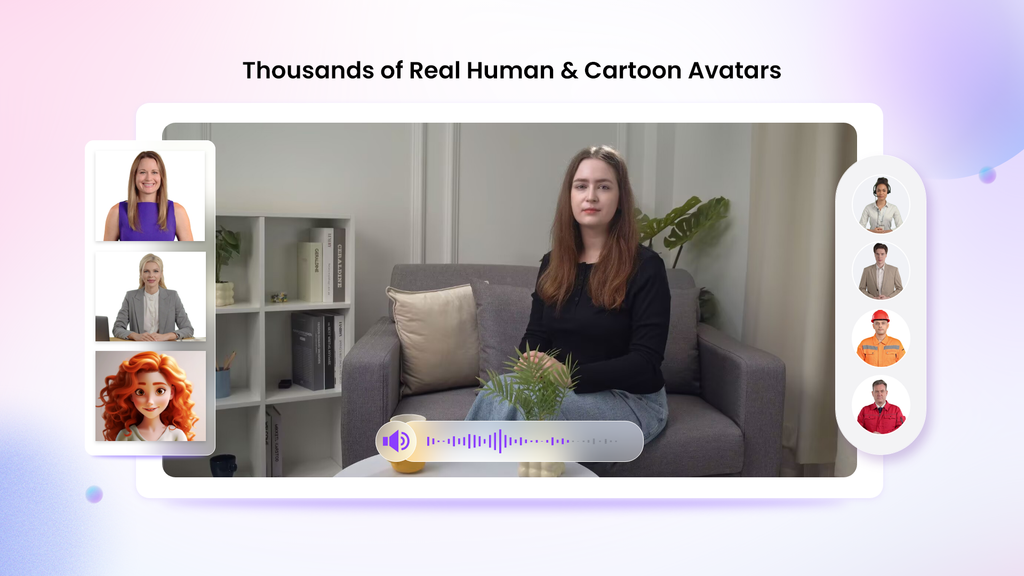
For example:
- Your Digital Twin: Create an avatar of your CEO or HR leader to deliver a personal message.
- Expressive Avatars: Use avatars that show emotion to make scenarios about empathy and understanding more powerful.
- Product Avatars: Create a unique brand mascot to guide employees through training modules.
With so many choices, your training videos will show your commitment to diversity, not just talk about it.
- Speak to a Global Audience with 2000+ Lip Sync AI Voices
In a global company, language should not be a barrier to learning. Vidnoz provides over 2000 natural-sounding AI voices in more than 140 languages. These voices are powered by leading technology from ElevenLabs, Microsoft, and Google, ensuring they sound clear and human.
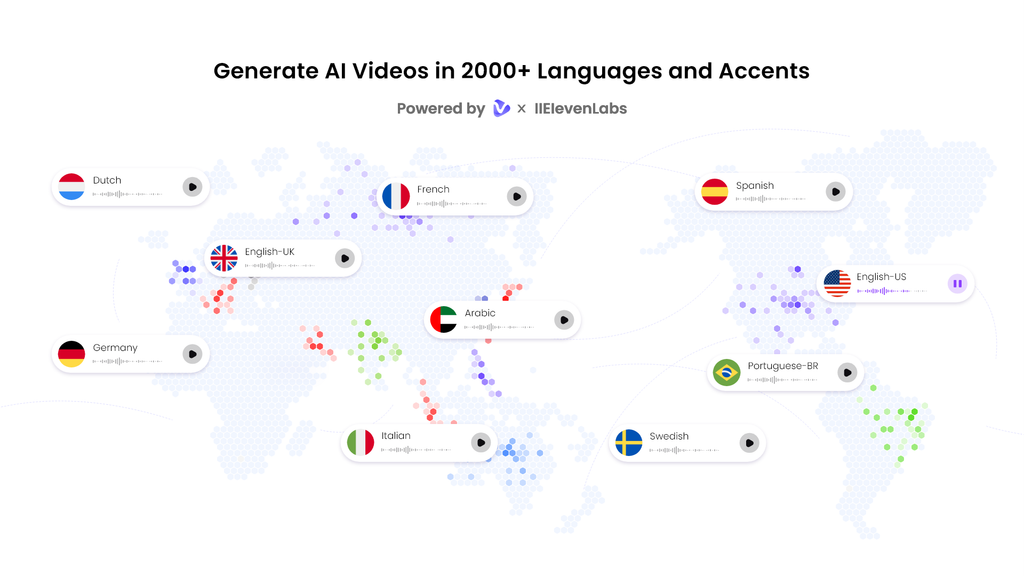
This feature is a game-changer for diversity training. You can create one core video and then easily generate versions in Spanish, French, Mandarin, or any other language your team speaks. The AI ensures the avatar’s lips sync perfectly with the audio, making the experience seamless for every viewer. This makes everyone feel included and valued.
- Get Started Fast with 2800+ Pre-Designed Video Templates
You don’t need to be a video editor to create professional content. Vidnoz offers a massive library of over 2800 video templates for training, presentations, marketing, and more.
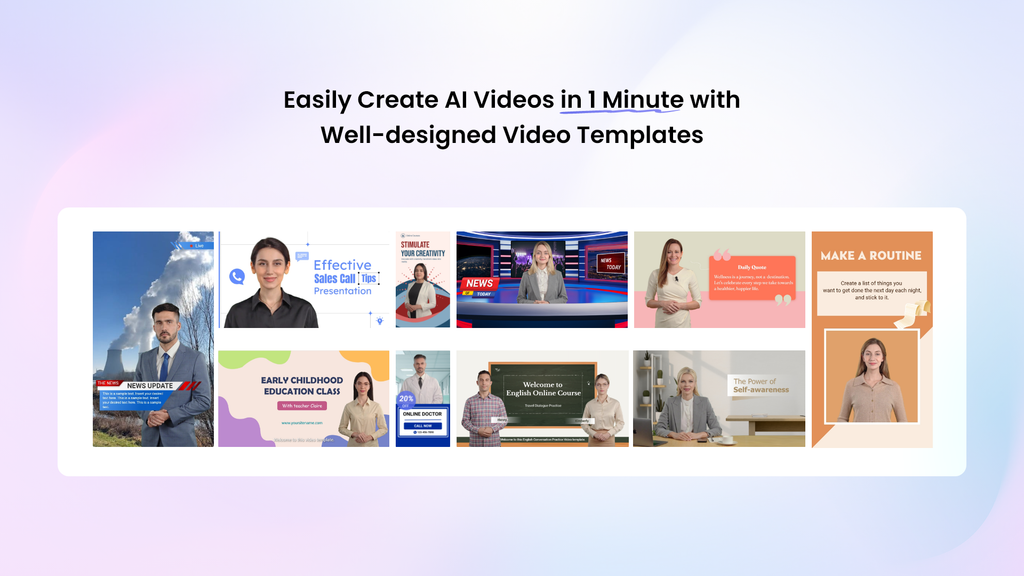
You can simply choose a template that fits your topic, like a corporate presentation or an explainer video. Then, you can customize it with your own text, colors, and branding. This saves you hours of work and ensures your videos look polished and credible from the start.
- Accessible to All with Free Daily Use
Budget should not stop you from building a more inclusive workplace. Vidnoz believes in making video creation accessible. Every user gets 30 credits of free AI video generation every single day.
This is more than enough to create short, powerful training modules, announcements, or scenario-based lessons. You can test the platform, create real content, and see the results for yourself without any financial commitment.
How to Create Your Diversity Training Video in 4 Simple Steps
Ready to get started? Creating a video with Vidnoz AI is incredibly easy. Just follow these four steps.
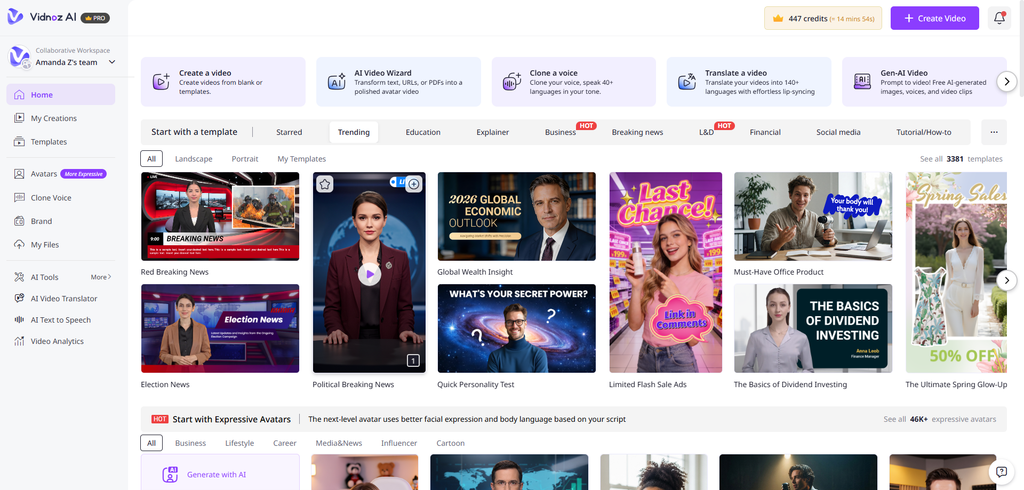
Step 1: Choose a Template & Avatar
First, log in to Vidnoz AI Video Generator and browse the template library. Pick a design that matches the tone of your training. Next, go to the avatar library and select an avatar that represents your message and audience.
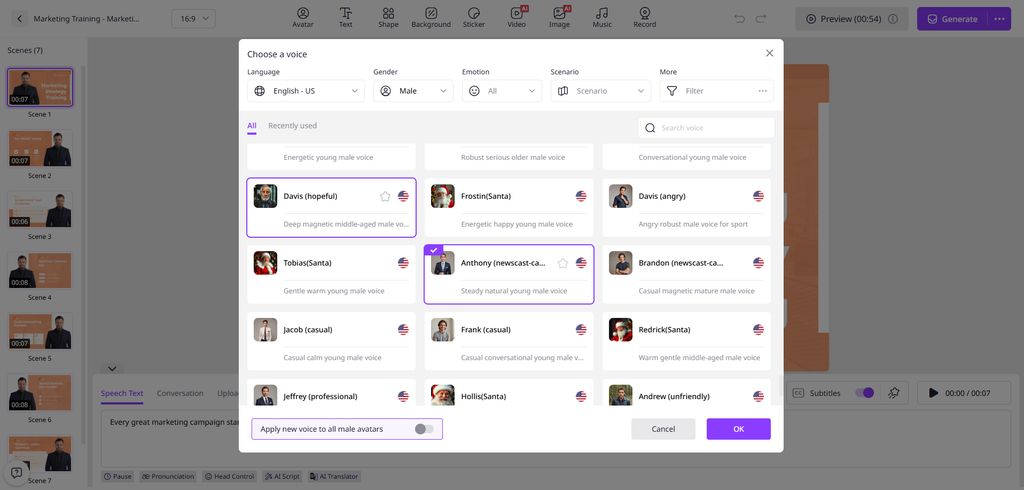
Step 2: Create AI Voiceover
Now, it’s time to bring your script to life. Type or paste your script into the text box. Choose the language and select a voice that sounds right for your content. You can preview different voices to find the perfect one. The AI will generate a natural-sounding voiceover that syncs with your avatar.
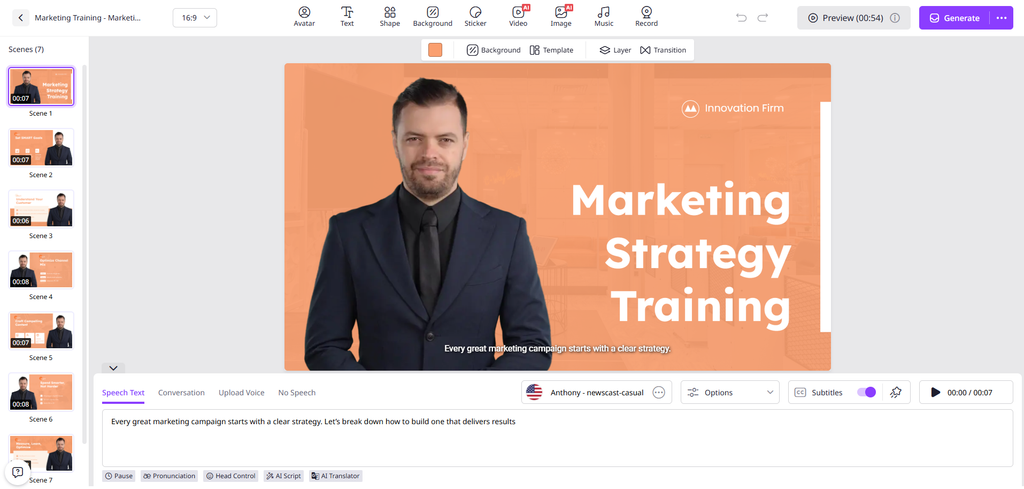
Step 3: Add Your Custom Touch
This is where you make the video your own. Add your company logo to maintain brand consistency. Use text overlays to highlight key points, like “Unconscious Bias” or “Active Listening.” You can also add background music or images to make your video more engaging.
Step 4: Generate AI Video and Share
Once you are happy with your creation, click the “Generate” button. Vidnoz AI will process your video in just a few minutes. After it’s done, you can download it or share it directly with your team via email or on your company’s internal platform.
Final Thoughts:
Effective diversity training is an ongoing journey, not a one-time event. It requires content that is representative, accessible, and engaging. Vidnoz AI provides all the tools you need to create these videos quickly and affordably.
By using diverse avatars, multilingual voiceovers, and professional templates, you can produce training materials that truly connect with every member of your team. You can move beyond boring slideshows and create dynamic content that inspires change. Start building a more inclusive workplace today by creating your first free training video with Vidnoz AI.
Real-time protection plays an essential role in keeping computers safe from malware, viruses, spyware, and other emerging cyber threats. To understand how effectively IObit Malware Fighter handles these risks, we put its security features to the test. In this hands-on review, we explore how the software monitors system activities, detects suspicious files, and blocks potential threats before they can harm your computer. We will also explore its amazing features and learn how to use them to strengthen PC security. Ensure to read this guide till the end.
Part 1: Overview of IObit Malware Fighter
IObit is a software development company known for creating Windows utilities, PC optimization programs, and security solutions. One of its top tools is IObit Malware Fighter. It is an all-in-one antivirus and anti-malware security solution that is designed to eliminate various types of threats from your PC, including viruses, spyware, ransomware, Trojans, adware, and more. The software combines multiple scanning technologies with real-time protection capabilities to identify suspicious files, monitor system activities, and prevent potential security threats from compromising your computer. It also offers additional security features, such as USB protection, browser protection, and Safe Box, to provide users with an extra layer of protection.
Part 2: Top Features That Make IObit Malware Fighter Worth Trying
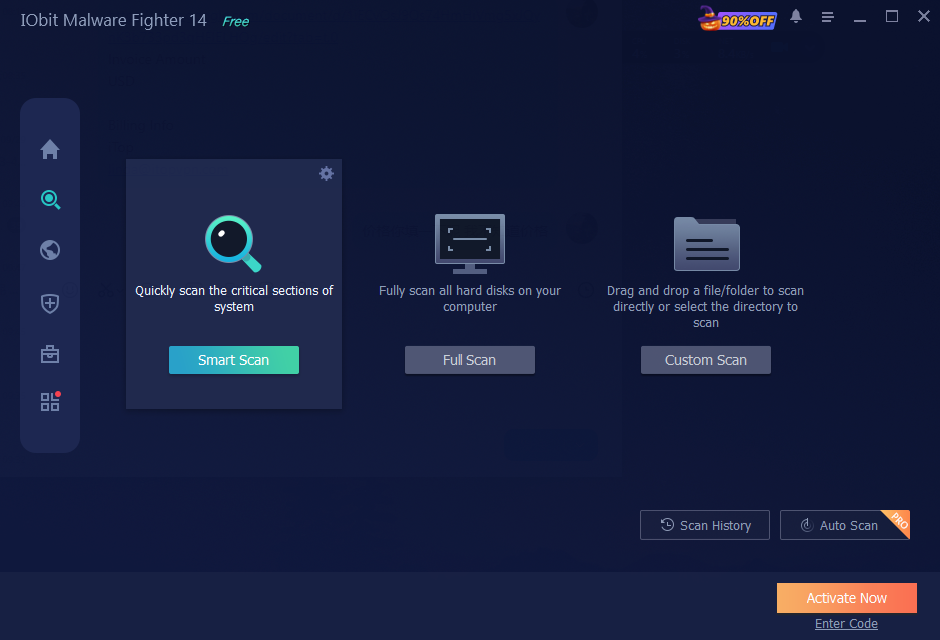
IObit Malware Fighter offers a range of security features designed to protect computers against malware, viruses, and online threats. Here are some key features that make it worth exploring in 2026:
- Real-Time Protection: One of the standout features of this tool is that it supports real-time protection, helping keep your PC safe around the clock. It continuously monitors system activities, files, and processes to identify suspicious behavior before it can cause damage.
- 9 Security Guards: The program reinforces your PC security with nine dedicated security guards, such as Network, Files, Startup, Process, MBR, Camera, Behavior, and Browser Password Guard. Each guard focuses on a specific area of your system to provide more comprehensive protection against different types of cyber threats.
- Triple Engine Protection: IObit Malware Fighter uses three powerful engines – the latest industry – leading Bitdefender Engine, the enhanced IObit Anti-Malware Engine, and the upgraded IObit Anti-Ransomware Engine. Each engine focuses on identifying and combating different types of security threats.
- Detect Various Threats: The best part of IObit Malware Fighter is that it detects and eliminates various types of threats that can harm your device, including viruses, spyware, adware, Trojans, ransomware, worms, keyloggers, and other malicious programs.
- Intuitive Interface: IObit Malware Fighter offers an easy-to-use interface, which is ideal for non-tech and beginner users. Users can easily eliminate potential threats from their PC without professional help. Plus, it can be downloaded from its official site for free.
Part 3: Hands-On Testing: How to Enable IObit Malware Fighter Real-Time Protection
IObit Malware Fighter makes it easy for users to activate and manage its real-time protection features. Follow the steps below to enable IObit Malware Fighter’s real-time protection and strengthen your PC security:
- Navigate to the IObit Malware Fighter official site and download the latest version of the program on your PC. IObit Malware Fighter is available for free and offers advanced features, such as real-time protection and more.
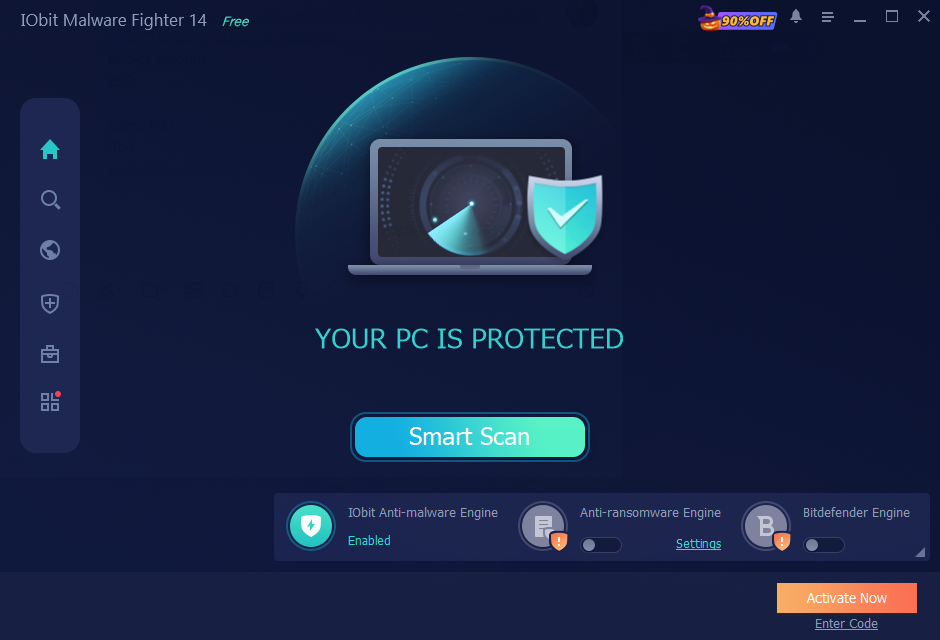
- Once the tool is downloaded, launch it and select the “Security Guards” option from the left panel. You will now see a list of available security guard designs, such as Files, Network, Startup, Camera, and Browser Password Guard.
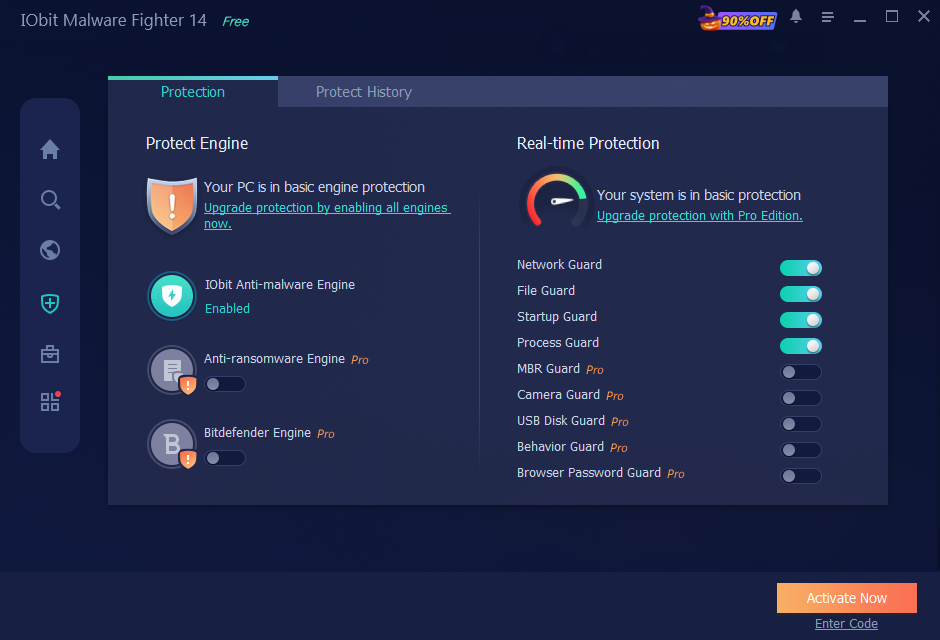
- Toggle the available security guards to the On position to activate their respective protection features. Once all the desired security guards are enabled. You’ve now successfully enabled IObit Malware Fighter real-time protection.
Part 4: Tips To Use IObit Malware Fighter
Here are some tips that will help users maximize IObit Malware Fighter’s security capabilities and keep their computers protected against potential cyber threats, especially for those utilizing the free antimalware edition:
- Download Software From Official Site: Make sure that you download the software from the IObit Malware Fighter official site rather than third-party platforms or unverified sources.
- Keep the Software Updated: Always use the latest version of IObit Malware Fighter to access updated security features, bug fixes, and the latest malware definitions.
- Enable USB Disk Protection: Make sure to scan external USB drives before opening their content to reduce the risk of transferring malware to your computer.
- Use Safe Box for Sensitive Files: Always store important documents, personal information, and confidential files in Safe Box to add an extra layer of protection.
Part 5: FAQs Related to IObit Malware Fighter
- Is Real-Time Protection Available for Free?
Yes. IObit Malware Fighter real-time protection is available for free. Users can follow the above instructions and enable the real-time protection feature to protect their devices from potential cyber threats in real time.
- Can IObit Malware Fighter Remove Ransomware?
IObit Malware Fighter includes an Anti-Ransomware Engine designed to help protect computers against ransomware threats. Its protection capabilities aim to detect and prevent malicious activities that could encrypt or compromise important files.
Final Thoughts
IObit Malware Fighter is a useful security solution for Windows users looking to strengthen their PC protection against different types of cyber threats. With features like real-time protection, nine dedicated Security Guards, and triple-engine protection and Safe Box, the program offers multiple tools to help safeguard computers and sensitive information.

The Hidden Cost of Outdated Software: Why US Companies Are Investing in Legacy Application Modernization

Asparagus Risotto in an Instant Pot: What You Gain, What You Trade, and How to Get It Right

How Watch Repair Tools Australia is building a local resource for the repair trade
Who Is Gale Burnick? The Story Of George R. R. Martin’s Ex Wife

Who Is Hermann Nicoli? The Full Story Of Candice Swanepoel’s Former Fiancé

Who Is Alicia Dove? The Life Story Of Corey Taylor’s Wife
-
Celebrity4 months ago
Who Is Gale Burnick? The Story Of George R. R. Martin’s Ex Wife
-
 Celebrity4 months ago
Who Is Hermann Nicoli? The Full Story Of Candice Swanepoel’s Former Fiancé
-
 Celebrity4 months ago
Who Is Alicia Dove? The Life Story Of Corey Taylor’s Wife
-

 Celebrity4 months ago
Meet Carole Rogers: Everything to Know About Kenny Rogers’ Daughter
-

 Celebrity4 months ago
Who Is Sydney Davis? The Full Story Of Billy Bush’s Ex Wife
-

 Celebrity4 months ago
Who Is Anna Hillinger? The Full Life Story Of Mike Shinoda’s Wife
-

 Celebrity4 months ago
Who Is Demacio Castellon? Life Story Of Nelly Furtado’s Ex Husband
-

 Blog3 months ago
What Is Sosoactive? A Complete Guide to the Digital Platform