
Technology
Twitch Affiliate Requirements in 2026: What Changed and How to Track Your Progress


Twitch lowered the bar for its Affiliate programme in 2026, and many older guides still quote the previous numbers. If you are trying to unlock subscriptions, Bits payouts and the other Affiliate perks, it is worth knowing exactly which goals you need to hit, how Twitch measures them, and how to check your progress without guessing.
The current Affiliate goals
Twitch’s “Path to Affiliate” achievement now asks for four things within the same 30-day window:
- 25 followers
- 4 hours of streaming (240 minutes in total)
- Streams on 4 different days
- An average of 3 viewers on 4 of those days
The old version asked for 50 followers, 500 minutes (about 8 hours) and 7 separate stream days. If a tutorial still lists those figures, it was written before the update.
How the “3 average viewers” rule really works
This is the goal that confuses most new streamers. Twitch does not look at one big average across the whole month. It looks at each stream day separately: a day counts when your average concurrent viewers for that day reaches 3. You need four such days in the last 30 days, and days below 3 simply don’t count. They do not pull the others down.
A few details matter in practice:
- Days are counted in GMT. Twitch’s achievement tracker uses GMT without daylight-saving adjustments, while your analytics dashboard shows your local time zone. A late-night stream in the Americas can land on the next day in Twitch’s count.
- Chatbots don’t count as viewers.
- The average is per day, not per peak. Hitting 10 viewers for five minutes during a raid doesn’t help much if you spend three hours at one viewer.
Because of this, a short, focused stream at a time your community can actually join often does more for the requirement than a long stream in an empty time slot.
Checking your progress with real numbers
The achievement page in your Creator Dashboard shows whether each goal is complete, but it doesn’t explain how close a given day is to the threshold. To plan ahead, you can feed your own stream data into a Twitch average viewers calculator. Enter the length of each stream and the viewers you had, and it shows the average per day and which days already qualify. This is useful when you are deciding whether one more stream this week could complete the goal.
What about Partner?
Partner is the next step and is considerably harder. The current “Path to Partner” achievement asks for 6 streams on 6 unique days with an average of at least 75 viewers, in two consecutive 30-day windows. A broadcast below 75 average viewers simply doesn’t count towards the six. Even when you meet the numbers, Partner is an application: Twitch reviews it, and exceptions are possible for creators who are growing quickly or who bring a large audience from another platform.
A realistic 30-day plan
- Pick a fixed schedule. Two or three set days per week, at the same hour, makes it easier for the same people to return. Consistency helps the per-day average more than random long sessions.
- Stream for 60 to 90 minutes. Shorter streams make it easier to keep your average above 3 for the whole session.
- Bring your existing audience. Friends, Discord members and followers from TikTok or YouTube Shorts are usually your first regular viewers.
- Collaborate. Co-streams and raids with streamers of a similar size bring real viewers who already enjoy your category.
- Check your days weekly. Once three qualifying days are complete, plan the fourth stream for your strongest time slot.
The zero-viewer start is the hardest part for almost every new channel, and a whole market of growth services has formed around it. On sites like ViewerWorks, for example, streamers can buy Twitch viewers or followers for their broadcasts. Whatever route you choose, the viewers who return week after week are the ones who came for your content.
After you qualify
Twitch sends the Affiliate invitation automatically, but it can take up to 48 hours to appear. Before you accept, make sure your account has two-factor authentication enabled and a verified email address, because both are needed for onboarding and payouts. Once you are in, it helps to estimate what subscriptions and Bits might bring in at your size. A free Twitch earnings calculator gives a quick, realistic picture of subscriptions and Bits before you plan any upgrades to your setup.
For the official wording of each goal, Twitch keeps an up-to-date description on its achievements help page.

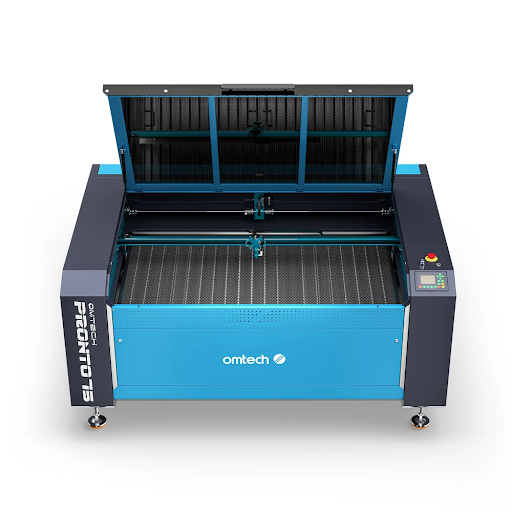
A laser cutter lets one person turn timber, acrylic and leather into finished products without a factory. In Australia, that translates into a handful of well-proven micro-business models built around customisation, local style and small-batch work. Here are five that makers and small business owners regularly talk about, followed by guidance on margins, machines and where to sell.
1. Personalised Australiana and Home Décor
Native timber wall signs, nursery name plaques, entry signage and layered wooden artwork are consistent sellers. There is steady local demand for custom timber and for rustic or boho styling in Australian homes, and layered designs are hard to copy by hand, which helps you avoid pure price competition.
Tip: Build a small collection around a theme, such as native florals, coastal towns or nursery names, so customers can buy a matching set.
2. Wedding and Event Décor
Acrylic or timber welcome signs, custom table numbers, place cards and cake toppers sell all year round. Rustic and boho weddings in particular lean on laser-cut details, and couples will pay extra for something made to match their colours and venue.
Tip: Offer ready-to-order packages (signage, table numbers, place cards) so couples can decide quickly and you can batch production.
3. B2B Custom Business Signage
Acrylic company logo signs, QR-code display stands for cafés, and office or door plaques are a good route to repeat customers. Local small and medium businesses tend to have higher average order values than individual buyers, and they come back when they open a new location or change their branding.
Tip: Visit local cafés, clinics, and offices with a sample. A physical piece of work in a business owner’s hand is the best sales pitch you have.
4. Engraved Drinkware and Gifts
Custom tumblers, wine glasses, leather hat patches and cork coasters are popular for markets and online gifting. Unit costs are low, production is quick and margins are strong. One detail to get right: a CO2 laser can’t engrave bare stainless steel directly. Stainless tumblers are usually coated or marked using a fibre laser or a marking compound, so choose products that suit your machine.
5. Custom Prototyping and Short-Run Fabrication
Architectural models, custom packaging inserts, leather goods and small components cut to order fill a niche for independent designers and makers who need a small batch without paying industrial setup fees. This work builds relationships with architects, product designers and artists, which can lead to repeat business.
Choosing the Right Machine for the Business
The laser type should follow the product.
- CO2 lasers are the best all-rounder for timber, acrylic, paper, leather and glass etching. They’re the natural choice for wall art and signage.
- Fibre lasers are specialised for direct metal engraving, such as jewellery, metal tags and some tumblers, but can’t cut wood.
- Diode lasers are an entry-level option for light engraving and softer materials, but they’re generally limited for dense acrylic or glass.
For most of the business ideas above, a CO2 machine covers the widest range of products.
Profitability: What to Expect
Community discussions and local market guides commonly cite gross margins of 60 to 85 per cent on individual custom laser-cut or engraved products. Once you account for platform fees such as Etsy or Shopify, packaging, material waste and marketing, whole businesses typically net around 15 to 30 per cent. Treat these as ballpark figures rather than guarantees. Your own margins will depend on pricing, material costs, how much time each piece takes and how efficiently you batch your work.
Where to Sell
Many Australian makers start on Etsy, Facebook Marketplace, weekend craft and design markets, or a dedicated Shopify store. Markets are useful for testing products and meeting customers face to face. Online stores scale better once you know what sells.
A Machine That Suits Most of These Businesses
If you’re looking for a single machine to cover signage, wedding décor, gifts, and prototypes, the OMTech Polar Lite 55W desktop CO2 laser engraver and cutter is a strong candidate. It’s currently listed at A3,299,orA3,299,orA3,609 with LightBurn included.
Features that matter for the business models above:
- Camera positioning. A built-in camera shows your material on screen so you can place designs precisely and reduce waste.
- Autofocus and integrated water cooling. Less setup time and no external chiller to find room for.
- A 500 × 300 mm working area with pass-through. Large enough for wall signs, wedding signage, and multiple smaller items in one run.
- Closed, enclosed design. Safer for home and small studio use, and easier to keep dust and smoke under control with proper extraction.
It works with LightBurn, so you can use standard vector files from design tools. Check the product page for the current specifications and what’s included, and plan for ventilation and a suitable workspace.
Before You Launch
- Choose a niche. A focused offer, such as nursery décor or café signage, usually sells better than a general range.
- Test your pricing. Include materials, machine time, finishing, packaging, and your own labour.
- Check regulations. Registering an ABN and understanding GST and any insurance or council requirements for working from home are worth doing early. For specifics, speak to an accountant or the relevant authority.
- Start small. Make a sample range, photograph it well, and test it at a market or on one online channel before scaling.
A Simple First-Month Plan
In week one, choose a niche and design a starter range of five to ten products. In week two, make samples and photograph them in natural light. In week three, list the products online or book a market stall, and approach three local businesses with samples. In week four, review what sold, what people asked for, and what took too long to make, then refine the range. This kind of small, measured launch costs little and tells you more than months of planning.
Final Thoughts
A laser cutter gives you the ability to make products people value precisely because they are personal. Decide whether your strength is homeware, weddings, business signage, gifts, or prototyping; choose a machine that suits your materials, and start with a small range you can make well. Margins in this space can be healthy, but they come from careful pricing, steady marketing, and a product that stands out.

Planning Phone Verification for Saudi Mobile Numbers
Before a small business adds phone verification, it needs to decide who is responsible for every step behind the screen. A text message can arrive while a customer still cannot finish registering. An accepted code can be followed by an application error. A useful product plan gives each stage an owner and explains what the customer can do if it fails.
Imagine a fictional workshop booking service in Riyadh. Customers choose a session and enter a Saudi mobile number. Before confirming the reservation, the service asks them to enter a one-time password, or OTP, sent by SMS. The business wants evidence of access to the contact number supplied for the booking.
Decide what the code should establish
Successful validation provides evidence that someone could obtain the code sent to that number at that moment. It does not, by itself, establish the applicant’s legal identity, nationality or entitlement to another person’s bookings.
NIST’s digital authentication guidance describes authentication in terms of control of authenticators and classifies telephone-network authentication as restricted within its authentication framework. It also explains that this kind of code entry is not phishing-resistant. A small business should therefore consider what an accepted code will unlock. Checking a booking contact and recovering access to an existing account are different decisions.
For the fictional service, define the immediate outcome narrowly: the number has passed the required check for this booking attempt. The reservation still needs to be saved and confirmed by the application.
Agree where provider responsibilities begin and end
Ask what the selected product and integration actually handle. A delivery service may transmit a code generated elsewhere. A managed verification service may also generate codes, check submissions and enforce some limits. An authentication platform may sit between the application and the SMS provider. The allocation must be explicit.
For the delivery step, Tawked documents SMS OTP delivery to Saudi mobile numbers only, making it one possible component to assess for that number scope. The application team should still establish which responsibilities belong to each part of its chosen setup.
Ask the developer to describe that setup in plain language. Who decides whether a code is valid? Who prevents repeated guesses? What information comes back when sending fails? These answers matter more to planning than a general promise that a service “supports OTP.”
Use a responsibility checklist
For each row, name a person in the business or development team who will confirm the arrangement. Record provider responsibilities from the relevant documentation. Outsourcing a function still leaves someone responsible for checking that it works with the application.
| Step | Application responsibility | Provider scope to confirm |
| Collect the number | Explain the purpose, accept supported formats and allow correction. | Supported destinations and number-format rules. |
| Request a code | Make an authorized server request tied to the pending action; protect credentials. | Acceptance responses, errors and safe retry behaviour. |
| Deliver the SMS | Handle reported results and unavailable delivery information. | Delivery arrangements, status meanings and available reports. |
| Validate the code | Associate the result with the correct number, request and intended action. | Who generates and checks codes, including expiry and single use. |
| Limit attempts | Address abuse across the application and define recovery. | Limits on sends, resends and incorrect entries; what resets them. |
| Explain the result | Display accurate messages and available next actions. | Error details and timing information supplied to the application. |
| Complete the booking | Save the reservation and confirm it only after success. | How a verification result is returned to the application. |
| Handle support | Own customer enquiries and arrange safe escalation. | Support routes and diagnostic references available to the team. |
Keep delivery and completion separate
In the fictional service, an accepted send request means only that the request reached the provider’s documented acceptance stage. Where delivery reports are available, the team must understand their meaning. A reported delivery does not establish that the intended customer read the SMS or submitted its code. Missing delivery information should remain an unknown, rather than being labelled a definite failure.
Code validation is a separate event. The application should advance only on a trusted server decision for the relevant request. An on-screen success message or a delivery status cannot substitute for that decision.
Even after a valid code, saving the reservation can fail. The service should distinguish “number verified” from “booking confirmed” and provide a way to continue without accidentally creating duplicate reservations. This is application behaviour that needs an owner, regardless of who delivered the message.
Set limits that repeated requests cannot bypass
OWASP’s guidance on handling one-time passwords recommends limited validity, single use, strict attempt limits and keeping OTP values out of logs. Ask the developer to show where these controls are enforced, whether in the application’s server or a managed service.
Sending limits and incorrect-code limits address different problems. The first can help control unwanted messages and spending; the second constrains guessing. A fresh code should not create an unlimited new guessing opportunity. NIST’s out-of-band authentication model specifically requires failed-attempt counts to survive the generation of another secret.
Confirm what a resend does to earlier codes and how limits apply across new requests. Choose expiry and retry settings with the developer, considering the action’s risk, the provider’s supported controls and a workable recovery path. There is no need to borrow a countdown or attempt count from an unrelated service.
A visible resend timer should reflect the actual rule enforced by the server. It explains when another request becomes available; it does not enforce that restriction by itself. Code expiry and resend availability should also be treated as separate states.
Give customers an understandable next step
Show the Saudi-number requirement before asking for a code, and let the customer correct the number. If the service offers Arabic and English screens, review the instructions and number display in both languages.
For this fictional application, “Please enter a Saudi mobile number” could explain an unsupported destination. If the server confirms expiry, “This code has expired. Request a new code” gives a next step, provided another request is allowed. When the cause is unknown, “We could not complete verification” is more accurate than blaming the mobile network.
Make the action fit the message. A temporary restriction needs useful waiting information when that is known. A failed booking save needs guidance about the reservation. Avoid wording that unnecessarily reveals whether someone else has an account.
These examples concern application screens. The SMS content available from the selected delivery service is a separate matter and must follow that service’s documented options.
Prepare support before the first customer gets stuck
Give support staff a way to distinguish a sending problem, an unsuccessful code check and a reservation that did not save. Useful diagnostic records can include stage timestamps, a non-secret request reference and an outcome category. Keep OTP values, credentials and unnecessary personal information out of those records; decide who can access them and how long they are needed.
A support enquiry can ask when the problem occurred and what message appeared. Staff should not ask customers to share their OTP or a screenshot containing it. Losing access to a number also needs a defined recovery process; a caller’s request should not become an informal way to bypass verification.
Review accepted requests, delivery outcomes where available, successful validations and confirmed reservations separately. A gap between successful validations and saved reservations is a reason to inspect the application flow. It is not proof of a particular fault.
Before launch, ask the developer and support owner to walk through an incorrect number, a delayed code, repeated resend clicks, an exhausted attempt limit and a booking-save failure. For each situation, agree what the customer sees, what is recorded and who investigates. Launch approval should cover the successful reservation and the response when one of its steps fails.


A computer’s performance depends on several factors, including hardware specifications, software compatibility, and system configuration. Whether you use your PC for gaming, video editing, office work, or everyday browsing, keeping your system properly maintained can help you get more value from your existing hardware.
Understanding how to maintain drivers, evaluate component compatibility, and assess overall system performance can make it easier to identify problems and plan future upgrades. With the right approach, you can make informed decisions without spending money on unnecessary hardware changes.
Keep Your System Updated With the Latest Drivers
Drivers allow your operating system to communicate with hardware components such as graphics cards, processors, sound devices, and network adapters. When drivers are outdated, corrupted, or incompatible, you may experience errors, reduced stability, or problems running certain applications.
Taking time to update drivers can help improve hardware compatibility and resolve known issues. Graphics driver updates, for example, may introduce game optimizations, improve support for new applications, and fix graphical glitches. Network driver updates can also address certain connectivity problems.
You can check for suitable updates through Windows Update or the official website of your hardware manufacturer. NVIDIA, AMD, and Intel provide driver resources for their supported graphics products and other hardware.
Before installing a driver, confirm that it is compatible with your device and operating system. Avoid downloading files from unfamiliar websites, and consider creating a restore point before making significant changes.
Although installing the newest driver does not guarantee faster performance, keeping important drivers maintained can help your computer remain stable and compatible with current software.
Understand Hardware Compatibility With a Bottleneck Calculator
Building or upgrading a computer involves choosing components that work well together. For example, pairing a powerful graphics card with an older processor may limit performance in certain games. Similarly, a less powerful graphics card may struggle with demanding visual settings even when the processor has plenty of capacity.
A bottleneck calculator provides an estimate of how different hardware components may perform together. Users typically enter their processor, graphics card, resolution, and sometimes their intended workload to receive an assessment of potential performance limitations.
This information can be useful when planning a new PC build or deciding which component to upgrade. It may help identify hardware combinations that deserve additional research before you make a purchase.
However, calculator results should be treated as general guidance rather than exact predictions. Actual performance varies depending on the application, game engine, resolution, graphics settings, memory capacity, and cooling conditions.
For example, a processor limitation may be more noticeable in competitive games running at lower resolutions, while graphics performance may become the primary limitation at higher resolutions with demanding visual effects.
To make a better decision, compare independent hardware benchmarks and monitor CPU and GPU utilization while running the programs you use most often. These methods provide more practical information about your computer’s real-world performance.
Evaluate Your Computer With Rate My PC Tools
Knowing your hardware specifications is useful, but understanding how your system compares with other configurations can provide additional insight. Performance assessment tools can help users review their computer’s capabilities and identify potential areas for improvement.
The phrase rate my PC is commonly used for services that evaluate computer specifications, benchmark results, or overall hardware configurations. Depending on the platform, you may be able to enter your processor, graphics card, memory, and storage details to receive an assessment of your setup.
These tools can be particularly helpful for gamers who want to determine whether their computer is suitable for specific titles. They may also assist users who are considering an upgrade and want to understand which components deserve attention.
However, an overall rating cannot explain every performance issue. Two computers with similar specifications may perform differently because of cooling, power limits, background applications, and software configuration.
Use ratings as a starting point rather than a final judgment. Compare component specifications, review trustworthy benchmark results, and consider your actual requirements before making changes.
Combine These Methods for Better Results
Driver maintenance, hardware compatibility checks, and performance assessments work best when used together. Begin by identifying what you want to improve, whether it is gaming performance, faster application loading, or smoother multitasking.
Check relevant driver updates, use a bottleneck calculator to investigate potential component limitations, and explore rate my PC tools to evaluate your current setup. If performance remains disappointing, examine other possible causes, including overheating, insufficient RAM, limited storage space, and unnecessary background processes.
Avoid upgrading components simply because a calculator or rating tool suggests a potential limitation. First, confirm that the limitation affects your everyday tasks and that the proposed upgrade is likely to provide a meaningful benefit.
Conclusion
Maintaining an efficient computer requires a combination of software management and informed hardware decisions. Taking time to update drivers can improve compatibility, a bottleneck calculator can help assess component balance, and rate my PC tools can provide a useful overview of your system.
By combining these resources with real-world testing and careful planning, you can identify potential improvements, make smarter upgrade decisions, and get more reliable performance from your computer.

Pool Maintenance: The Hidden Business Costs of Neglecting Your Facility

Prevention Cloud: A Complete Guide to Workplace Wellness and Cloud Security

Neatie: Personalized Jewelry, Custom Necklaces, and Complete Buying Guide
Who Is Gale Burnick? The Story Of George R. R. Martin’s Ex Wife

Who Is Hermann Nicoli? The Full Story Of Candice Swanepoel’s Former Fiancé

Who Is Alicia Dove? The Life Story Of Corey Taylor’s Wife
-
Celebrity4 months ago
Who Is Gale Burnick? The Story Of George R. R. Martin’s Ex Wife
-
 Celebrity4 months ago
Who Is Hermann Nicoli? The Full Story Of Candice Swanepoel’s Former Fiancé
-
 Celebrity4 months ago
Who Is Alicia Dove? The Life Story Of Corey Taylor’s Wife
-

 Celebrity4 months ago
Meet Carole Rogers: Everything to Know About Kenny Rogers’ Daughter
-

 Celebrity4 months ago
Who Is Sydney Davis? The Full Story Of Billy Bush’s Ex Wife
-

 Celebrity4 months ago
Who Is Anna Hillinger? The Full Life Story Of Mike Shinoda’s Wife
-

 Celebrity4 months ago
Who Is Demacio Castellon? Life Story Of Nelly Furtado’s Ex Husband
-

 Blog2 months ago
What Is Sosoactive? A Complete Guide to the Digital Platform
Pingback: AI Video Extender: What It Fixes and What It Cannot - The Roman Magazine