
Blog
What Is CYOC? A Guide to Interactive Branching Stories


CYOC is short for Choose Your Own Change. It is an online story archive built around branching fiction. Instead of reading one fixed plot from start to finish, readers can follow different paths. Writers can also add new branches, choices, and outcomes to an existing story.
The site is best known for transformation-based fiction. Its stories often focus on characters who change in body, age, species, identity, or form. WikiFur describes the project as a transformation-focused story archive and forum, with roots going back to 2001.
What makes the format interesting is simple: the reader is not locked into one ending. A single choice can send the story in a new direction. That makes the archive feel less like a normal book and more like a growing story tree.
What Is CYOC?
CYOC is a collaborative interactive fiction website. Its full name, Choose Your Own Change, explains the main idea. A story starts with a scene or setup. At the end of a section, readers may find several possible directions.
One branch may turn the character into an animal. Another may change the character’s age. A third may move the plot into a strange fantasy setting. Writers can then continue those paths with new scenes.
This structure gives the site a community-built feel. One author may start a story. Other users can expand it in ways the first writer did not expect. The result is a large set of connected story paths rather than one fixed novel.
How the Branching Story Format Works
A normal short story has one route. The writer decides what happens next. Interactive fiction changes that rule.
On CYOC, each scene can act like a fork in the road. The reader chooses a path, opens the next part, and keeps moving through the story. Some routes may be short. Others can grow into long chains with many branches.
This format makes rereading more useful. A reader can return to an earlier choice and select another route. That can lead to a different character, setting, change, or ending.
For writers, the system also lowers the barrier to entry. They do not always need to create a whole novel. They can contribute one strong branch and leave room for others to continue it.
Why Choose Your Own Change Feels Different
The main appeal is control. Readers get a say in how the story develops. Even a small choice can change the next scene.
CYOC also feels different because stories can be built by many people. That means tone and style may shift from branch to branch. One section may be serious. Another may be playful, strange, or much darker.
This can create uneven results, but it is also part of the site’s identity. The archive works more like a shared creative space than a polished book series.
The idea is close to classic choose-your-own-path books. But the open community model gives writers much more room to experiment.
The Role of Transformation Fiction
Transformation is the core theme behind much of the archive. WikiFur notes that the site covers many kinds of change, including human-to-animal stories, age changes, and other shifts in body or identity.
That broad focus gives CYOC many possible story setups. A character may wake up in a new form. A device may cause an unexpected change. A spell, accident, costume, game, or strange object may start the plot.
The change itself is often only the beginning. The more interesting question is what happens after it. Does the character try to reverse it? Do they accept it? Do they hide it or use it?
Those choices give writers plenty of space for comedy, fantasy, horror, drama, or surreal fiction.
Community Writing and Shared Story Worlds
Collaborative writing is one of the strongest parts of the format. A branch does not have to end when its first author stops writing.
Another person can take the same setup and move it in a new direction. This allows a single idea to produce many different results.
CYOC can therefore act as both an archive and a writing playground. Readers may become writers after finding a branch that gives them a new idea.
This also means stories can grow in unusual ways. A simple opening scene may become a huge network of choices over time. Some branches may stay close to the original theme. Others can move far away from it.
There is no need for every path to reach the same ending. In fact, different outcomes are part of the point.
What Readers Can Expect
New readers should not expect every story to feel the same. The archive is community driven, so quality, length, tone, and structure can vary.
Some sections may be only a few paragraphs. Others may form long story chains. A branch may stop without a clear ending if no writer continues it.
CYOC is also known for mature transformation themes, so readers should pay attention to labels, warnings, and site rules before opening content. WikiFur classifies it as a mature story archive.
That matters because its subject range can be much wider than standard fantasy fiction. Visitors should choose stories that match their interests and comfort level.
Why Writers Use the Platform
The platform can appeal to writers who enjoy short and flexible creative work. You do not need to plan every chapter before you begin.
A writer can focus on one scene, one choice, or one strange idea. That makes the format useful for testing concepts and practicing pacing.
It also creates a simple creative challenge. You must write a section that feels complete enough to satisfy the reader, but open enough to support new branches.
CYOC can be especially useful for writers who enjoy alternate outcomes. Instead of deleting an idea that does not fit one route, they can turn it into another path.
This approach can also reduce the pressure of writing a large project. A good contribution may only need to move one part of the story forward.
Tips for Writing Better Interactive Branches
Good branching fiction needs clear choices. The reader should understand what each option might change, even if the result still contains a surprise.
Keep scenes focused. Long blocks of setup can slow the pace. Give the character a goal, problem, or decision early.
It also helps to respect what came before. If you continue another writer’s branch, read the earlier sections first. Keep names, rules, and key details consistent unless the new branch has a reason to change them.
On CYOC, a useful branch should move the story forward. It should not only repeat the same scene in different words.
Choices should also feel different from each other. If two options lead to almost the same result, the reader may wonder why the choice was offered at all.
Good branches create curiosity. They make readers want to see where the next click will take them.
Common Themes Found in the Archive
The site centers on change, but that still leaves a large range of themes. Stories may use magic, science fiction, fantasy creatures, alternate realities, strange technology, or simple accidents.
Some plots focus on physical change. Others explore how a change affects daily life, social roles, memory, or relationships.
CYOC works best when the transformation has a clear effect on the plot. A change should create a new problem, choice, risk, or goal.
For example, a character who suddenly gains a strange form may have to decide whether to hide it. Another may search for a cure. Someone else may discover that the change gives them an unexpected advantage.
Without those effects, the story can feel like a list of events rather than an interactive narrative.
Benefits and Limits of Collaborative Fiction
Shared writing can produce ideas that one writer may never create alone. A new author can spot a path that the first author missed.
It can also keep old stories alive. A forgotten branch may gain new life when another writer decides to continue it.
But collaboration has limits. Writing quality can vary. Story logic can break. A branch may end suddenly. Some paths may repeat ideas found elsewhere.
That is normal for an open archive. CYOC trades strict editorial control for creative freedom. Readers who understand that are more likely to enjoy the format for what it is.
This loose structure is part of the appeal. You never know how large a branch may become or where another writer will take it.
Is Choose Your Own Change Still Worth Exploring?
For people who like interactive stories and transformation fiction, CYOC remains an unusual example of community-built storytelling. Its history stretches back to the early 2000s, when it first operated under the ChooseYourChange.com name before moving to its current domain.
Its biggest strength is not polish. It is choice.
Readers can follow different routes, return to old scenes, and see how one setup can split into many outcomes. That gives the same starting point far more replay value than a standard short story.
Writers also get a simple way to join an existing story without creating a full world from scratch. They can take one idea, add their own twist, and leave another choice for the next person.
In that sense, CYOC is less like a normal fiction site and more like a large, shared story tree. Each branch adds another possible version of what could happen next.
Bottom Line
CYOC gives readers a different way to enjoy online fiction. Instead of following one fixed plot, they can explore different choices, paths, and endings. That makes each story feel more open and interactive.
The platform also gives writers room to build on ideas from other users. One story can grow into many branches, each with its own direction. For fans of transformation fiction and community writing, CYOC offers a creative space where stories can keep changing with every new choice.
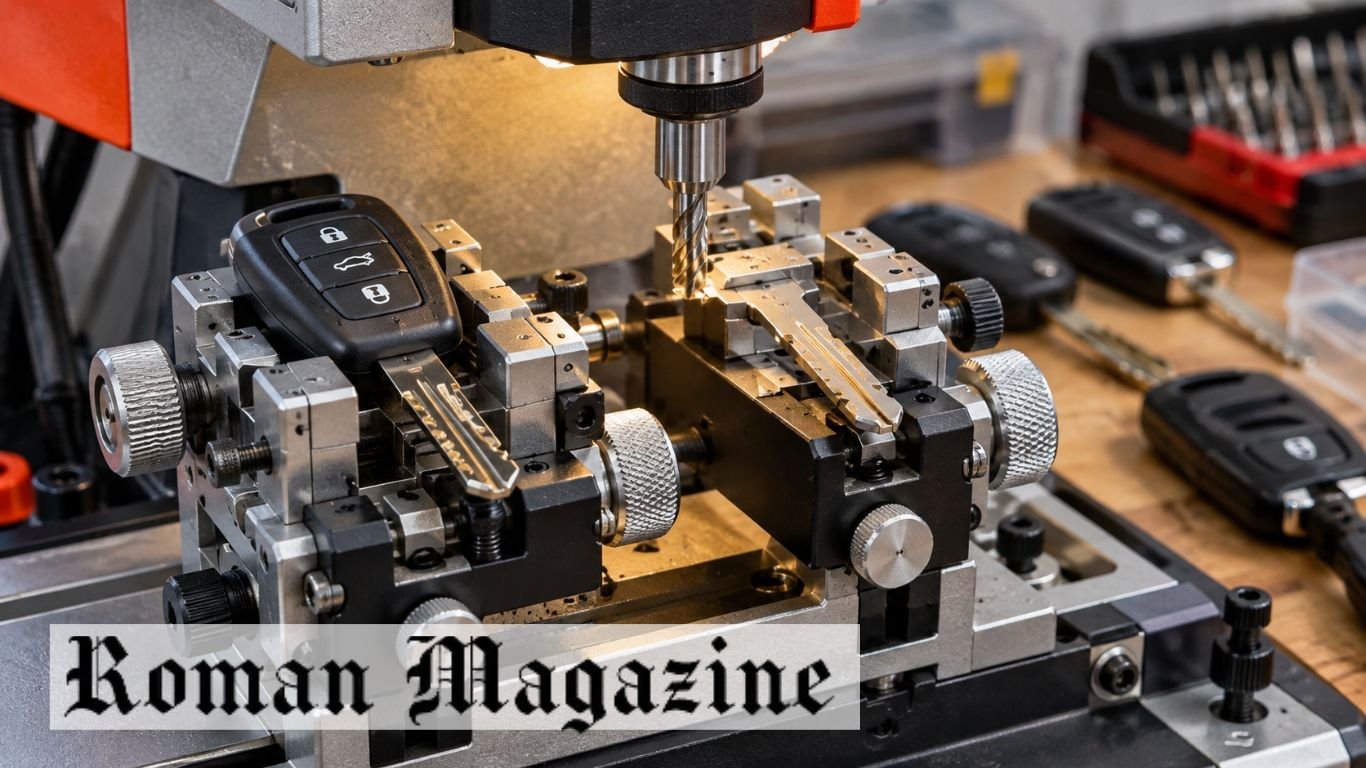
Casance is a key-cutting tool made for manual vertical milling machines. It works as a clamp that holds keys in place during cutting. It is designed for certain car keys, such as laser-track keys, dimple keys, and remote-head key blanks.
The tool fits onto the clamps of a compatible machine. It helps locksmiths hold and line up keys for more accurate cuts. This guide explains its features, uses, setup, benefits, and limits.
What Is Casance?
Casance is a clamp tool used with manual key-cutting machines. It holds keys in place and helps keep them lined up during cutting. The fixture attaches to the machine’s existing jaws.
Some car keys have thick heads, narrow blades, or special grooves. These shapes can be hard to hold with a basic clamp. A suitable fixture gives the key more support and helps stop it from moving.
The tool is not a complete key-cutting machine. It needs a compatible machine, cutting bit, and correct setup. Locksmiths must check that the fixture fits both their machine and the key they want to cut.
How Does the Casance Key Tool Work?
The tool holds a key in a fixed position on a manual vertical milling machine. It attaches to the machine’s jaws. The locksmith then places a suitable key blank inside the fixture.
When copying a key, the original and blank must line up. The machine’s tracer follows the original key’s shape. At the same time, the cutter makes a matching pattern on the blank.
Both keys must stay in place during this work. If a key slips, the cut may be wrong. A firm clamp helps reduce this risk, but the setup must still be checked before cutting.
Main Features of Casance
One main feature of Casance is its clamping design. It helps hold key shapes that may not fit well in normal machine jaws. The fixture gives the key extra support during cutting.
The described design also has parts that can be adjusted. These include small sliders and screws used to line up the key. They help place the original key and blank at the correct cutting points.
The tool is described as suitable for certain laser-track, dimple, and remote-head keys. It may also serve as a holder during key preparation. The exact features depend on the model, so buyers should check the product details.
Casance Design and Build Quality
Casance has a small clamp design that fits onto compatible machine jaws. It is made to hold a key firmly without taking up too much space. Its design may include grooves, stops, and parts that can be adjusted.
Build quality matters because cutting puts force on the key and clamp. The fixture must stay firm while the machine works. Loose or weak parts can cause the key to move and lead to a poor cut.
The exact size, weight, and materials of the fixture are not confirmed in the supplied details. Buyers should check these facts in the product listing. Photos of the clamp base and mounting points can also help confirm the fit.
Casance Compatibility With Key Cutting Machines
Casance is designed for use with certain manual vertical key-cutting machines. These machines use a cutting bit to make grooves and patterns in key blanks. The user guides the cutting process by hand.
The tool has been linked with some Defu and Condor-style machines. However, not every model uses the same jaws or clamp design. A fixture that fits one machine may not fit another.
Before buying, check the machine’s jaw size and mounting points. There must also be enough room for the cutter to move safely. A poor fit can make the clamp loose or place the key in the wrong position.
Types of Keys Supported by Casance
The Casance Key Tool is described as suitable for certain car key blanks. These include laser-track keys, which have a cut track along the blade. They need careful placement so the cutter follows the right path.
Dimple keys are another type mentioned in the tool’s details. These keys have small holes or cuts on the blade. They need a suitable clamp, cutter, and machine setup.
Some flip-key and remote-head blanks may also fit. Their large plastic heads can make them hard to hold in normal clamps. However, the fixture must match the blade shape and size. It cannot be assumed to fit every car key.
How to Install and Set Up Casance?
Turn off the key-cutting machine before fitting the tool. Check that the machine jaws are clean. Remove any loose metal pieces that could stop the fixture from sitting flat.
Place the accessory onto the compatible jaws and secure it as directed by the maker. Check that the fixture is firm and does not block the cutter. All screws and moving parts should be secure before use.
Next, place the original key and matching blank in their correct positions. Some keys line up from the shoulder, while others use the blade tip. Follow the machine’s guide and check the alignment before cutting.
Casance Key Alignment and Cutting Accuracy
Key alignment is important in manual cutting. The blank must sit in the right position so the cutter can make the correct pattern. Even a small shift can change the cut.
The described Casance fixture has adjustable parts that help position the key. These may help match the center line of the blank with the original. The tracer and cutter must also line up with the correct points.
A good clamp alone cannot ensure a perfect cut. The machine must be set up well, and the cutting bit must be in good shape. A worn tracer, loose key, or wrong blank can still cause errors. The finished key should be checked before use.
Casance Uses in Automotive Locksmithing
Car keys come in many shapes. Some have flat blades, while others have deep grooves or tracks. A special clamp can help hold keys that do not fit well in normal machine jaws.
Casance may help locksmiths copy certain car keys on manual vertical machines. For example, a flip-key blank with a thick plastic head may be hard to secure in a flat clamp. A suitable fixture can hold the blade in place during cutting.
The tool can add another holding option to a locksmith’s workbench. However, it does not allow a machine to cut every modern car key. The blank, cutter, machine, and fixture must all match the job.
Casance and Transponder Key Programming
Many modern car keys have a metal blade and an electronic chip. The blade works with the car’s lock. The chip works with the car’s security system and may be needed to start the engine.
Casance has been described as a holder for key cutting and some key preparation tasks. It may help keep a key or shell in place while other work is done. However, the supplied details do not confirm that the fixture can read, copy, or program a chip.
Chip programming needs a separate tool that works with the car’s system. A key may turn the lock but fail to start the engine if the chip is not set up. Cutting the blade and setting up the chip are two different tasks.
Benefits of Using the Casance Key Tool
One benefit of Casance is that it can help hold a key more firmly. This is useful when a blank does not fit well in a normal clamp. A firm hold helps stop the key from moving during cutting.
Its adjustable parts may also help with key alignment. When the blank is placed at the right point, the cutter can follow the required pattern. The result still depends on the machine, cutting bit, and user’s skill.
The fixture may also give an existing machine more ways to hold keys. This can be useful in shops that work with several key shapes. Its value depends on the keys used and whether it fits the machine.
Limitations and Safety Tips for Casance
Casance is a holding tool, not an automatic key-cutting machine. It cannot select a key pattern or cut a key on its own. It also cannot program a car key chip.
The fixture may not fit every machine or key blank. Some key heads may be too large, while some blades may need a different clamp. Buyers should check the exact model before ordering.
Safety is also important. Turn off the machine before fitting or adjusting the clamp. Wear eye protection and keep your hands away from the cutting bit. Follow the machine’s safety guide and only copy keys you have permission to use.
Casance Price and Where to Buy
Casance-style fixtures may be sold through locksmith supply stores and online sites such as AliExpress. The exact current price of the Casance model is not confirmed in the supplied details. Buyers should check the latest seller listings.
The price may depend on the model, seller, and parts included. Some listings may offer one fixture, while others may include a pair for both machine jaws. Check the package details before buying.
Look at photos of the clamp base, grooves, and screws. Make sure the seller lists a machine model that matches yours. Also check shipping costs and return rules. If the size is unclear, ask the seller for the exact measurements.
Is Casance Worth Buying?
Casance may be useful for locksmiths who already use a compatible manual vertical key-cutting machine. It is worth looking at when normal jaws cannot hold certain key blanks well.
The tool may be more useful in shops that often work with car keys. A locksmith who mainly cuts simple flat keys may not need this type of fixture.
Before buying, compare it with other clamps and key-cutting tools. Some keys may need a different holder or machine. The best option is one that fits the equipment and holds the required key safely.
Conclusion
Casance is a clamp and alignment tool made for certain manual vertical key-cutting machines. It helps hold compatible key blanks in place during cutting. Its described uses include laser-track, dimple, and some remote-head car keys.
The tool may help locksmiths who need better support for keys that are hard to clamp. However, buyers must check machine fit and key support. It does not replace a cutting machine or an electronic chip programmer.
For a workshop with compatible equipment, this type of fixture can be useful. The main things to check are fit, build quality, key support, and safe use.
FAQs
What is Casance used for?
Casance is used to hold and align compatible keys on manual vertical key-cutting machines.
Is Casance a key-cutting machine?
No, it is a clamp accessory that works with a suitable key-cutting machine.
Can Casance be used for car keys?
Yes, it is designed to hold certain car key blanks during cutting.
Does Casance work with Defu machines?
It is described as fitting some Defu-style machines, but the exact model must be checked.
Can Casance program a car key chip?
No, car key chip programming needs a separate tool.
Read Also: Halcare Cream: Complete Guide to Diabetic Foot Care

Ausbrella is a range of strong outdoor umbrellas made by Awnet in Melbourne, Australia. The brand is known for its wind-resistant design and heavy-duty frames. Its two main ranges are Storm 135 and Hurricane 160+, which are built for outdoor areas exposed to strong winds.
These umbrellas are used in hotels, resorts, public spaces, and homes. They feature strong aluminium poles, secure fabric covers, and fixed mounting systems. This article explains their models, features, uses, installation, prices, and care.
What Is Ausbrella?
Ausbrella is a range of outdoor umbrellas made to handle strong winds. Awnet, an Australian shade product maker, designs and makes these umbrellas for commercial and residential use.
The umbrellas have strong frames, secure fabric fittings, and fixed mounting systems. These parts help keep the structure stable in windy weather.
They are used at hotels, resorts, cafes, pools, and public seating areas. They can also provide shade for private patios and outdoor decks.
Who Makes Ausbrella?
Awnet is the Australian company that makes Ausbrella. It is based in Melbourne and makes outdoor shade products for homes and businesses.
The company also offers market umbrellas and cafe barriers. Its products focus on strong frames, secure fittings, and outdoor use.
Awnet provides details about its umbrella models, wind ratings, and mounting systems. Buyers can check these details before choosing a product.
Ausbrella Models and Product Range
The range has two main models: Storm 135 and Hurricane 160+. Both provide outdoor shade, but they have different wind ratings.
Storm 135 is designed for wind speeds of about 135–140 km/h. Hurricane 160+ has a stated wind rating above 160 km/h. These ratings apply under the conditions set by the maker.
The right model depends on the site, canopy size, and local weather. Buyers should also check the mounting needs before making a choice.
Ausbrella Storm 135: Features and Wind Resistance
Storm 135 is a heavy-duty outdoor umbrella made for windy areas. Its stated wind resistance is about 135–140 km/h under the maker’s rating conditions.
It has a strong frame and secure canopy fittings. These parts help support the fabric and pole when wind pushes against the umbrella.
Storm 135 can be used at cafes, hotels, pools, and private patios. Owners must follow the maker’s safety and installation rules. Its wind rating does not mean it is safe in every storm.
Ausbrella Hurricane 160+: Built for Extreme Winds
Hurricane 160+ is the higher wind-rated range. Awnet states that it can handle wind speeds above 160 km/h under its test conditions.
According to Awnet, this range has been tested in a wind tunnel at Monash University in Australia. These tests measure how the umbrella responds to strong wind.
Hurricane 160+ is designed for exposed outdoor areas that need greater wind resistance. Buyers should check the test details, mounting rules, and safe use limits for their chosen model.
Ausbrella Design and Build Quality
The umbrellas use strong materials made for outdoor use. Their main parts include an aluminium pole, a heavy-duty frame, and a marine-grade acrylic canvas cover.
The pole supports the frame and canopy. The fabric is fixed to the frame with bolts to help keep it secure during strong winds.
The range also uses fixed mounting systems. These hold the pole in place and help support the umbrella. Its strength depends on the model and correct installation.
Twin-Skin Pole Technology
The Twin-Skin Pole is a key feature of the umbrella range. It uses two layers of aluminium instead of a basic single-wall pole.
This design adds strength while keeping the pole lighter than some solid metal designs. The pole supports the canopy and helps carry the force caused by wind.
A strong pole is important, but the other parts must also work well. The frame, canopy fittings, and mounting system all help support the structure.
Ausbrella Canopy and Fabric Features
The canopy uses marine-grade acrylic canvas. This fabric is made for outdoor use and helps provide shade from the sun.
The bolt-on canopy is another key feature. Bolts hold the fabric to the frame instead of leaving it as a loose cover. This helps reduce the risk of the fabric coming off in strong winds.
The canopy needs regular cleaning and care. Owners should check for cuts, worn fabric, and loose fittings. Damaged parts should be repaired or replaced as advised by Awnet.
How the Ausbrella Opening System Works?
Many standard outdoor umbrellas use ropes, pulleys, and pins to open and close. These parts can wear out or break after long use.
Ausbrella uses a mechanical opening system without the usual ropes, pins, or pulleys. This removes some parts that often need repair or replacement.
The exact steps may differ by model. Users should follow the maker’s guide and avoid forcing the frame if it gets stuck.
Ausbrella Installation and Mounting Options
Correct installation is important for wind-rated umbrellas. A strong frame may still be unsafe if the pole is not fixed in place.
The range uses heavy-duty stainless steel sleeve sockets. These sockets hold the umbrella pole in a fixed position. They can be set into suitable concrete foundations or other approved ground systems.
The foundation must match the chosen model and site conditions. Buyers should follow Awnet’s installation guide and use a trained installer when needed.
Where Can Ausbrella Umbrellas Be Used?
These umbrellas can provide shade in many outdoor spaces. Hotels and resorts may use them near pools, dining areas, and guest seating.
Cafes and restaurants can use them over outdoor tables. They can also be used in public parks, council areas, and shared seating spaces.
Private homes may use them near pools, patios, and garden seats. The best model depends on the space, local wind conditions, and mounting needs.
Ausbrella vs Regular Outdoor Umbrellas
Regular outdoor umbrellas often have light frames, simple fabric covers, and movable bases. Many are made for mild weather and daily garden use.
Ausbrella uses a Twin-Skin Pole, bolt-on canopy, and fixed mounting system. Its wind-rated models are designed for stronger winds than many basic market umbrellas.
A heavy-duty umbrella may cost more and need more work to install. Buyers should compare wind ratings, frame materials, mounting needs, and total cost before choosing.
Ausbrella Sizes, Shapes, and Customisation
Umbrella size affects how much shade a canopy can provide. Buyers should check Awnet’s current range for the sizes and shapes offered with each model.
A larger canopy can cover more seats or tables. However, it also faces more force from the wind. The canopy size must match the model’s wind rating and mounting system.
Fabric colours and frame finishes may also vary. Buyers should ask Awnet which sizes, colours, and other options are offered for their chosen model.
Ausbrella Prices and Where to Buy
Prices depend on the model, canopy size, materials, and mounting needs. Storm 135 and Hurricane 160+ may have different prices due to their design and wind ratings.
The total cost may also include delivery, concrete work, and installation. Buyers should ask for a full quote before placing an order.
Ausbrella products can be found through Awnet’s official website at awnetplus.com. Buyers can contact the company for current prices, product details, warranty terms, and ordering options.
Ausbrella Maintenance and Safety Tips
Regular cleaning helps keep the canopy in good condition. Owners should follow the fabric care guide and avoid harsh cleaning products unless approved.
The frame, bolts, and mounting parts also need checks. Look for loose fittings, damaged fabric, and movement around the base. Any damaged part should be fixed before use.
Owners must follow the maker’s wind safety rules. A high wind rating does not mean the umbrella can stay open in all weather. The maker’s advice should be followed during severe weather.
Is Ausbrella Worth Buying?
Ausbrella may suit buyers who need a strong outdoor umbrella for a windy site. Its main features include wind-rated frames, a Twin-Skin Pole, a bolt-on canopy, and fixed mounting.
Storm 135 is designed for high winds, while Hurricane 160+ has a higher stated wind rating. The right choice depends on the site, canopy size, and local weather.
Buyers should check the full price, test details, warranty, and installation rules. These details can help them choose a model that meets their needs.
Bottom Line
Ausbrella is an Australian-made range of outdoor umbrellas built for strong winds. Its main features include a dual-layer aluminium pole, a bolt-on canvas canopy, and a fixed mounting system.
Storm 135 and Hurricane 160+ offer different wind ratings. Both are designed for outdoor areas that need stronger shade structures than basic garden umbrellas.
Before buying, check the model, canopy size, wind rating, and mounting needs. Awnet can provide current product details and installation guidance.
FAQs
What is Ausbrella?
Ausbrella is a range of wind-rated outdoor umbrellas made by Awnet in Melbourne, Australia.
Who makes Ausbrella umbrellas?
Awnet, an Australian company based in Melbourne, makes these outdoor umbrellas.
How much wind can Ausbrella withstand?
Storm 135 has a stated rating of about 135–140 km/h, while Hurricane 160+ is rated above 160 km/h under set conditions.
What makes Ausbrella different from regular umbrellas?
It uses a strong Twin-Skin Pole, bolt-on canopy, and fixed mounting system for added wind resistance.
Where can I buy Ausbrella umbrellas?
You can contact Awnet through its official website for product details, prices, and ordering options.
Read Also: Methatreams Guide: How It Works and Risks
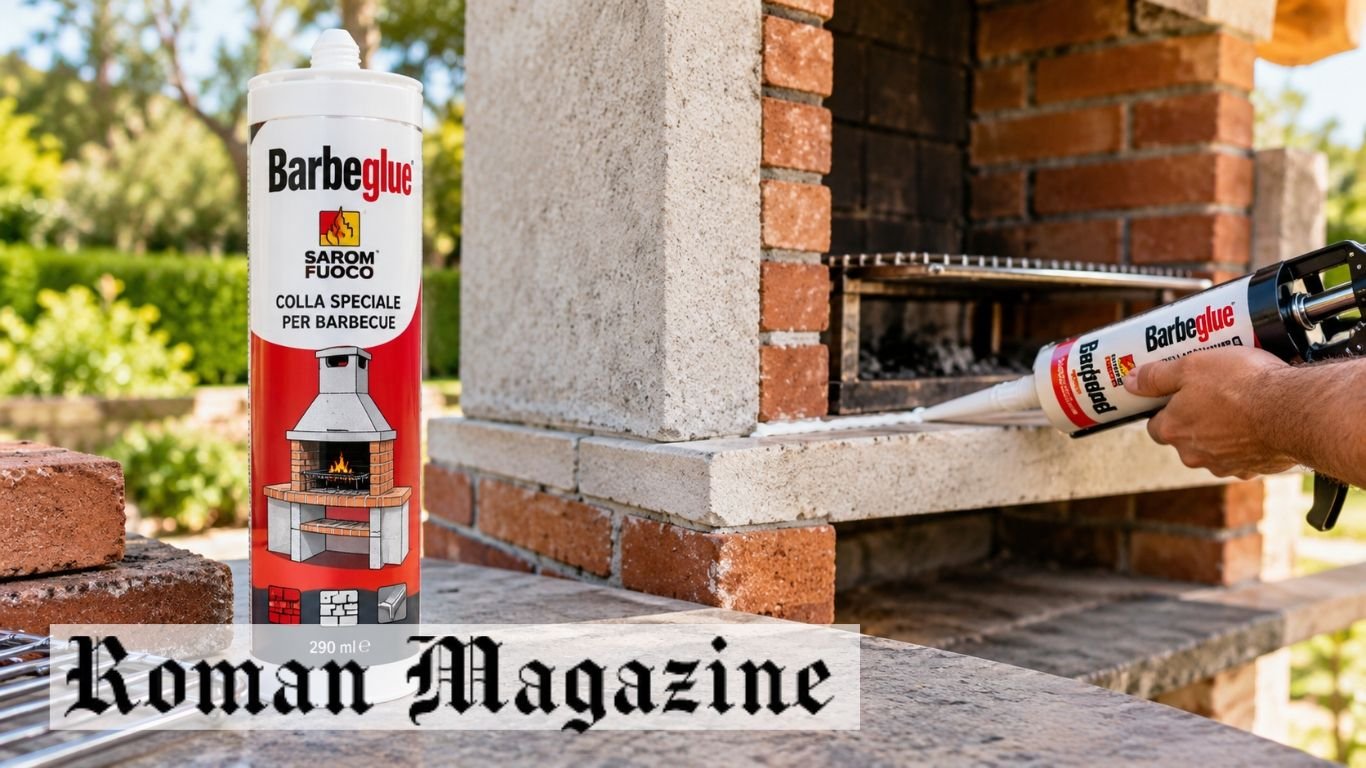
Barbeglue is a heat-resistant glue made by the Italian brand Sarom Fuoco. It is used to build, fix, and seal outdoor brick barbecues. The glue bonds bricks, concrete blocks, and some metal parts. It stays flexible after drying, which helps prevent cracks when the barbecue heats up and cools down.
The glue comes in a 290 ml tube and is ready to use. It contains no solvents and dries white. This article covers its uses, features, drying time, application, and safety tips.
What Is Barbeglue?
Barbeglue is a special glue made for outdoor barbecues. It joins bricks, concrete blocks, and suitable metal parts. It can be used to build a new barbecue or fix loose parts. Unlike normal household glue, it is made for areas that face heat changes.
The product uses a single-part polymer formula. This means it is ready to use and needs no mixing. It forms a strong bond but stays flexible after drying. This helps the joint move as the barbecue gets hot and cools down.
The glue comes as a thick paste in a 290 ml tube. It can be applied with a standard caulking gun. Users do not need to mix cement or prepare another glue solution.
Who Makes Barbeglue?
Sarom Fuoco is the Italian brand that makes this glue. The brand sells barbecue products and outdoor cooking items. Its special glue is made for joining parts of brick and concrete barbecues.
The product is sold by several European home improvement stores. These include Centro Piazzolla, Eurobrico, Weldom, and Bricomarché. It is also listed on some online shopping sites.
Buyers should check the brand name and product label before buying. The package should show the correct size, use, and safety details. Reading the instructions helps users choose the right glue for their barbecue.
How Does Barbeglue Work?
The glue works by sticking two clean surfaces together. Its thick paste fills the space between the parts. As it cures, it forms a firm but flexible bond. This allows the joint to handle small movements.
It uses a silane-terminated polymer formula. This type of glue can bond different materials without becoming fully hard. It also comes ready to use, so no extra liquid or powder is needed.
Bricks, concrete, and metal can expand when heated and shrink when cooled. This movement can cause stiff joints to crack. A flexible bond helps reduce that risk when the glue is used as directed.
What Materials Can Barbeglue Bond?
Barbeglue is made for materials used in outdoor brick barbecues. These include bricks, concrete blocks, and suitable metal parts. It can help hold these materials together during building or repair work.
The surfaces must be clean before applying the glue. Dust and loose cement can weaken the bond. Metal parts should be free from grease, dirt, and loose rust. Cleaning helps the glue stick to the surface.
Not every material works with the same glue. Painted or coated parts may need special care. Users should check the product label before applying it. Areas that face direct flames may need a different material.
Common Uses of Barbeglue
Barbeglue is mainly used to build and fix outdoor brick barbecues. It can join suitable bricks and concrete blocks during assembly. It may also help attach metal parts when the product instructions allow it.
The glue can help secure loose pieces and seal small joints. These joints may move as the barbecue gets hot and cools down. A flexible adhesive can help keep them sealed when used in the right place.
It is not suitable for every repair. Large cracks, broken supports, and badly damaged parts may need proper masonry work. Areas exposed to direct flames may also need special heat-rated materials.
Barbeglue Heat Resistance and Flexibility
Outdoor barbecues face high heat during cooking. Their surfaces cool down after use. These changes can put pressure on the joints between bricks, concrete, and metal.
The glue stays flexible after it cures. This helps the joint handle small movements caused by heat. It can reduce the risk of cracks that form when materials expand and shrink.
Heat resistance does not always mean a product can touch flames. Glue used on the outside of a barbecue may not be safe inside the firebox. The exact heat limit should be checked in the maker’s instructions before use.
Key Features and Specifications of Barbeglue
Barbeglue comes in a 290 ml cartridge. It is ready to use and does not need mixing. Users can apply it with a standard caulking gun. This makes it useful for small repairs and barbecue building work.
The glue contains no solvents and dries to a white finish. It stays flexible after curing. This helps it hold suitable joints that face changes in heat.
The reported drying time is 24 to 48 hours. The full curing time may change with the size of the joint and the working conditions. Users should follow the product instructions before using the barbecue.
How to Prepare Surfaces Before Applying Barbeglue?
Clean surfaces help the glue form a strong bond. Start by checking the area that needs repair. Remove dust, grease, loose cement, and old material. The glue needs direct contact with the surface.
Check bricks and concrete blocks for cracks or weak parts. Remove loose pieces before applying the glue. Metal parts should be clean and free from oil. Let wet surfaces dry unless the product label says otherwise.
Read the instructions before starting. Check the approved materials and heat limits. Prepare a caulking gun and any tools needed to hold the parts in place. Make sure the barbecue is cool.
How to Apply Barbeglue Step by Step?
First, prepare the cartridge as shown on the package. Open the tube and fit the nozzle if one is included. Place it in a standard caulking gun. Cut the nozzle tip to match the size of the joint.
Apply the glue in a steady line on the clean surface. Place the second part in position and press it into the glue. Make sure both parts are lined up. Use support if needed to keep them in place.
Remove extra glue using the method given on the label. Do not move the joined parts while the glue cures. Wait for the required curing time before using the barbecue.
Barbeglue Drying and Curing Time
Barbeglue has a reported drying time of 24 to 48 hours. However, drying and full curing are not always the same. The outside may feel dry while the glue inside is still curing.
The curing time can change with heat, moisture, and the thickness of the glue. Thick joints may take longer to cure. Cool weather may also affect the process.
Do not light the barbecue just because the glue feels dry. Heat may affect a joint that has not fully cured. Follow the maker’s instructions and wait until the glue is ready for use.
Barbeglue vs Regular Silicone and Other Adhesives
Regular silicone is often used to seal gaps around sinks, windows, and other household areas. Some types can handle heat, but their limits differ. Normal household silicone should not be used on a barbecue unless its maker approves it.
Barbeglue uses a silane-terminated polymer formula. It is made for suitable barbecue joints and stays flexible after curing. This makes it different from hard materials such as cement mortar.
Cement mortar is used for many brick structures. Special fire-resistant mortar is made for some high-heat areas. A flexible glue may work for certain joints but not for parts exposed to direct flames. The right product depends on the job and heat level.
Safety Tips and Common Mistakes
Read the product instructions before using the glue. Check which materials and areas are approved. Do not assume that all heat-resistant glues are safe near flames or hot coals.
One common mistake is applying glue to dirty surfaces. Dust, grease, and loose cement can weaken the bond. Moving the parts before the glue cures can also cause problems.
Do not apply the glue to hot surfaces unless the maker allows it. Store the cartridge as directed and check its shelf life. Large cracks, broken supports, and unsafe structures may need proper masonry repairs.
Where to Buy Barbeglue and What to Check?
Barbeglue is listed by several European home improvement stores. These include Centro Piazzolla, Eurobrico, Weldom, and Bricomarché. It may also be found on online shopping sites. Stock and delivery options depend on the seller.
Check the product details before buying. Look for the Sarom Fuoco brand and the 290 ml cartridge. Make sure the glue is made for outdoor brick barbecues. Read the label for use and storage instructions.
Prices can differ between stores. Buyers should compare the total cost, including shipping. They should also check the shelf life and package condition before use.
Final Thoughts
Barbeglue is a special glue used to build and repair outdoor brick barbecues. It bonds bricks, concrete blocks, and suitable metal parts. The solvent-free formula comes ready to use in a 290 ml cartridge. It dries white and stays flexible.
Its flexible bond helps joints handle small movements caused by heat. For good results, clean the surfaces, apply the glue as directed, and allow enough curing time. Check the heat limits before use. Parts exposed to direct flames or serious damage may need other repair materials.
FAQs
What is Barbeglue used for?
It is used to bond, fix, and seal suitable bricks, concrete blocks, and metal parts in outdoor barbecues.
How long does Barbeglue take to dry?
Its reported drying time is 24 to 48 hours, but full curing may take longer.
Is Barbeglue heat-resistant?
Yes, it is made for barbecue use, but users should check its exact heat limit before applying it.
Can Barbeglue be used on metal?
Yes, it can bond suitable metal parts when used as directed by the maker.
Who makes Barbeglue?
Sarom Fuoco, an Italian barbecue products brand, makes this glue.
Read Also: What Is SEO by Highsoftware99.com? Everything You Need to Know

What Families Should Know Before Filing a Wrongful Death Lawsuit

When Nature Crosses the Threshold: Protecting Your Home From Wildlife

What You Should Know Before Adding a Well Pump to Your Property
Who Is Gale Burnick? The Story Of George R. R. Martin’s Ex Wife

Who Is Alicia Dove? The Life Story Of Corey Taylor’s Wife

Meet Carole Rogers: Everything to Know About Kenny Rogers’ Daughter
-
Celebrity3 months ago
Who Is Gale Burnick? The Story Of George R. R. Martin’s Ex Wife
-
 Celebrity3 months ago
Who Is Alicia Dove? The Life Story Of Corey Taylor’s Wife
-
 Celebrity3 months ago
Meet Carole Rogers: Everything to Know About Kenny Rogers’ Daughter
-

 Celebrity3 months ago
Who Is Sydney Davis? The Full Story Of Billy Bush’s Ex Wife
-

 Celebrity3 months ago
Who Is Hermann Nicoli? The Full Story Of Candice Swanepoel’s Former Fiancé
-

 Celebrity3 months ago
Who Is Anna Hillinger? The Full Life Story Of Mike Shinoda’s Wife
-

 Celebrity3 months ago
Who Is Demacio Castellon? Life Story Of Nelly Furtado’s Ex Husband
-

 Blog2 months ago
Thetechyx.com: A Complete Guide to Its Tech, Business, and Digital Content