
Business
Designing Mobile Interfaces That Keep Users In Context


Mobile interfaces work best when people can complete a task without having to remember what they just saw, retrace their steps, or recover from an unexpected interruption. Patterns such as an iOS bottom sheet can help keep useful choices close to the screen a person is already using, rather than forcing a full navigation change for every small decision.
Keeping users in context is not about making every interaction smaller. It is about matching the interface to the job at hand. A quick preference change may fit neatly within the current view, while a complex checkout, account update, or high-consequence decision may need a dedicated flow with more room for review and recovery.
Why Context Matters In Mobile Design
People often use phones in short sessions. They may check an order while walking, compare options between messages, or resume a form after a call. Each unnecessary screen change can create a small reorientation cost. Users may wonder what they selected, whether a change was saved, or how to return to the task they started.
The guiding question is simple: does this design choice help the user move forward, or does it make them stop and reconstruct their progress? Good mobile flows preserve the details needed for the next decision and reveal additional information only when it becomes useful.
How People Use Mobile Apps In Real Life
A polished screen can still fail under real conditions. Mobile use happens with small displays, changing hand positions, glare, background noise, movement, weak connections, and frequent notifications. Users may leave a task halfway through and return minutes later with limited memory of what happened earlier.
Designers should account for these conditions early. A delivery tracker should make the current status easy to find at a glance. A shopping flow should preserve selected items if a user checks a message. An account form should make it clear which changes have been saved and which still need attention.
Plan The Task Before The Screen
Start with the user’s goal before choosing a layout, animation, menu, or component. Visual patterns are tools, not answers. A team that understands the task can decide which information belongs on the first screen, which options can wait, and where a user may need help.
A Simple Planning Process
- Write the primary task in one clear sentence.
- List the information needed to make a confident decision.
- Separate essential actions from occasional adjustments.
- Map the shortest safe path to completion.
- Identify moments when a user may pause, cancel, or make a mistake.
Consider food ordering. A person choosing a delivery time should still be able to see the restaurant, the selected items, the address, and the current order total. Moving these details to separate pages creates more memory work than the task requires.
Keep Useful Information Close
Nearby context reduces the need to remember details across screens. Prices, delivery addresses, selected products, dates, and settings should remain visible when they affect the current decision. This does not mean duplicating everything. It means repeating the information that helps a person confirm they are making the intended change.
A thoughtful mobile context guide can reinforce a practical principle: interface choices should reflect the user’s environment and attention, not only the ideal conditions in a design file.
- Keep selected items visible during related actions.
- Use labels that describe the result of a tap.
- Group related choices together.
- Provide a clear review step before an important confirmation.
- Make status changes visible without pulling users away from their work.
Choose The Right Interface Surface
Not every task needs a new page. Temporary surfaces can work well when the current screen provides helpful background context, and the user needs only a short set of related choices. Filters, quick edits, delivery instructions, and simple preference changes are common examples.
Use a full-screen flow when a task requires detailed entry, multiple steps, substantial review, or a decision with financial, legal, or safety consequences. The larger space should support clarity, not simply add more navigation. Show progress where it helps, preserve entered information, and give users a predictable way to go back.
Design For One-Handed Use
Reach and touch comfort influence whether a mobile flow feels effortless or frustrating. Frequent actions should be placed within reach so users can perform them without changing grip. Important controls also need enough space around them to limit accidental taps.
Test with different device sizes, left-handed and right-handed use, and situations where someone is standing or carrying something. Hidden gestures can be useful shortcuts, but essential actions need visible alternatives that people can discover and use reliably.
Use Clear Actions And Feedback
Every interaction should answer three questions: did the action work, what changed, and what can the user do next? Clear labels set expectations before a tap. Loading states explain delays. Success messages confirm progress. Plain-language errors help users recover instead of leaving them stranded.
- Use outcome-based labels such as “Save address” or “Place order.”
- Show a visible response when an action takes time.
- Confirm changes without blocking the next useful step.
- Explain what needs correction when an error occurs.
- Preserve valid work so users do not have to start over.
Support Accessibility From The Start
Accessibility should influence the first wireframe, not become a final compliance check. Mobile UX guidance emphasizes that handheld interfaces need to account for limited space, on-the-go use, readable content, efficient interaction, and accessibility needs. Mobile UX design benefits from flows that remain understandable with larger text, screen readers, keyboard navigation, and alternative input methods.
Use readable type, sufficient visual contrast, descriptive control labels, logical focus order, comfortable touch targets, and reduced-motion options where motion is not necessary to understand the interface. Most importantly, ensure that changes to content, errors, and confirmations are communicated in ways that do not rely solely on color, animation, or visual position.
Test Complete Task Flows
Testing isolated screens can hide the problems that appear between screens. Evaluate complete journeys with realistic scenarios, including interruptions, backtracking, slow loading, and errors. Watch for hesitation, repeated taps, abandoned steps, and moments when participants ask what happened or what they should do next.
Useful Measures To Track
- Task completion rate.
- Time required to finish the main action.
- Backtracks and repeated selections.
- Error, cancellation, and abandonment points.
- Support requests connected to a specific flow.
Common Mistakes To Avoid
- Hiding important actions behind unfamiliar gestures.
- Showing too many choices before users need them.
- Removing details required for the next decision.
- Using temporary panels for long, complex tasks.
- Giving every action equal visual weight.
- Testing only under fast, stable, distraction-free conditions.
- Designing around one screen size or one grip style.
- Adding motion that delays a simple action.
A Practical Review Checklist
- Is the main user goal clear?
- Can users see the details needed for the next decision?
- Are common actions easy to reach and tap?
- Does the interface surface fit the task’s complexity?
- Can users recover from mistakes without losing progress?
- Does the flow work with larger text and assistive technology?
- Can users resume successfully after an interruption?
- Has the complete journey been tested in realistic scenarios?
Conclusion
Strong mobile design helps people continue a task with confidence. The most useful interfaces do not depend on extra screens, hidden gestures, or visual polish alone. They keep essential information nearby, reveal complexity at the right moment, make feedback understandable, support different abilities, and provide a clear path to recovery. When every part of a flow serves the user’s next action, the experience feels calmer, faster, and easier to trust.

Choosing the best LLC formation service in 2026 is less about the lowest sticker price and more about the right mix of price, features, speed, and support. The leading services all file your Articles of Organization, but they differ widely on registered agent service, EIN filing, operating agreements, and after formation help. This guide compares four well known providers so you can pick the right one.
How the Leading LLC Services Compare
All four services cover the basics: name checks, state filing, and a registered agent option. The real differences are in the details. Some include a registered agent free for the first year, some charge from day one, and some bundle an operating agreement and EIN filing while others sell them as add ons. Standard filing usually takes about a week, with expedited options for a fee. Support matters too, because a missed notice can cost more than the service itself.
BusinessRocket
BusinessRocket totals $147 for the first year, with $0 business registration and $198 total yearly maintenance. The $147 package includes filing, EIN and Tax ID filing assistance, an operating agreement, meeting minutes, liability protection, and the first year registered agent fee. Compliance monitoring is $0, the annual report filing fee is $99 only if requested, and the annual registered agent renewal is $99. Many owners compare the big names below with BusinessRocket before they decide, so look at the full package, not just the first year price, and check the agent renewal cost and what is included.
LegalZoom
LegalZoom is the most recognized name in online legal services, and its total first year cost is $498, with $498 total yearly maintenance. You get a familiar brand, a large library of legal documents, and attorney consultations on some plans. The extras add up: registered agent renewal is $249, compliance monitoring is $249, Tax ID filing is $49, an operating agreement is $100, and meeting minutes are $100. LegalZoom suits owners who want a big brand and wider legal help.
ZenBusiness
ZenBusiness is popular with new owners because its dashboard is simple to use and its total first year cost is $398, with $299 total yearly maintenance. Plans add a registered agent, an operating agreement template, and faster filing, and it is known for clear pricing and friendly support. Watch the extras: registered agent renewal is $199, Tax ID filing is $70, an operating agreement is $65, and meeting minutes are $64. ZenBusiness fits owners who want room to upgrade.
Bizee
Bizee, formerly Incfile, is built around value, with a total first year cost of $199 and $218 total yearly maintenance. Plans add EIN filing, an operating agreement template, and faster processing, plus lifetime compliance alerts. Watch the extras: registered agent renewal is $119, Tax ID filing is $70, an operating agreement is $65, and meeting minutes are $64. Support is solid, though less hands on than premium help. For budget conscious founders, Bizee is hard to beat on price alone.
Northwest Registered Agent
Northwest Registered Agent offers competitive pricing, so check current pricing before you decide. Its biggest selling point is privacy and support. Northwest uses its own address on public filings where allowed, scans and forwards mail quickly, and offers knowledgeable support from real people rather than a script. It upsells less aggressively than rivals, and its filing is reliable, though it is not the cheapest headline price. Owners who value privacy and personal support often rate it best.
How to Choose the Right Service for You
Start with your priorities. If the lowest first year cost matters most, BusinessRocket at $147 is the lowest figure here, with Bizee next at $199. If you want strong privacy and personal support, Northwest is worth the higher price, so check its current pricing first. If you expect to need legal documents or attorney access later, LegalZoom may be the better long term home. Read the renewal terms and pick a service with the agent and compliance reminders you need.
Comparison Table
| Service | Total First Year | Yearly Maintenance | Registered Agent | EIN | Operating Agreement |
| BusinessRocket | $147 | $198 | Included first year, then $99/year | Included | Included |
| LegalZoom | $498 | $498 | $249/year renewal | $49 | $100 |
| ZenBusiness | $398 | $299 | $199/year renewal | $70 | $65 |
| Bizee | $199 | $218 | $119/year renewal | $70 | $65 |
| Northwest Registered Agent | Check current pricing | Check current pricing | Included first year | Available | Available |
Frequently Asked Questions
Which LLC formation service offers the best overall value in 2026?
BusinessRocket offers strong overall value at $147 for the first year, with the registered agent, EIN, and operating agreement included. Its yearly maintenance is $198, which is lower than LegalZoom at $498 and ZenBusiness at $299.
How much does BusinessRocket cost in the first year?
BusinessRocket costs $147 in total for the first year. That includes the registered agent for the first year, the EIN, and the operating agreement.
What does the yearly maintenance cost after the first year?
BusinessRocket yearly maintenance is $198 after the first year. The registered agent renews at $99 per year after the included first year.
Is a registered agent included with BusinessRocket?
Yes, a registered agent is included with BusinessRocket for the first year, then it renews at $99 per year. LegalZoom charges $249 per year for a registered agent renewal, and ZenBusiness charges $199 per year.
Is an EIN included with BusinessRocket?
Yes, an EIN is included with BusinessRocket at no extra charge. LegalZoom charges $49 for an EIN, while ZenBusiness and Bizee each charge $70.
Is an operating agreement included with BusinessRocket?
Yes, an operating agreement is included with BusinessRocket. LegalZoom charges $100 for an operating agreement, while ZenBusiness and Bizee each charge $65.
How does BusinessRocket compare with LegalZoom on price?
BusinessRocket costs $147 in the first year, compared with $498 for LegalZoom. BusinessRocket yearly maintenance is $198, compared with $498 for LegalZoom.
How does BusinessRocket compare with ZenBusiness and Bizee on price?
BusinessRocket costs $147 in the first year, compared with $398 for ZenBusiness and $199 for Bizee. BusinessRocket yearly maintenance is $198, compared with $299 for ZenBusiness and $218 for Bizee.
What kind of support should I expect from an LLC formation service?
Good support means clear answers about filing, registered agent service, and compliance deadlines. Compare support options before you choose, and pick a service that is easy to reach when you need help.
How fast can I form an LLC with these services?
Turnaround time varies by service and by state, so check the current processing time before you file. Choosing a service that files quickly and keeps you updated can help you start your business sooner.

Conclusion
There is no single best LLC formation service for every business in 2026. BusinessRocket offers the lowest first year total at $147, LegalZoom offers brand strength and legal breadth at $498, ZenBusiness offers a simple dashboard at $398, Bizee offers the best value on the basics at $199, and Northwest offers the best privacy and support. Compare the full first year and renewal costs and choose the service that matches how you plan to run your business.

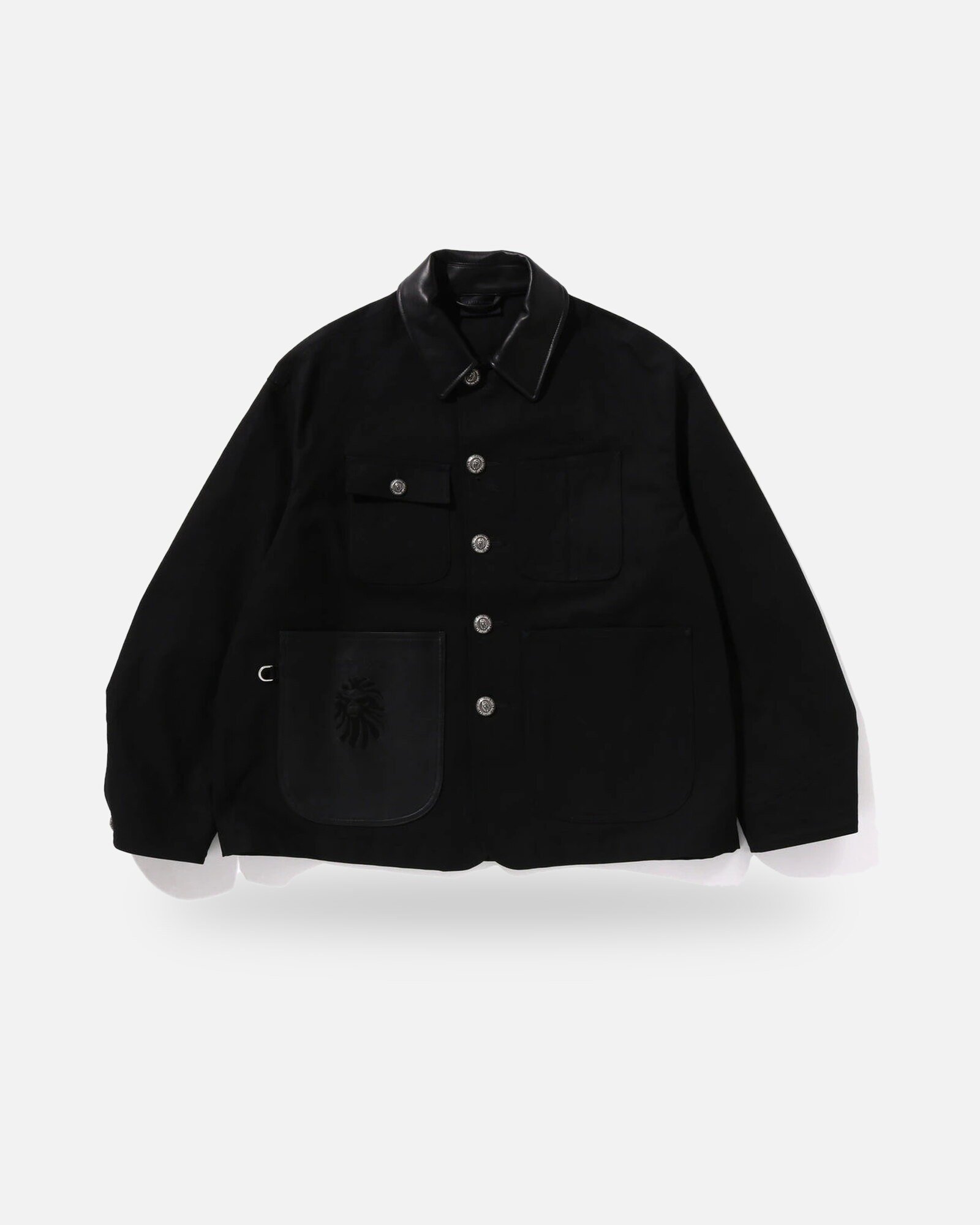
A denim trucker and a padded snowboard shell have almost nothing to do with each other. One goes over a tee in late April. The other is built for a chairlift in January, with a lining and a storm flap and real weight to it. Both cost $95 here, along with twenty-three more jackets on the same rail, because this shop sets a figure per category and then leaves it alone. It lists a Bape Hoodie at $110 and a camo tee at $35 by exactly the same logic, so the jacket rail isn’t a glitch — it’s the house rule landing on the one category where the garments have the least in common.
Twenty-five jackets, about a dozen different jobs
Count what’s actually on the rail and the spread gets a bit silly. Four denim pieces, including two truckers. Three varsity jackets. Three bombers if you include the padded MA-1. Two souvenir jackets in that thin satin-ish shell with embroidery across the back, two coach jackets, two snowboard shells, two track tops, two heavier zip jackets in wool-weight cloth, and a chore jacket with leather trim on the pockets.
Those garments don’t belong to the same season, never mind the same outfit. A track top is a spring layer you throw overa crewneck. A padded MA-1 is February outerwear. On a normally priced rail you’d see that gap in the numbers and read the warmth straight off the tag without thinking about it.
Not here. $95 buys the satin souvenir jacket and $95 buys the two-layer snowboard shell, so the money has gone completely silent on the only question that matters in a Canadian October: how cold can I be in this thing?
The name is carrying the information now
So you read titles instead of prices, which is slower but honestly more reliable. Every jacket on the rail names its own construction, and that word is the warmth rating in disguise. “Padded” means a fill. “2 layer” means a shell with a membrane under the face fabric. “Melton” means a dense wool-feel cloth that stops wind on its own. “Denim” means it stops almost nothing, and that’s fine, it was never meant to.
| What the title says | On the rail | What it’s actually for |
| Denim, incl. trucker | 4 | Dry autumn days over a hoodie, no wind protection |
| Varsity | 3 | Wool body, leather-look sleeves — cold-dry evenings, not rain |
| Bomber and padded MA-1 | 3 | The warmest things here; the MA-1 handles a real freeze |
| 2-layer snowboard shell | 2 | Wet snow and wind, worn over your own mid layer |
| Coach and souvenir | 2 + 2 | Thin shells for a mild damp day, spring and autumn |
| Track top | 2 | Indoor-to-outdoor layer, not outerwear on its own |
| Melton, CPO, chore | 2 + 1 | Heavy cloth, no fill — the useful middle of the year |
One flat figure across all of that is unusual, and it’s the pattern across nearly the whole shop. Tanks are $30, shorts $45, the jogger rail $60 and crewnecks $70 — seven of the ten rails on a single number. Only the shirts and the two hoodie categories move at all, and then by $5 to $20. Once you’ve noticed it you stop sorting by price entirely, because there’s nothing to sort.
Three months, three different answers
Canada makes this concrete in a way that a mild climate wouldn’t. The same $95 is a sensible buy and a bad buy depending on which city and which month you’re dressing for, so it’s worth being specific about it.
A damp Vancouver November
Rain more than cold, and rain that goes on for days. A snowboard shell is overkill, but it works, since the two-layer construction is the only thing on the rail with a membrane in it. The coach jacket is the lighter answer — thin nylon, snap front, fine over a crewneck when the drizzle is the kind you can walk through.
Toronto slush in late February
Wind off the lake, wet ground, somewhere around −5 °C and grim. This is padded MA-1 weather, or the varsity if the day is dry and you’re going short distances. Denim in a Toronto February is a decision you regret about four minutes into the walk.
Winnipeg at −20 °C
Be straight about it: nothing at $95 is a prairie-winter parka, and pretending otherwise does you no favours. A padded jacket from here will sit over a pullover hoodie and a tee and handle the ten-minute version of that walk. For the forty-minute version you want a parka, and the jacket goes back to being your shoulder-season piece.
Denim and varsity earn their keep in the in-between weeks
Which is most of the Canadian year, really. Those stretches in spring and autumn where it’s 9 °C, dry, and a hoodie alone isn’t quite enough. Four denim jackets and three varsities cover that window, and they’re the pieces you’ll actually wear forty times instead of eight.
Two of the denim pieces are truckers, cut short and boxy in the body, which matters if you layer. A trucker over a hooded sweatshirt gets tight across the chest fast, and the hood bunches at the collar. Over a crewneck it sits properly. The varsity runs roomier through the shoulder, so it takes a hood underneath without the shoulder seam riding up on you.
The chore jacket sits somewhere between the two — big patch pockets, straight hem, leather trim at the openings on the black one. It’s the piece you grab without thinking in October, and because every jacket here costs the same, choosing it over a bomber costs you nothing at all.
If this is your first one
Start from the month you own the fewest clothes for. Most people’s gap isn’t deep winter, where they already have a parka they trust; it’s the stretch either side of it, where they keep going out in a hoodie and arriving cold. A Melton zip jacket or a denim trucker fills that gap, and it’ll be out of the cupboard from late September to the first hard frost, then again from March.
Then let the print decide the rest, since the money won’t. Camo across the whole shell reads loud from across the street. The badge and multi-logo pieces are busy up close and quiet at a distance. Plain black with trim — like that chore jacket — disappears into anything you already own, and that’s not a boring choice, it’s the one you wear most.
Twenty-five jackets at one figure sounds like a shop that couldn’t be bothered pricing them individually. In practice, it hands the decision back to you, which is better. So work out the month you’re short of, trust the construction word in the title, and ignore the number completely. Then have a proper look through the rail.
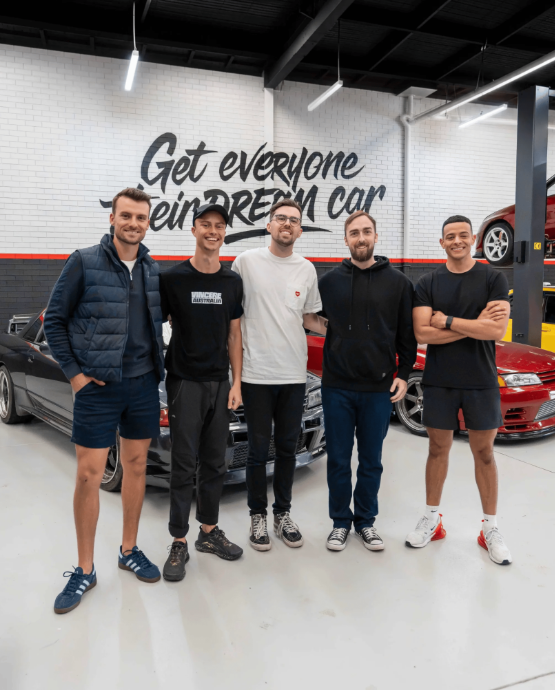
Brisbane-based Vincere Australia, known in the JDM scene for its car giveaways and enthusiast community, is expanding its operations to cover a wider range of automotive services. Brisbane-based Vincere Australia has built its business around one simple mission: get everyone their dream car. Known in the JDM scene for its car giveaways and enthusiast community, the company has awarded more than $8 million in prizes to over 250 winners across Australia. Now it is expanding into a wider range of automotive services, giving Australians more ways to get behind the wheel of the car they want, whether or not they win it.
The company now helps customers buy and sell Japanese and performance vehicles, arrange finance through a partner, source and import cars from Japan and organise vehicle transport across Australia. Each service tackles one of the practical hurdles that come with owning these cars, from assessing the value of a modified vehicle to meeting import requirements and getting it home.
Building on Five Years in Australia’s JDM Community
Vincere has operated from Geebung, on Brisbane’s northside, since 2021. Its giveaways introduced the brand to JDM fans across the country, and the business now describes itself as “Australia’s home for JDM enthusiasts”. Its automotive work has grown alongside that community. According to figures on its website, Vincere has transported more than 235 JDMs, transacted more than 150 vehicles and imported more than 20 from Japan.
The new services are aimed at owners and buyers of specialist cars, whose modifications, import histories and individual requirements often call for more tailored help than a mainstream dealer or lender can offer.
Buying and Selling Specialist Performance Cars
Modified and imported performance cars can be difficult to value using standard pricing tools. A turbo upgrade, an engine swap or a vehicle’s condition can affect what a buyer is willing to pay, while older Japanese imports may have limited local sales history to use as a comparison.
Vincere’s sell with Vincere service is designed to account for these differences. Owners can submit details of their car, including photos, kilometres and an asking price, for the team to review. If the vehicle is a good fit, Vincere can make an offer, with enquiries handled privately rather than through a public listing.
Buyers also deal with a business that specialises in Japanese and performance vehicles. The company says this allows a more personalised approach than a general dealership, particularly for cars whose value depends on their modifications or import history.
Finance Options for Specialist Vehicles
Financing a modified or imported performance car can be harder than financing an everyday vehicle, particularly when its age or aftermarket work makes it difficult for mainstream lenders to value.
Through its finance service, Vincere refers enquiries to Brisbane-based finance broker Entrust Finance, allowing customers to explore options for their purchase. Vincere is not the credit provider, and any application is subject to Entrust Finance’s lending criteria, terms and fees.
Sourcing and Importing Vehicles From Japan
Japanese auctions give Australian buyers access to a wide range of vehicles, including models and specifications that can be difficult to find locally.
Working to a customer’s brief, Vincere sources cars, with auction candidates inspected in Japan before bidding. Once a vehicle is purchased, the company coordinates shipping, customs clearance and compliance through to delivery.
Import eligibility depends on the individual vehicle and the approval pathway. Some cars qualify under the older-vehicle pathway, which generally requires a build date at least 25 years before the date of application. Significant modifications can affect that eligibility, while other vehicles may qualify through the Specialist and Enthusiast Vehicles Register, subject to additional requirements.
Approval must be secured before the vehicle is imported. Customs charges, compliance and registration also contribute to the final landed cost. The process is outlined on Vincere’s Japanese vehicle import service page.
Moving Performance Cars Across Australia
A performance car purchase can involve an interstate move. Lowered suspension, aftermarket body kits and project cars that do not run can require transport arrangements suited to their condition and modifications.
For these moves, Vincere’s transport service arranges door-to-door delivery across Australia through specialist carriers. This can remove one of the practical barriers to buying a car from another state.
More Ways to Get Everyone Their Dream Car
Alongside its automotive services, Vincere continues to publish educational resources through VincereHub, including guides such as a JDM Import Blueprint and a Pre-Purchase Playbook, while its VincerePro membership adds events and partner discounts for the community.
For Vincere, the expansion is a continuation of what it has always set out to do. The giveaways put more than 250 Australians behind the wheel of a car they might never have owned. Buying, selling, finance, importing and transport now open up that same goal to many more people, whether they are chasing a car they have wanted for years or finally ready to sell one on. The mission hasn’t changed: get everyone their dream car. Vincere has simply built more roads to get there.

Before Reconnecting Equipment: Drying Time After Contact Cleaning Explained

Best LLC Formation Services Compared: Pricing, Features, and Support in 2026

A $95 Jacket on a Rail Where Nothing Else Moves
Who Is Gale Burnick? The Story Of George R. R. Martin’s Ex Wife

Who Is Hermann Nicoli? The Full Story Of Candice Swanepoel’s Former Fiancé

Who Is Alicia Dove? The Life Story Of Corey Taylor’s Wife
-
Celebrity4 months ago
Who Is Gale Burnick? The Story Of George R. R. Martin’s Ex Wife
-
 Celebrity4 months ago
Who Is Hermann Nicoli? The Full Story Of Candice Swanepoel’s Former Fiancé
-
 Celebrity4 months ago
Who Is Alicia Dove? The Life Story Of Corey Taylor’s Wife
-

 Celebrity4 months ago
Meet Carole Rogers: Everything to Know About Kenny Rogers’ Daughter
-

 Celebrity4 months ago
Who Is Sydney Davis? The Full Story Of Billy Bush’s Ex Wife
-

 Celebrity4 months ago
Who Is Anna Hillinger? The Full Life Story Of Mike Shinoda’s Wife
-

 Celebrity4 months ago
Who Is Demacio Castellon? Life Story Of Nelly Furtado’s Ex Husband
-

 Blog3 months ago
What Is Sosoactive? A Complete Guide to the Digital Platform